
RefontCrafts



RefontCrafts is a Minecraft server plugin for creating, viewing and managing custom crafting recipes through an in-game GUI.
The plugin allows server owners to create custom recipes for both the crafting table and the anvil without manually editing complicated recipe files. It is made for survival, RPG, roleplay, economy and custom Minecraft servers that need flexible crafting mechanics, permission control and support for custom items.
What does this plugin add?
RefontCrafts adds a GUI-based custom crafting system for server-side Minecraft servers.
You can create:
- custom crafting table recipes;
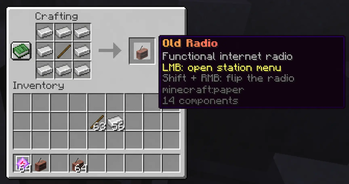
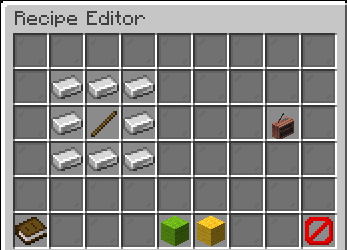
- shaped 3x3 crafting recipes;
- shapeless crafting recipes;
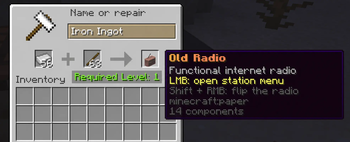
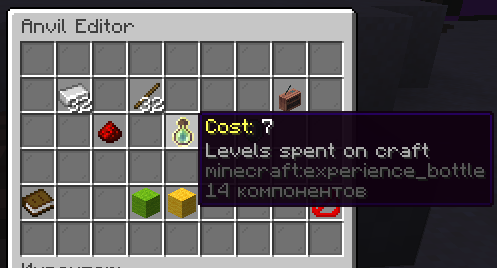
- custom anvil recipes;
- anvil recipes with configurable experience cost;
- recipes using custom items, metadata, names, lore, enchantments and CustomModelData.
Players can also browse saved recipes if they have permission, so server staff can allow players to view available custom crafts without giving them admin access.
Why use RefontCrafts?
This plugin is useful if your server needs more control over crafting than vanilla Minecraft provides.
Typical use cases:
- RPG servers with custom items and progression;
- roleplay servers with unique crafting systems;
- survival servers with special recipes;
- economy servers with controlled item production;
- servers using custom items from shops or other plugins;
- projects that need an in-game recipe editor instead of manual config editing.
Features
- GUI editor for crafting table recipes.
- GUI editor for anvil recipes.
- Support for shaped 3x3 recipes.
- Support for shapeless recipes.
- Recipe browser for regular players.
- Permission-based access to viewing, creating, editing and deleting recipes.
- Support for custom items, potions, CustomModelData, item names, lore, enchantments and stable PDC data.
- Optional softer item comparison with
exact_meta_match: false. - Strict anvil slot order support.
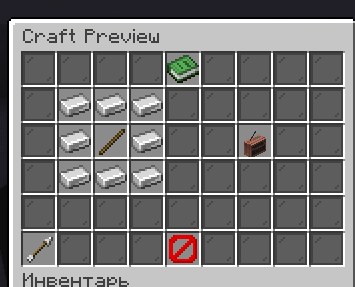
- Automatic crafting result preview updates when items are added, removed or dragged.
- Crafting table result preview and output stacks up to
126. - SQLite database by default.
- Optional MySQL database support.
- Automatic config updates for new settings.
Server support
| Item | Value |
|---|---|
| Server side | Required |
| Client side | Unsupported |
| Platforms | Bukkit / Spigot / Paper |
| Database | SQLite by default, MySQL optional |
| Main command | /rcrafts |
| Aliases | /rc, /refontcrafts |
No client-side mod is required. Players can join with a normal Minecraft client.
Supported Minecraft versions are listed in each uploaded version on Modrinth. Do not assume support for versions that are not selected in the version metadata.
Installation
- Download the plugin
.jar. - Put the file into your server
plugins/folder. - Restart the server.
- Open the main menu with:
/rcrafts
The plugin will create its configuration files and database on first startup.
Commands
| Command | Description |
|---|---|
/rcrafts |
Opens the main menu |
/rcrafts view workbench [page] |
Shows crafting table recipes |
/rcrafts view anvil [page] |
Shows anvil recipes |
/rcrafts recipe |
Creates a crafting table recipe |
/rcrafts anvil |
Creates an anvil recipe |
/rcrafts reload |
Reloads the configuration and recipes |
Aliases:
/rc
/refontcrafts
Permissions
| Permission | Default | Description |
|---|---|---|
refontcrafts.use |
Everyone | Basic access to /rcrafts |
refontcrafts.view |
Everyone | Allows viewing crafting table and anvil recipes |
refontcrafts.create.workbench |
OP | Allows creating crafting table recipes |
refontcrafts.create.anvil |
OP | Allows creating anvil recipes |
refontcrafts.edit.workbench |
OP | Allows editing crafting table recipes |
refontcrafts.edit.anvil |
OP | Allows editing anvil recipes |
refontcrafts.delete.workbench |
OP | Allows deleting crafting table recipes |
refontcrafts.delete.anvil |
OP | Allows deleting anvil recipes |
refontcrafts.reload |
OP | Allows reloading the plugin |
refontcrafts.notify |
OP | Allows receiving plugin service notifications |
refontcrafts.admin |
OP | Full access to all plugin features |
For players who should only view recipes, give:
refontcrafts.use
refontcrafts.view
Important configuration options
settings:
  exact_meta_match: false
  workbench_strict_shape: true
  workbench_allow_mirror: false
  workbench_preview_limit: 126
  take_back_on_close: true
  default_anvil_cost: 0
  anvil_mode: anvil

  anvil:
    strict_order: true
    creative_ignores_xp: true
    ops_ignore_xp: true
    stack_preview_result: false

database:
  type: sqlite

  sqlite:
    file: data.db

  mysql:
    host: 127.0.0.1
    port: 3306
    database: refontcrafts
    user: root
    password: ''
    use_ssl: false
    params: 'useUnicode=true&characterEncoding=utf8'

  bootstrap_from_config: true
  async_save: true
exact_meta_match
Controls how strictly the plugin compares items.
true— strict comparison of item metadata.false— compares important visual and logical data while ignoring unique technical NBT tags.
For servers using custom items from shops, Brewery, ExecutableItems or similar plugins, false is usually the better option.
workbench_strict_shape
If enabled, shaped crafting table recipes only work when items are placed in the exact 3x3 slot positions.
workbench_preview_limit
Controls the result preview limit for the crafting table.
The recommended stable value is:
126
Higher values may display incorrectly on the Minecraft client.
anvil.strict_order
If enabled, the left and right anvil slots are treated as different positions.
Example:
A + B
will not work as:
B + A
Database
RefontCrafts uses SQLite by default, so it can work without any external database setup.
MySQL is optional and should only be configured if the server owner wants to use their own database server.
Privacy and remote connections
RefontCrafts does not require a client-side mod.
The plugin does not need to send analytics or telemetry to the author.
If MySQL is enabled, the plugin connects only to the database server configured by the server owner in config.yml.
Source code and issues
- Source code: https://github.com/RizonChik/RefontCrafts
- Issues: https://github.com/RizonChik/RefontCrafts/issues
- Documentation: https://github.com/RizonChik/RefontCrafts/wiki
Русское описание
RefontCrafts — серверный Minecraft-плагин для создания, просмотра и управления кастомными крафтами через GUI.
Плагин позволяет создавать кастомные рецепты для верстака и наковальни без ручного редактирования сложных файлов рецептов. Он подходит для survival, RPG, RP, economy и custom-серверов, где нужны гибкие рецепты, права доступа и поддержка кастомных предметов.
Что добавляет плагин?
RefontCrafts добавляет GUI-систему кастомных крафтов на сервер.
Можно создавать:
- рецепты верстака;
- строгие рецепты 3x3;
- бесформенные рецепты;
- рецепты наковальни;
- рецепты наковальни с настраиваемой стоимостью опыта;
- рецепты с кастомными предметами, метаданными, названиями, лором, чарами и CustomModelData.
Игроки могут просматривать сохранённые рецепты, если у них есть соответствующее право. Это позволяет дать игрокам доступ к списку крафтов без выдачи OP или админских прав.
Основные возможности
- GUI-редактор рецептов верстака.
- GUI-редактор рецептов наковальни.
- Поддержка строгой выкладки 3x3.
- Поддержка бесформенных рецептов.
- Просмотр рецептов обычными игроками.
- Права на просмотр, создание, редактирование и удаление рецептов.
- Поддержка кастомных предметов, зелий, CustomModelData, названий, лора, чар и PDC-данных.
- Мягкое сравнение предметов через
exact_meta_match: false. - Строгий порядок слотов в наковальне.
- Автообновление результата крафта при добавлении, удалении и перетаскивании предметов.
- Preview и выдача результата верстака стаками до
126. - SQLite по умолчанию.
- MySQL опционально.
- Автообновление конфига при появлении новых настроек.
Установка
- Скачай
.jarфайл. - Закинь его в папку
plugins/. - Перезапусти сервер.
- Открой меню командой:
/rcrafts
После первого запуска плагин сам создаст конфиг и базу данных.
Команды
| Команда | Описание |
|---|---|
/rcrafts |
Главное меню |
/rcrafts view workbench [page] |
Просмотр рецептов верстака |
/rcrafts view anvil [page] |
Просмотр рецептов наковальни |
/rcrafts recipe |
Создание рецепта верстака |
/rcrafts anvil |
Создание рецепта наковальни |
/rcrafts reload |
Перезагрузка конфига и рецептов |
Алиасы:
/rc
/refontcrafts
Права
| Право | По умолчанию | Описание |
|---|---|---|
refontcrafts.use |
Все игроки | Базовый доступ к /rcrafts |
refontcrafts.view |
Все игроки | Просмотр рецептов |
refontcrafts.create.workbench |
OP | Создание рецептов верстака |
refontcrafts.create.anvil |
OP | Создание рецептов наковальни |
refontcrafts.edit.workbench |
OP | Редактирование рецептов верстака |
refontcrafts.edit.anvil |
OP | Редактирование рецептов наковальни |
refontcrafts.delete.workbench |
OP | Удаление рецептов верстака |
refontcrafts.delete.anvil |
OP | Удаление рецептов наковальни |
refontcrafts.reload |
OP | Перезагрузка плагина |
refontcrafts.notify |
OP | Служебные уведомления |
refontcrafts.admin |
OP | Полный доступ |
Для обычного просмотра рецептов игрокам достаточно:
refontcrafts.use
refontcrafts.view
Важные настройки
exact_meta_match— строгое или мягкое сравнение предметов.workbench_strict_shape— точная выкладка рецепта в верстаке.workbench_preview_limit— лимит отображения результата верстака. Рекомендуемое стабильное значение:126.anvil.strict_order— строгий порядок левого и правого слота наковальни.
Если используются кастомные предметы из магазинов, Brewery, ExecutableItems и похожих плагинов, обычно лучше оставить:
exact_meta_match: false
Если нужно, чтобы рецепт верстака срабатывал только при точной выкладке предметов по слотам, оставь:
workbench_strict_shape: true
Если результат выше 126 начинает пропадать на клиенте, это ограничение отображения Minecraft. Поэтому стабильный лимит оставлен 126.
Исходный код и поддержка
- Исходный код: https://github.com/RizonChik/RefontCrafts
- Баги и предложения: https://github.com/RizonChik/RefontCrafts/issues
- Документация: https://github.com/RizonChik/RefontCrafts/wiki
- Edition: Minecraft Java
- File type: .jar
- Minecraft versions listed: 1.8.8, 1.8.9, 1.9
- How to install: Install the matching mod loader (Forge, Fabric or NeoForge) for your Minecraft version. → Download the .jar. → Put it in the .minecraft/mods folder and launch that loader profile.
- Where to get it: Opens on Modrinth — not every file is mirrored on our own servers.
Install steps are the general flow for this file type — How to install Minecraft Java mods & modpacks walks through it step by step.
- Ships as RefontCrafts-1.0.9.jar — drop this file into the mods folder
- Download size: 150 KB
- Download link checked 12 Sept 2026 — working
These come from our own check of the pack file, not from the source page.