
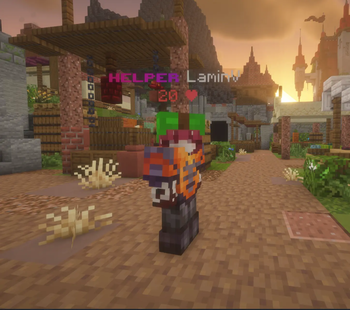
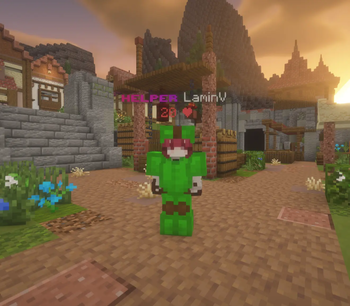
HisokaTeammates is a client-side Fabric mod for Minecraft that helps you avoid accidentally hitting your teammates during PvP.
Features
- Friends list — add players to your local teammates list.
- Quick keybind — look at a player and press the assigned key to add or remove them from the list.
- Anti-hit — the mod blocks accidental attacks against players on your friends list before the hit is sent.
- Visual highlighting — friends can be shown with colored visual armor, making them easier to spot during fights.
- Armor customization — change the highlight color and choose which armor pieces are displayed.
- Proper invisibility handling — the mod does not show visual armor on fully invisible players who have no equipment.
- ModMenu support — all main features can be configured through a convenient menu.
- Commands — the friends list and mod features are also available through
/ht.
Client-side
The mod works entirely on the client side and does not need to be installed on the server.
It does not change server-side damage, real armor, inventories, hitboxes, or player stats.
Quick facts
- Edition: Minecraft Java
- File type: .jar
- Minecraft version listed: 1.21.11
- How to install: Install the matching mod loader (Forge, Fabric or NeoForge) for your Minecraft version. → Download the .jar. → Put it in the .minecraft/mods folder and launch that loader profile.
- Where to get it: Opens on Modrinth — not every file is mirrored on our own servers.
Install steps are the general flow for this file type — How to install Minecraft Java mods & modpacks walks through it step by step.
Verified by MCModsHub
- Ships as hisokateammates-1.0.0+1.21.11.jar — drop this file into the mods folder
- Download size: 69 KB
- Download link checked 14 Sept 2026 — working
These come from our own check of the pack file, not from the source page.