
NoSlotHoverHighlight
Java resource pack listed for Minecraft 1.21–26.x. Downloads from the MC Java Mods app on Android.
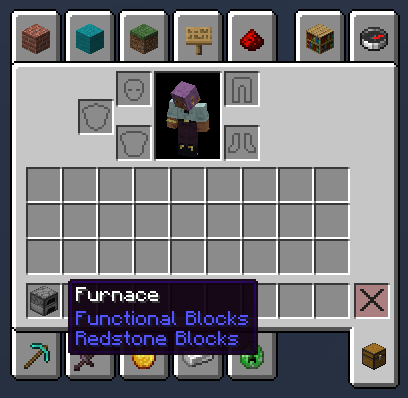
NoSlotHoverHighlight: Removes the white hover background from inventory and hotbar slots for a cleaner UI! Supports Bundles.
⬇ Download on Modrinth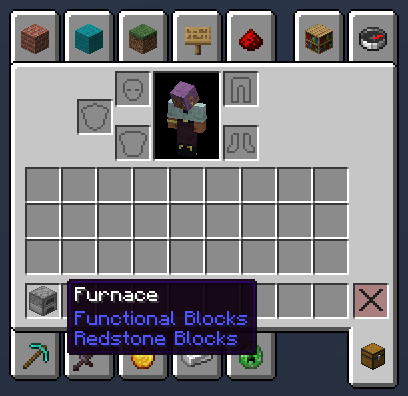
🚫 NoSlotHoverHighlight Resource Pack
Want a cleaner, sleek inventory without the distracting white highlight covering your items when you hover over slots or switch hotbar selection? NoSlotHoverHighlight removes that default white square overlay completely!
✨ Features:
- 🎯 Clean UI: Removes the white highlight overlay from all inventory, chest, and hotbar slot hovers.
- 📦 Updated for Bundles: Fully tested and updated to support the new Bundle UI mechanics!
- 🎨 Aesthetic & Unobtrusive: Lets item icons and custom GUI textures shine without bright white blocks covering them.
- ⚡ Lightweight & Vanilla Compatible: Pure resource pack with zero FPS impact or extra mod requirements.
❓ FAQ
Q: Does this work with custom GUI / UI resource packs?
Yes! If you place this pack at the top of your Resource Packs list, it will remove the slot hover highlight over any custom inventory textures you use.
Q: Does it support newer Minecraft versions with Bundles?
Yes! The pack has been updated to handle slot hovering inside Bundle interfaces cleanly.
Q: Do I need OptiFine or Sodium?
No extra mods needed. Works natively on Vanilla Minecraft Java Edition.
💡 How to Install:
- Download the
.zipfile for your Minecraft version. - Place it into your
.minecraft/resourcepacksfolder. - Open Minecraft, go to Options > Resource Packs, and move NoSlotHoverHighlight to the right side (place it near the top for best compatibility)!
- Edition: Minecraft Java
- File type: .zip (resource pack)
- Minecraft versions listed: 1.21, 1.21.1, 1.21.2
- How to install: Download the .zip resource pack — do not unzip it. → Put it in .minecraft/resourcepacks. → Enable it in Options → Resource Packs.
- Where to get it: Opens on Modrinth — not every file is mirrored on our own servers.
Install steps are the general flow for this file type — How to install Minecraft Java resource packs walks through it step by step.
- Downloads as NoSlotHoverHighlight.zip
- Download size: 34 KB
- Download link checked 24 Oct 2026 — working
These come from our own check of the pack file, not from the source page.