
Flashback Keystrokes Bridge
Java mod listed for Minecraft 1.21. Downloads from the MC Java Mods app on Android.
Records keystrokes during Flashback recording and plays them back as a synced HUD overlay, matching Clean Keystrokes' style.
⬇ Download on Modrinth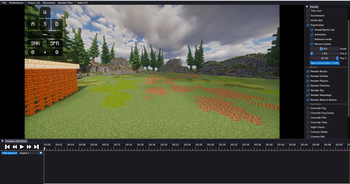
Flashback Keystrokes Bridge
Records your keystrokes while Flashback records a replay, then plays them back as a synced HUD overlay when you watch it. Perfect for PvP clips and highlight exports where you want to show off your keystrokes without recording a separate overlay live.
The HUD looks identical to Clean Keystrokes' HUD, reusing its textures and styling, but it's synced to the replay's timeline instead of real time.
Features
- Automatically records keystrokes (WASD, Space, Sneak, Sprint, LMB, RMB) whenever Flashback is recording
- Auto-matches the recording to the right replay when you open it for playback
- HUD overlay with the same look as Clean Keystrokes: key press animation, rainbow mode, mouse movement tracker, CPS counter
- Configurable scale, position, and color presets via
/fkbridgecommands - Manual override commands (
/fkbridge list,/fkbridge use,/fkbridge status) if auto-matching picks the wrong recording
Requirements
- Flashback
- Clean Keystrokes
- Fabric API
Commands
| Command | What it does |
|---|---|
/fkbridge list |
List saved recordings |
/fkbridge use <number> |
Pick a recording manually |
/fkbridge auto |
Back to automatic matching |
/fkbridge status |
Check which recording is active |
/fkbridge stylelist |
List color presets |
/fkbridge style <name> |
Apply a color preset |
/fkbridge scale <0.5-2.0> |
Change HUD scale |
/fkbridge position <corner> |
Move HUD to a corner |
- Edition: Minecraft Java
- File type: .jar
- Minecraft version listed: 1.21.11
- How to install: Install the matching mod loader (Forge, Fabric or NeoForge) for your Minecraft version. → Download the .jar. → Put it in the .minecraft/mods folder and launch that loader profile.
- Where to get it: Opens on Modrinth — not every file is mirrored on our own servers.
Install steps are the general flow for this file type — How to install Minecraft Java mods & modpacks walks through it step by step.
- Ships as flashback-keystrokes-bridge-0.3.0.jar — drop this file into the mods folder
- Download size: 50 KB
- Download link checked 4 Oct 2026 — working
These come from our own check of the pack file, not from the source page.