
Time and Weather Potions
Five brewable potions that let you take control of the sky: skip the night, call down a thunderstorm, or clear the clouds right before your build session.
No commands, no cheats, no creative mode — just a brewing stand and the right ingredient.
The potions
| Potion | What it does | Brewed from | Ingredient |
|---|---|---|---|
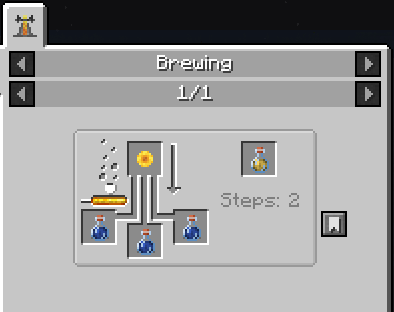
| Potion of Day | Brings on the next sunrise | Awkward Potion | Sunflower |
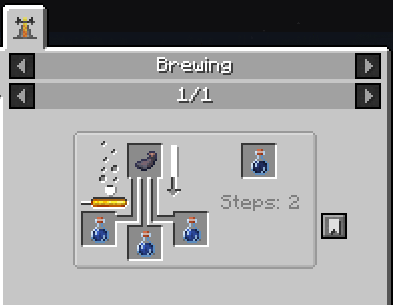
| Potion of Night | Brings on the next nightfall | Awkward Potion | Ink Sac |
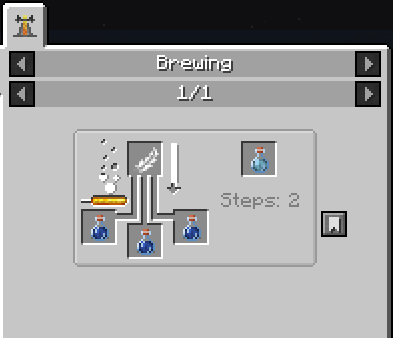
| Potion of Clear Sky | Clears the sky | Awkward Potion | Feather |
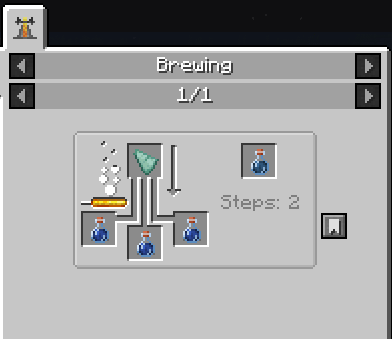
| Potion of Rain | Calls down rain | Awkward Potion | Prismarine Shard |
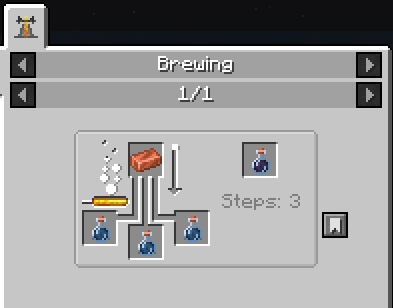
| Potion of Thunderstorm | Calls down a thunderstorm | Potion of Rain | Copper Ingot |
Copper draws lightning, so the storm potion is an upgrade of the rain potion rather than a separate brew.
How they behave
- Time moves forward, never backward. The time potions skip ahead to the next sunrise or sunset, so your world's day counter keeps growing. Unlike
/time set day, nothing gets reset. - They affect the world, not you. Whatever dimension you drink in changes for everyone in it — worth keeping in mind on a server.
- The Nether and the End say no. There is no moving sun and no open sky down there, so drinking is refused before the animation starts and your bottle is not wasted.
- A shared cooldown across all five potions stops you from flicking day and night on and off like a light switch.
- Empties into a Glass Bottle, stacks to 16, and costs nothing in Creative.
- Every ingredient is unused by vanilla brewing, so no vanilla recipe is overridden.
Configuration
config/timeweather-common.toml
| Option | Default | Meaning |
|---|---|---|
weatherDurationTicks |
6000 |
How long forced weather holds before the game takes over again (5 minutes) |
cooldownTicks |
100 |
Shared cooldown after drinking (5 seconds), 0 disables it |
preserveDayCount |
true |
Set to false for vanilla /time set behaviour, which resets the day counter |
Зелья времени и погоды
Пять варимых зелий, которые отдают небо в твои руки: перемотать ночь, вызвать грозу или разогнать тучи прямо перед стройкой.
Никаких команд, читов и творческого режима — только варочная стойка и нужный ингредиент.
Зелья
| Зелье | Что делает | Основа | Ингредиент |
|---|---|---|---|
| Зелье дня | Приближает ближайший рассвет | Мутное зелье | Подсолнух |
| Зелье ночи | Приближает ближайший закат | Мутное зелье | Мешок чернил |
| Зелье ясного неба | Разгоняет тучи | Мутное зелье | Перо |
| Зелье дождя | Призывает дождь | Мутное зелье | Осколок призмарина |
| Зелье грозы | Призывает грозу | Зелье дождя | Медный слиток |
Медь притягивает молнии, поэтому зелье грозы — это улучшение зелья дождя, а не отдельный рецепт.
Как это работает
- Время идёт вперёд, а не назад. Зелья времени перематывают к следующему рассвету или закату, поэтому счётчик дней мира продолжает расти. В отличие от
/time set day, ничего не сбрасывается. - Меняется мир, а не игрок. Измерение, в котором ты выпил зелье, меняется для всех, кто в нём находится — это стоит помнить на сервере.
- В Нижнем мире и Крае не сработает. Там нет движущегося солнца и открытого неба, поэтому зелье не выпьется вовсе — бутылка не потратится впустую.
- Общая перезарядка на все пять зелий не даст щёлкать днём и ночью как выключателем.
- Оставляет стеклянную бутылку, стакается по 16, в творческом режиме не расходуется.
- Все ингредиенты не используются в ванильной варке, поэтому ни один ванильный рецепт не перекрывается.
Настройки
config/timeweather-common.toml
| Параметр | По умолчанию | Значение |
|---|---|---|
weatherDurationTicks |
6000 |
Сколько держится заданная погода, прежде чем игра возьмёт своё (5 минут) |
cooldownTicks |
100 |
Общая перезарядка после глотка (5 секунд), 0 отключает |
preserveDayCount |
true |
false вернёт поведение ванильной /time set со сбросом счётчика дней |
- Edition: Minecraft Java
- File type: .jar
- Minecraft version listed: 1.20.1
- How to install: Install the matching mod loader (Forge, Fabric or NeoForge) for your Minecraft version. → Download the .jar. → Put it in the .minecraft/mods folder and launch that loader profile.
- Where to get it: Opens on Modrinth — not every file is mirrored on our own servers.
Install steps are the general flow for this file type — How to install Minecraft Java mods & modpacks walks through it step by step.
- Ships as UnusualPotions-1.0.0.jar — drop this file into the mods folder
- Download size: 25 KB
- Download link checked 14 Sept 2026 — working
These come from our own check of the pack file, not from the source page.