Andy's Disenchanting Pillar
Extract chosen enchantments into reusable books with a balanced Bedrock workstation. Spend XP, books, and amethyst; build compact pillars, stacked…
⬇ Download on CurseForge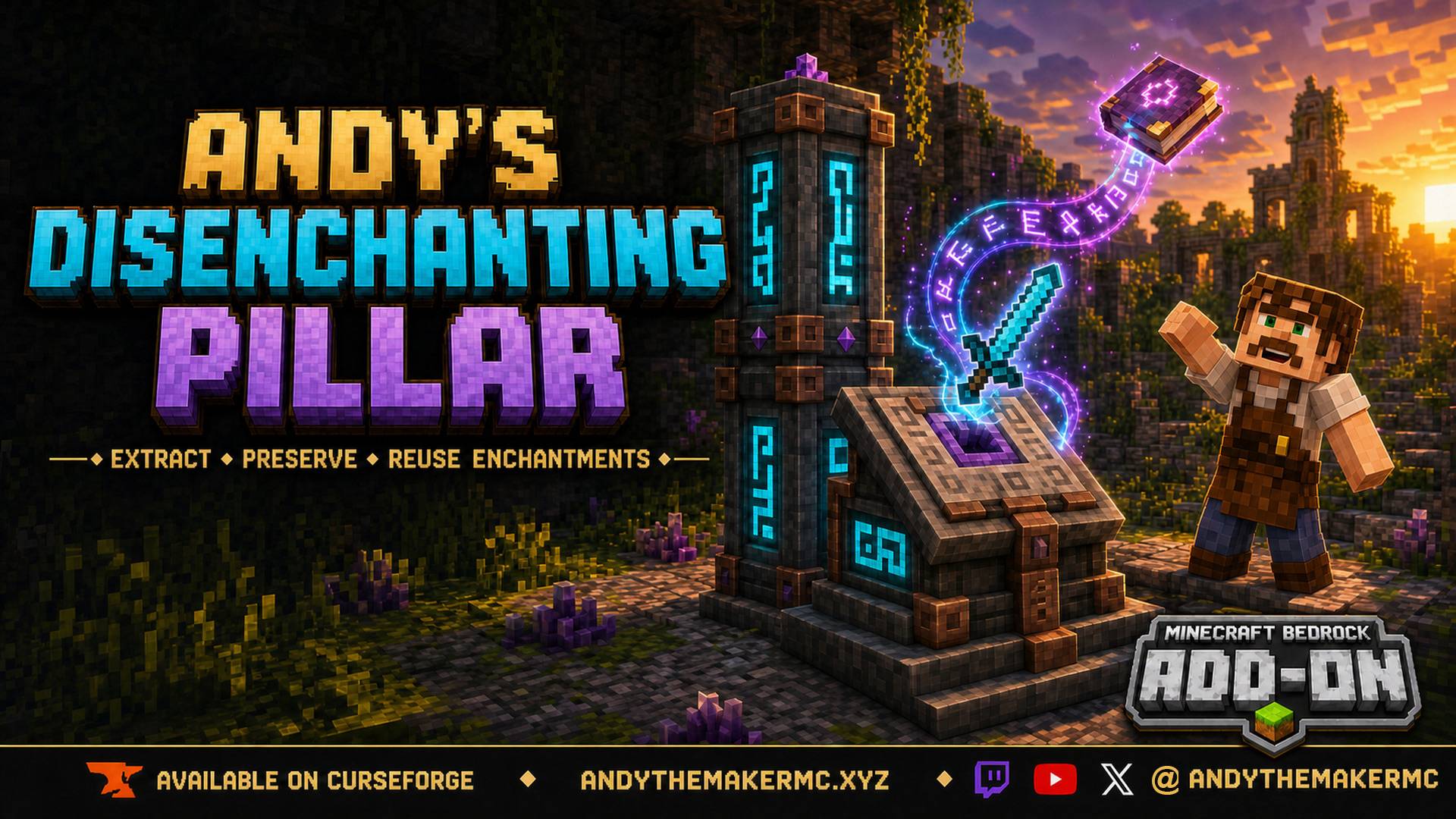
Andy's Disenchanting Pillar
Save the enchantment you want without destroying the item — or dragging the others along with it.
Andy's Disenchanting Pillar adds a Survival-balanced reverse-enchanting workstation to Minecraft Bedrock. Insert an enchanted tool, weapon, armor piece, or enchanted book; supply ordinary books and Amethyst Shards; select one exact enchantment; review the full cost; then take the previewed enchanted book to complete the transfer. The source item survives and keeps every enchantment you did not select.
This is deliberately not a free or early-game enchantment splitter. Preserving both the item and the removed enchantment is powerful, so the workstation recipe and the recurring book, Amethyst, and XP costs are substantial by design. The goal is a valuable mid-game service that never makes Survival enchanting, exploration, loot, or anvils irrelevant.
Quick start
- Craft a Disenchanting Pillar at a crafting table and place it.
- Interact with it to open the workstation.
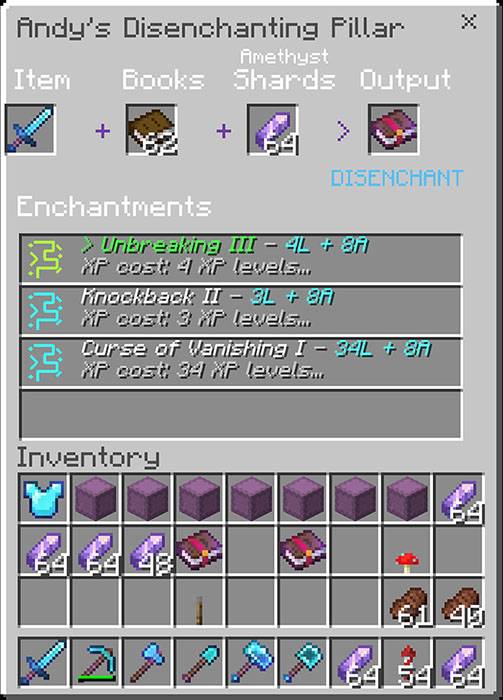
- Put an enchanted item in Item, ordinary books in Books, and Amethyst Shards in Amethyst Shards.
- Select the enchantment row you want to remove.
- Take the previewed enchanted book from Output to complete the extraction.
The source item keeps every enchantment you did not select. Close the screen at any point and your item comes straight back to you.
Vanilla-friendly by design
This add-on does not alter vanilla enchanting, anvils, grindstones, loot tables, or world generation. It adds its own craftable workstations and nothing else touches your world.
- Achievement-friendly — worlds using it keep Achievements enabled
- No required experimental gameplay toggle
- No required external or third-party add-on
- No Beta APIs; the stable Script API only
- Standard graphics and Vibrant Visuals compatible
- Normal Survival play never requires cheats or operator permission
The paired resource pack is required — it supplies the workstation interface — and both packs are included in the single .mcaddon.
Features
- Extracts one chosen enchantment at a time.
- Works with vanilla enchanted tools, weapons, armor, and enchanted books.
- Preserves every unselected enchantment on the source item.
- Produces a normal enchanted book usable in a vanilla anvil.
- Uses a real container-style interface with drag and shift-click support.
- Shows the exact result and full cost before consuming anything.
- Returns your Item and Output slots when you close the screen, like an anvil.
- Rebuilds processed items so hidden prior-work history cannot create runaway anvil prices.
- Removes Mending and both curses, at a deliberately steep price.
- Offers 48 vanilla body materials, three workstation forms, and all 16 dye colors.
- Includes validation and best-effort rollback to protect items and resources.
- Configurable in-game, from the behavior-pack gear page, or from a hosted server console.
Three workstation forms
Choose the shape that fits your build:
- Compact Disenchanting Pillar — a complete one-block workstation.
- Tall Disenchanting Pillar — add a second matching pillar for a coordinated two-block form.
- Disenchanting Altar — a one-block lectern-shaped alternative with a recessed amethyst focus.
All three work identically. They share the same interface, storage, costs, dye system, visual effects, and operator settings; the difference is purely aesthetic. Pillars stack to a maximum of two blocks. Altars do not stack.
48 vanilla-material variants
Craft the pillar from your preferred hard block. The models reference Minecraft's built-in material textures so they blend naturally into Survival builds, finished with copper fittings, amethyst growths, and custom rune channels.
| Family | Available materials |
|---|---|
| Stone | Stone, Smooth Stone, Cobblestone, Mossy Cobblestone, Stone Bricks, Mossy Stone Bricks, Cracked Stone Bricks, Chiseled Stone Bricks |
| Andesite | Andesite, Polished Andesite |
| Diorite | Diorite, Polished Diorite |
| Granite | Granite, Polished Granite |
| Tuff | Tuff, Polished Tuff, Tuff Bricks, Chiseled Tuff |
| Deepslate | Deepslate, Cobbled Deepslate, Polished Deepslate, Deepslate Bricks, Cracked Deepslate Bricks, Deepslate Tiles, Cracked Deepslate Tiles, Chiseled Deepslate |
| Earthen and mineral | Mud Bricks, Packed Mud, Calcite, Dripstone Block |
| Quartz | Quartz Block, Smooth Quartz, Quartz Bricks, Chiseled Quartz |
| Sandstone | Sandstone, Smooth Sandstone, Chiseled Sandstone, Cut Sandstone |
| Nether | Netherrack, Nether Bricks, Red Nether Bricks, Blackstone, Polished Blackstone, Polished Blackstone Bricks, Basalt, Polished Basalt |
| Ocean | Prismarine, Dark Prismarine |
Dyeable glowing runes
Hold any of Minecraft's 16 normal dyes and interact with a pillar or altar to recolor its rune inscriptions and nearby floating glyphs. Both halves of a tall pillar stay synchronized.
Only the carved runes and amethyst focus emit light; the body keeps its normal block appearance, and a faint non-emissive glint occasionally sweeps the main faces. Rune color is cosmetic and does not affect compatibility, costs, or workstation power.
How it works
The safe preview workflow
Selecting an enchantment is free and reversible. The prospective enchanted book appears in Output, but nothing is consumed until you take it. Change your selection as often as you like, or close the screen and walk away at no cost.
Before committing, the add-on validates the source item, selected enchantment, ordinary book, Amethyst supply, XP levels, output compatibility, player proximity, and inventory space. If any step fails mid-transaction, it rolls back on a best-effort basis.
Interface slots
| Interface area | Purpose |
|---|---|
| Item | Holds one enchanted tool, weapon, armor piece, or enchanted book |
| Books | Holds ordinary books, up to a stack of 64 |
| Amethyst Shards | Holds the shards used for the configured extraction cost |
| Enchantments | Lists each enchantment on the source as a selectable row |
| Output | Previews the enchanted book that will be created |
- Interact with any part of a pillar or altar.
- Place the enchanted source in Item.
- Place ordinary books in Books.
- Place Amethyst Shards in Amethyst Shards.
- Select the row containing the enchantment you want to remove.
- Review the displayed XP, book, and shard cost.
- Change rows freely to preview another enchantment.
- Take or shift-click the enchanted book in Output to commit the transfer.
Only the selected enchantment is removed; every other enchantment stays on the source. Repeat to extract another. When the last enchantment is removed from an enchanted book, the emptied source becomes an ordinary book.
Four enchantment rows are visible at a time. If an item carries more, blue arrow runes let you page through up to 15.
What stays in the workstation
Closing the screen returns the Item and Output slots to your inventory, the same way an anvil or enchanting table will not eat an item you back out of.
Books and Amethyst Shards deliberately stay loaded between visits, because they are bulk supplies and re-stocking every session would be tedious. Take them out by hand, or break the workstation to recover everything.
Balanced extraction costs
Every completed extraction uses one ordinary book, eight Amethyst Shards by default, and XP levels based on enchantment rarity and level. The normal portion is capped between one and four levels. Mending adds five. Curse of Binding and Curse of Vanishing add thirty, making curse removal possible but intentionally expensive.
These costs use player levels, not raw XP points.
| Default cost setting | Amount |
|---|---|
| Common base | 1 level |
| Uncommon base | 2 levels |
| Rare base | 3 levels |
| Very rare base | 4 levels |
| Each enchantment level above I | +1 level |
| Normal minimum | 1 level |
| Normal maximum | 4 levels |
| Mending surcharge | +5 levels |
| Curse surcharge | +30 levels |
| Amethyst Shards | 8 shards |
| Ordinary books | 1 book |
| Example | Final XP cost |
| -------------------- | ------------- |
| Efficiency I | 1 level |
| Efficiency V | 4 levels |
| Unbreaking II | 3 levels |
| Fortune III | 4 levels |
| Silk Touch I | 4 levels |
| Mending I | 9 levels |
| Curse of Binding I | 34 levels |
| Curse of Vanishing I | 34 levels |
Unknown or third-party enchantments are treated as Rare. World operators can adjust every value above.
Reapplying an extracted enchantment
Use a normal anvil. The workstation clears the hidden vanilla prior-work penalty on items it processes, so moving enchantments around repeatedly does not spiral into "Too Expensive!".
Crafting
Compact pillar
Craft any material variant at a crafting table:
Amethyst Shard | Lapis Block      | Amethyst Shard
Copper Ingot   | Enchanting Table | Copper Ingot
Body Material  | Obsidian         | Body Material
The two body-material positions set the permanent appearance. Material cannot be changed after crafting.
Tall pillar
Craft two pillars from the same body material. Place the first, hold the second, and interact with the placed pillar. The held item is consumed outside Creative mode and the workstation becomes a coordinated two-block pillar.
The tall pillar is assembled by interaction — do not try to place a pillar block directly on top. Two blocks is the maximum.
Altar
Convert a matching pillar with this shapeless recipe:
1 Disenchanting Pillar + 2 Copper Ingots + 1 Amethyst ShardThe altar retains the pillar's body material.
| Finished form | Total resources |
|---|---|
| Compact pillar | 2 Amethyst Shards, 1 Lapis Block, 2 Copper Ingots, 1 Enchanting Table, 1 Obsidian, 2 matching Body Material blocks |
| Tall pillar | 4 Amethyst Shards, 2 Lapis Blocks, 4 Copper Ingots, 2 Enchanting Tables, 2 Obsidian, 4 matching Body Material blocks |
| Altar | 3 Amethyst Shards, 1 Lapis Block, 4 Copper Ingots, 1 Enchanting Table, 1 Obsidian, 2 matching Body Material blocks |
The recipes target established mid-game Survival: enchanting-table progression, amethyst exploration, lapis, copper, obsidian, and your chosen building material.
In-game guide
Every player receives a signed CWES field guide the first time the add-on loads. It covers crafting, workstation forms, slot placement, enchantment selection, costs, extraction, rune dyeing, and operator controls.
Craft a replacement from one ordinary book and one Amethyst Shard, or run /scriptevent adp:guide.
Requirements
- Minecraft Bedrock Edition 1.26.30 or newer
- Both included packs active at the same version
- The paired resource pack delivered to players; it supplies the workstation interface
- No experimental gameplay toggles
- No external or third-party add-on dependencies
Compatibility
| Environment | Support |
|---|---|
| Minimum game version | Minecraft Bedrock Edition 1.26.30 |
| Achievements | Remain enabled |
| Standard graphics | Yes |
| Vibrant Visuals | Yes; rune-only emissive rendering with no full-body glow or additive bloom |
| Single-player and local multiplayer | Yes |
| Realms | Yes, when the Realm supports the pack and Script API version |
| Dedicated Bedrock servers | Yes; operators configure everything in-game or from the hosted console |
| Dimensions | Overworld, Nether, and End |
| Experiments | None required |
| Required external dependencies | None |
| Required resource pack | Included and required; it supplies the workstation interface |
| World settings | Costs are stored per world and apply to every workstation in it |
Standard vanilla equipment and books are the primary compatibility target. Third-party enchantments work when they can legally be stored on a vanilla enchanted book, and are priced as Rare unless added to the rarity table. Back up important worlds before installing or updating any add-on, and test unusual third-party items in a copied world first.
Achievements
Worlds using this add-on keep Achievements enabled: both packs identify as an add-on with a current manifest format, no experiment is required, no Beta API is used, and normal play never needs cheats or operator permission.
Anything else that disables Achievements still does. Turning on cheats, enabling an experimental toggle, or installing another pack that requires one will switch Achievements off for that world regardless of this add-on.
Installation
Windows and mobile
- Download Andys Disenchanting Pillar v1.6.16.mcaddon.
- Do not extract, rename to ZIP, or recompress the file.
- Open it with Minecraft Bedrock and wait for both packs to import or update.
- Create a world or edit an existing world.
- In Behavior Packs → My Packs, activate Andy's Disenchanting Pillar [BP].
- Confirm Andy's Disenchanting Pillar [RP] is active under Resource Packs. Bedrock may activate the paired pack automatically.
- Optionally open the gear icon on the behavior pack to set starting costs.
- Start the world. No experimental gameplay toggles are needed.
Console through a Realm
Consoles do not provide a general-purpose local .mcaddon importer. Import and configure the add-on on a supported Windows or mobile device, apply that world to a Realm, then join the Realm from the console. Platform and Realm support can vary.
Hosted Bedrock Dedicated Server
Install and activate both packs in the server world, then set texturepack-required=true in server.properties. The resource pack is required, not cosmetic — it supplies the workstation interface, and clients that never receive it will see a plain container often titled Unknown.
Hosted servers never show Minecraft's behavior-pack gear pages, so a world created on a server starts from the built-in defaults. Every cost is reachable from the console and from operator chat instead. Run these from the console without a leading slash, or in-game with / in front:
scriptevent adp:list
scriptevent adp:set amethyst_cost 4
scriptevent adp:set mending 10
scriptevent adp:get maximum
scriptevent adp:status
scriptevent adp:reset
scriptevent adp:help| Command | Purpose |
|---|---|
adp:list |
Show every setting with its current value, default, and allowed range |
adp:get <setting> |
Show one setting |
adp:set <setting> <value> |
Change one setting; the rest are left alone |
adp:status |
Summary of how many settings differ from the defaults |
adp:reset |
Restore the gear-icon settings, or the built-in defaults on a server |
adp:help |
List the commands |
adp:admin |
Open the settings menu (in-game operators) |
| Setting | Range |
| -------------------- | ----- |
common_base |
0-10 |
uncommon_base |
0-10 |
rare_base |
0-10 |
very_rare_base |
0-10 |
per_level |
0-4 |
minimum |
0-10 |
maximum |
1-10 |
mending_extra_levels |
0-100 |
curse_extra_levels |
0-100 |
amethyst_cost |
0-64 |
Setting names accept the obvious variations, so amethyst_cost, amethystCost, amethyst, and shards all reach the same option. Values outside a setting's range are refused with an explanation rather than silently clamped. Only operators and the server console can run these, and settings are stored in the world, so they survive restarts.
/scriptevent adp:guide is available to every player, not just operators.
Updating from an older version
Back up the world, import the new .mcaddon, confirm the behavior and resource packs are the same version, then completely leave and reopen the world. If multiple installed versions appear, activate only the newest matching pair.
Operator controls
Operators can sneak-interact with a workstation while not holding dye, or run /scriptevent adp:admin, to open the settings menu. It adjusts rarity costs, per-level scaling, the normal minimum and maximum, the Mending surcharge, the curse surcharge, and the shards consumed per extraction.
Troubleshooting
The workstation does not appear in the crafting table
- Confirm Andy's Disenchanting Pillar [BP] is active.
- Confirm its paired resource pack is active at the same version.
- Use a crafting table, not the 2×2 inventory grid.
- Use two identical supported body-material blocks in the bottom corners.
- Completely leave and reopen the world after changing active packs.
The pillar opens a plain container, or one titled Unknown
- The resource pack is not reaching the client; confirm both packs are active at the same version.
- On a server, set
texturepack-required=true. - Completely leave and reopen the world if the packs were just installed or updated.
- Test once with other UI-changing resource packs disabled.
No enchantments appear
- Put one enchanted tool, weapon, armor piece, or enchanted book in Item.
- Confirm the item actually carries enchantments.
- Remove and reinsert the source item to refresh its rows.
- Only the first 15 enchantments are listed.
Output remains empty
- Put at least one ordinary book in Books.
- Put at least the configured number of Amethyst Shards in Amethyst Shards.
- Select one of the named enchantment rows; Output stays empty until you do.
- Confirm the selected enchantment can legally be stored on an enchanted book.
The output cannot be taken
- Confirm you have the displayed number of XP levels.
- Confirm one ordinary book and the required shards are still present.
- Make room in your inventory.
- Reselect the enchantment if the source or workstation contents changed after the preview appeared.
My item stayed in the workstation
Closing the screen returns the Item and Output slots. Books and Amethyst Shards stay loaded on purpose — take them out by hand or break the workstation.
Rune dyeing does not work
- Hold one normal Minecraft dye.
- Interact directly with the pillar or altar.
- Both halves of a tall pillar recolor together.
- One dye is consumed outside Creative mode.
The operator menu does not open
- The player must be a world operator.
- Sneak-interact while not holding dye, or run
/scriptevent adp:admin. - On a hosted server, use the console commands above.
Achievements are disabled in my world
Not caused by this add-on. Check whether cheats or an experimental toggle are enabled, or whether another installed pack requires an experiment.
The import fails
- Confirm the filename ends in
.mcaddon, not.zip. - Download again if the file may be incomplete.
- Close and reopen Minecraft Bedrock.
- Do not extract, rename, or recompress the package.
An older version still appears
- Check Settings → Storage for older behavior-pack and resource-pack copies.
- Remove obsolete copies if needed.
- Restart Minecraft.
- Import the current version again and activate the matching BP and RP.
Credits
Original gameplay design, scripts, interface, workstation geometry, rune channels, guide, lore, balancing, integration, and documentation: Andy/CWES.
Floating rune designs adapt Enchantment Runes by SargentReckless, released under CC0-1.0:
- https://modrinth.com/resourcepack/enchantment-runes
- https://creativecommons.org/publicdomain/zero/1.0/
Follow and support Andy
Visit AndyTheMakerMC.xyz for Andy's add-ons, world lore, tutorials, guides, videos, and other Minecraft content.
Follow @AndyTheMakerMC on YouTube, Twitch, X, TikTok, and Instagram.
Support future projects through Ko-fi or direct Stripe support.
Reporting problems
Report issues at AndyTheMakerMC.xyz. Please include:
- your Minecraft Bedrock version and platform;
- the add-on version, and whether both packs are active at the same version;
- the source item and its enchantments;
- the selected enchantment and the displayed cost;
- the workstation form and body material;
- exact steps that reproduce the problem;
- a screenshot, video, or relevant content-log message;
- whether it also happens in a new test world with other add-ons disabled.
Player, server, Realm, and creator permissions
You may use the unmodified add-on in personal worlds, multiplayer worlds, Realms, and servers. You may feature it in videos, livestreams, reviews, tutorials, and showcases, including monetized creator content, provided you do not redistribute the add-on file itself.
Ownership and license
Copyright © AndyTheMaker 2026. All rights reserved, except for the separately credited CC0 floating-rune source.
You may not redistribute or mirror the .mcaddon, scripts, artwork, or modified versions; sell, repackage, or bundle the project; publish derivative versions; or claim the work as your own without prior written permission.
Minecraft is a trademark of Microsoft. This project is not affiliated with or endorsed by Microsoft or Mojang.
The promotional artwork is AI-assisted illustrative art. It is not an in-game screenshot and does not add custom tools, ores, blocks, or textures.
- Edition: Minecraft Bedrock
- File type: .mcpack or .mcaddon
- Minecraft version listed: 26.30
- How to install: Download the .mcpack or .mcaddon file. → Open it — Minecraft imports it. → In your world: Behavior Packs → Available → Activate, then the same under Resource Packs.
- Where to get it: Opens on CurseForge — not every file is mirrored on our own servers.
Install steps are the general flow for this file type — How to install Minecraft Bedrock addons & mods walks through it step by step.
Andy's Disenchanting Pillar is a free Minecraft Bedrock addon. Compatible with Minecraft 26.30. Downloaded 185 times (via CurseForge). Download it and open it directly in the game.