
DatapacksJava
Super Survival Mode
Java data pack listed for Minecraft 26.x. Downloads from the MC Java Mods app on Android.
⬇ Download on Modrinth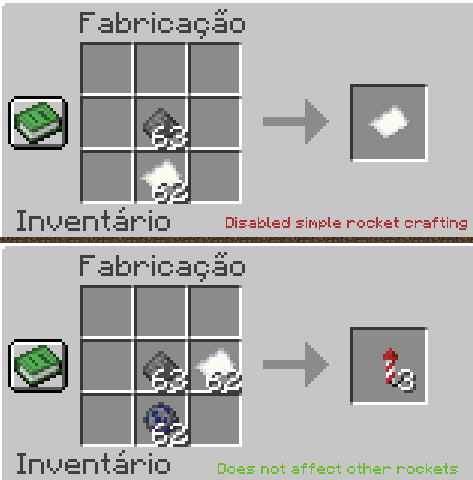
CHANGES
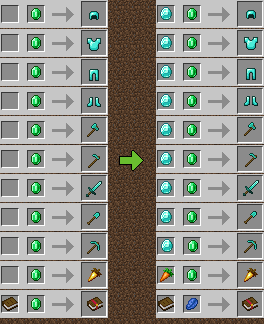
- Trades are less broken (See gallery)
- Limited enchantment combinations with Mending.
- Non-explosive rockets removed from crafting (no more infinite flying)
- Sniffers are now edible 😋
INSTALLING DATAPACKS
- Download the datapack file.
- Locate the ".minecraft" folder in your computer (This may vary depending on your OS).
- Once in ".minecraft", in "saves" folder, look for your world's folder.
- Copy the datapack file to the "datapack" folder inside your world's folder.
WARNING
It's possible that, by adding my datapack to your world, you'll need to confirm "I know what I'm doing" every time you want to enter your world. I don't know why this happens, nor how to fix it, but I know it's reversible. Removing my datapack will stop this screen from appearing.
Quick facts
- Edition: Minecraft Java
- File type: .jar
- Minecraft version listed: 26.2
- How to install: Install the matching mod loader (Forge, Fabric or NeoForge) for your Minecraft version. → Download the .jar. → Put it in the .minecraft/mods folder and launch that loader profile.
- Where to get it: Opens on Modrinth — not every file is mirrored on our own servers.
Install steps are the general flow for this file type — see the MC Java Mods guides for the full walkthrough.
File checked by MCModsHub
- Downloads as super_survival_mode.zip
- Download size: 42 KB
- Download link checked 25 Oct 2026 — working
These come from our own check of the pack file, not from the source page.