
Legacy Console World Sizer
Java mod listed for Minecraft 1.21. Downloads from the MC Java Mods app on Android.
⬇ Download on Modrinth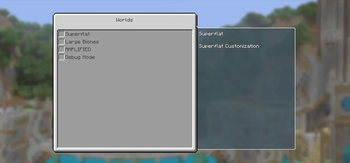
Console World Sizes
Console World Sizes is an unofficial Legacy4J add-on that brings Legacy Console Edition-inspired world size selection to Minecraft Java Edition.
Choose the size of a newly created world directly from Legacy4J's world creation menu:
- Modern — a normal Minecraft world without a practical border.
- Large — extends up to 5,120 blocks from the center in each direction.
- Classic — extends up to 864 blocks from the center in each direction.
- Small — extends up to 512 blocks from the center in each direction.
Finite worlds use Minecraft's native world border, centered at 0, 0, without continuously scanning or generating chunks.
Special Worlds
The mod adds a console-style Special Worlds screen containing:
- Superflat
- Large Biomes
- Amplified
- Debug, when available
Selecting Superflat enables Legacy4J's normal customization screen, where layers, biomes, structures and presets can be edited.
Centered Spawn
When a new world is created, the first player is moved to a safe location at or near 0, 0.
If the exact center is obstructed by water, foliage, terrain or another unsafe condition, the mod searches for the nearest safe surface position.
Languages
The mod includes language resources for all 143 language codes available in Minecraft 1.21.10. Mod-specific names use an English fallback when a dedicated translation is unavailable.
Requirements
- Minecraft Java Edition 1.21.10
- Fabric Loader 0.18.4 or newer
- Fabric API 0.138.4 or newer
- Legacy4J 1.8.7
- Factory API 2.2.7 or newer
- Java 21
The mod is primarily designed for singleplayer and integrated-server world creation through Legacy4J.
World size, border and centered-spawn settings are applied when creating a new world. Existing worlds retain the border already stored in their level.dat.
Installation
- Install Fabric Loader for Minecraft 1.21.10.
- Install Fabric API, Legacy4J and Factory API.
- Place Console World Sizes in the
modsfolder. - Open Legacy4J's world creation menu and select the desired world size.
Unofficial Project
Console World Sizes is an independently developed, unofficial add-on.
It is not affiliated with or endorsed by Mojang Studios, Microsoft, 4J Studios, the Legacy4J team, or the existing Legacy World Sizes project.
Português
Console World Sizes é um complemento não oficial para Legacy4J que adiciona ao Minecraft Java uma seleção de tamanhos inspirada nas edições clássicas de console.
No menu de criação de mundos do Legacy4J, você poderá escolher:
- Moderno — mundo normal sem uma borda prática.
- Grande — alcança até 5.120 blocos do centro em cada direção.
- Clássico — alcança até 864 blocos do centro em cada direção.
- Pequeno — alcança até 512 blocos do centro em cada direção.
Os mundos finitos utilizam a borda nativa do Minecraft, centralizada em 0, 0.
Mundos especiais
O mod adiciona uma tela no estilo das versões de console com as opções:
- Superplano
- Biomas Grandes
- Amplificado
- Depuração, quando disponível
Ao selecionar Superplano, o botão normal de personalização do Legacy4J é habilitado, permitindo editar camadas, biomas, estruturas e predefinições.
Posição inicial
Ao criar um mundo, o primeiro jogador é levado para uma posição segura em 0, 0 ou nas proximidades.
Se o centro estiver obstruído por água, vegetação, terreno ou outra condição perigosa, o mod procura a superfície segura mais próxima.
Requisitos
- Minecraft Java Edition 1.21.10
- Fabric Loader 0.18.4 ou superior
- Fabric API 0.138.4 ou superior
- Legacy4J 1.8.7
- Factory API 2.2.7 ou superior
- Java 21
As configurações de tamanho, borda e posição inicial são aplicadas na criação de mundos novos. Mundos existentes mantêm a borda já armazenada no level.dat.
Este é um complemento independente e não oficial. Ele não possui afiliação com Mojang Studios, Microsoft, 4J Studios, a equipe do Legacy4J ou o projeto existente Legacy World Sizes.
- Edition: Minecraft Java
- File type: .jar
- Minecraft versions listed: 1.21.10, 1.21.11
- How to install: Install the matching mod loader (Forge, Fabric or NeoForge) for your Minecraft version. → Download the .jar. → Put it in the .minecraft/mods folder and launch that loader profile.
- Where to get it: Opens on Modrinth — not every file is mirrored on our own servers.
Install steps are the general flow for this file type — How to install Minecraft Java mods & modpacks walks through it step by step.
- Ships as console-world-sizes-1.0.0.jar — drop this file into the mods folder
- Download size: 113 KB
- Download link checked 25 Oct 2026 — working
These come from our own check of the pack file, not from the source page.