
Sulfur+
Java mod listed for Minecraft 26.x. Downloads from the MC Java Mods app on Android.
Shows a sulfur cube's archetype and physics stats next to your crosshair. Client-side, configurable, per-stat colours.
⬇ Download on Modrinth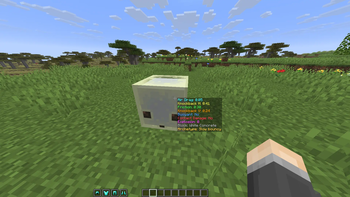
Sulfur+
See what's really going on inside a sulfur cube. Look at a sulfur cube that has absorbed a block and Sulfur+ shows its archetype and physics stats right next to your crosshair — no guessing which cube is bouncy, sliding, explosive, or floaty.
Sulfur+ is a lightweight, client-side overlay. It doesn't change any gameplay, add items, or touch the world — it just reads the cube you're looking at and puts the numbers on screen.
What it shows
Point at a sulfur cube with a block inside it and, by default, two stats pop up:
- Air Drag — the cube's
air_drag_modifier - Knockback H — the archetype's horizontal knockback power
Turn on any of the rest whenever you want:
- Friction modifier
- Knockback V (vertical knockback power)
- Buoyant (does it float?)
- Contact Damage (does it hurt to touch?)
- Explosion power
- Block — the block the cube absorbed
- Archetype — the cube's physics profile by name (Bouncy, Light, Explosive, Sticky, Hot, Fast Sliding, …)
Make it yours
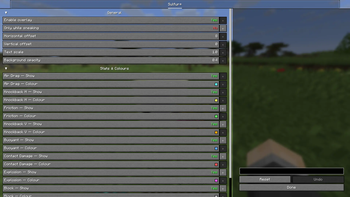
Everything is configurable from the in-game settings screen (Mod Menu on Fabric/Quilt, the mods list on NeoForge):
- Toggle each stat on or off individually.
- Pick a colour for every line so the info you care about stands out.
- Only show while sneaking (on by default) to keep your HUD clean — or show it always.
- Nudge the position, scale the text, and set the background opacity.
Changes apply instantly — no restart.
- Edition: Minecraft Java
- File type: .jar
- Minecraft version listed: 26.2
- How to install: Install the matching mod loader (Forge, Fabric or NeoForge) for your Minecraft version. → Download the .jar. → Put it in the .minecraft/mods folder and launch that loader profile.
- Where to get it: Opens on Modrinth — not every file is mirrored on our own servers.
Install steps are the general flow for this file type — How to install Minecraft Java mods & modpacks walks through it step by step.
- Ships as sulfurplus-neoforge-26.2-1.0.0.jar — drop this file into the mods folder
- Download size: 986 KB
- Download link checked 5 Oct 2026 — working
These come from our own check of the pack file, not from the source page.