
CleanConnectedGlass
This resource pack features Clean Connected Glass (CCG). It requires CTM (OptiFine/Continuity) support.
⬇ Download on Modrinth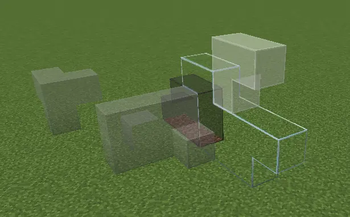
Clean Connected Glass (CCG) – Resource Pack
English
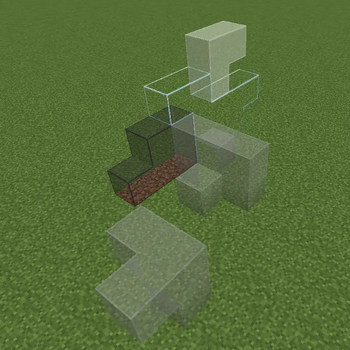
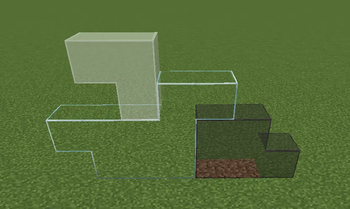
Clean Connected Glass (CCG) is a lightweight, polished resource pack that brings seamless, borderless glass connections to your Minecraft world. No more ugly grid lines – just pure, clean transparency that makes modern builds, greenhouses, and underwater bases look stunning.
Features
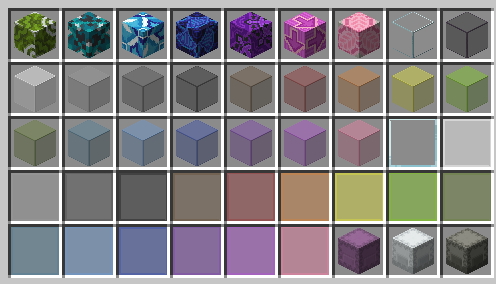
- Full CTM support – All glass blocks (including tinted glass, white/colored stained glass, and glass panes) connect smoothly with adjacent glass blocks.
- Minimalist design – Keeps the vanilla Minecraft aesthetic while removing visual clutter. No extra patterns or obtrusive borders.
- Lightweight & compatible – Works with most shader packs and modded environments (as long as CTM is available).
Requirements
- OptiFine (with Connected Textures enabled) OR
- Continuity (Fabric/Quilt mod for CTM support) – recommended for Fabric users.
Without OptiFine or Continuity, glass will not connect. The pack will still apply custom textures, but connected glass will not function.
Installation
- Download the
.zipfile (do not unzip it). - Place it in your
resourcepacksfolder. - Launch Minecraft, go to Options > Resource Packs, and move the pack to the top of the list.
- Ensure you have OptiFine or Continuity installed and activated.
- (For OptiFine) Go to Video Settings > Quality > Connected Textures and set it to Fancy or Fast.
- (For Continuity) No extra configuration needed – CTM is enabled by default.
Compatibility
- Minecraft 1.21 and above (up to the latest release) This pack is built for modern versions – if you are using an older Minecraft release, please check for legacy versions elsewhere.
- Works with vanilla, Fabric, Quilt, Forge, and NeoForge.
- May conflict with other resource packs that modify glass textures – place CCG above them to override.
Notes
- This pack does not alter glass sounds, recipes, or behavior – purely visual.
- If you notice z-fighting or flickering, try disabling other connected-glass packs or adjust your render settings.
- For bug reports or suggestions, please leave a comment on the Modrinth page.
中文
Clean Connected Glass (CCG) 是一款轻量且精致的资源包,为你的 Minecraft 世界带来无缝、无边框的玻璃连接效果。告别难看的网格线,享受纯粹通透的视觉体验,让你的现代建筑、温室和水下基地更加出色。
特性
- 完整 CTM 支持 – 所有玻璃方块(包括遮光玻璃、白色/彩色染色玻璃及玻璃板)都能与相邻玻璃平滑连接。
- 极简设计 – 保留原版 Minecraft 美学风格,同时消除视觉杂乱,无额外图案或突兀边框。
- 轻量兼容 – 兼容大多数光影包和模组环境(只要 CTM 功能可用)。
需求
- OptiFine(需开启连接纹理)或
- Continuity(Fabric/Quilt 的 CTM 支持模组)—— Fabric 用户推荐使用。
如果没有 OptiFine 或 Continuity,玻璃将不会连接。资源包本身仍可加载,但连接效果无法生效。
安装方法
- 下载
.zip文件(请勿解压)。 - 将其放入
resourcepacks文件夹。 - 启动 Minecraft,进入 选项 > 资源包,将本包移至列表顶部。
- 确保已安装并启用 OptiFine 或 Continuity。
- (OptiFine 用户)进入 视频设置 > 品质 > 连接纹理,设置为精致或快速。
- (Continuity 用户)无需额外配置,CTM 默认启用。
兼容性
- Minecraft 1.21 及以上版本(直至最新版)。 本包专为现代版本构建 – 若你使用更旧的 Minecraft 版本,请另行查找旧版资源包。
- 兼容原版、Fabric、Quilt、Forge 和 NeoForge。
- 可能与其他修改玻璃纹理的资源包冲突——请将 CCG 置于其上方以覆盖。
备注
- 本资源包不会更改玻璃音效、合成配方或行为——仅为视觉调整。
- 若遇到深度冲突或闪烁,请尝试禁用其他连接玻璃包,或调整渲染设置。
- 如有 Bug 反馈或建议,请在 Modrinth 页面留言。
Enjoy your crystal-clear builds!
享受清晰透明的建筑乐趣!
- Downloads as CleanConnectedGlass_CCG_0.1.0.zip
- Download size: 418 KB
- Download link checked 3 Aug 2026 — working
These come from our own check of the pack file, not from the source page.