BytePlayer
BytePlayer is a Minecraft Bedrock addon that simulates the experience of being one block tall with a lowered first-person camera, multiple camera modes…
⬇ Download on CurseForgeBytePlayer
Become one block tall in Minecraft Bedrock!
BytePlayer is a lightweight Script API addon that gives you the feeling of being a tiny player by lowering the first-person camera, reducing jump height, and providing multiple camera perspectives while keeping the gameplay as close to vanilla survival as possible.
Features
-📷 Low first-person camera for a one-block-tall perspective.
-🎥 Three camera modes: First Person, Third Person Back, Third Person Front
-🦘 Reduced jump height for a more realistic tiny-player experience.
-⚡ Lightweight and optimized for performance.
-🌍 Works in Survival worlds.
Setup
1. Enable Experimental Features
Before creating or loading a world, make sure all required experimental features are enabled, including:
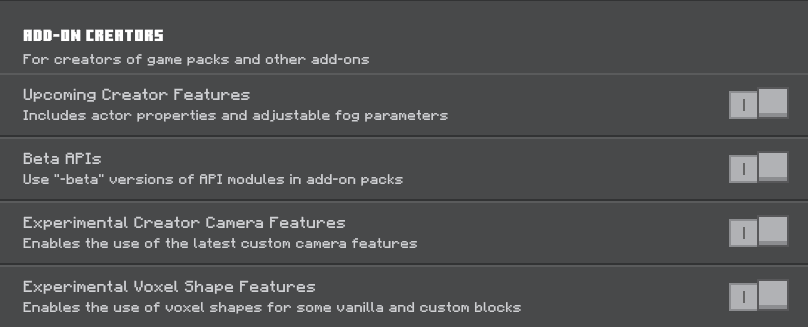
Without these enabled, the addon will not function correctly.
First-Time Use
When joining a world for the first time, the camera will remain in the default Minecraft position.
Simply run:
/tag @s add 1p
to activate the BytePlayer camera.
Cheats must be enabled to use the tag commands.
Camera Controls
Switch between camera modes using these commands:
/tag @s add 1p
First Person
/tag @s add 3pb
Third Person Back
/tag @s add 3pf
Third Person Front
Keyboard & Mouse Users
If you play using Keyboard & Mouse, you can use Minecraft's built-in Command by Hotkey feature to switch perspectives instantly.
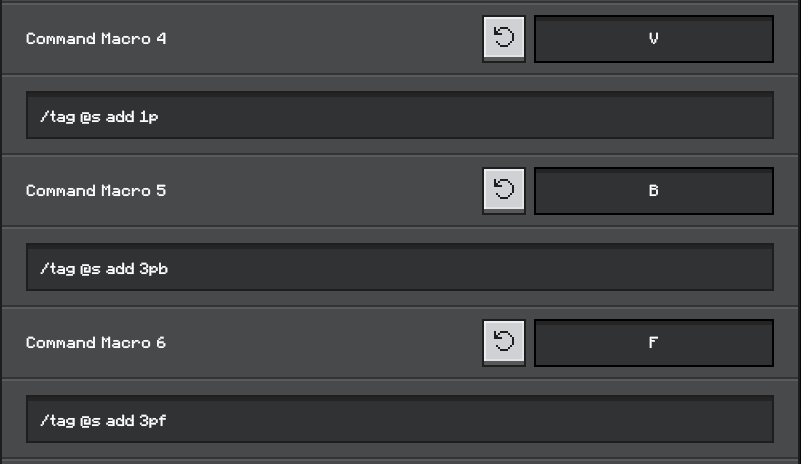
This lets you change camera modes with a single key press instead of typing commands every time.
Known Limitations
Due to current Minecraft Bedrock engine limitations:
-
Player collision size cannot be changed.
-
Interaction ray (crosshair alignment) cannot currently be modified through the Script API.
These are engine limitations, not addon bugs.
BytePlayer is still under active development, and more features are planned in future updates. Feedback and bug reports are always appreciated!
- Edition: Minecraft Bedrock
- File type: .mcpack or .mcaddon
- Minecraft versions listed: 1.21.132, 26.0.02, 26.0
- How to install: Download the .mcpack or .mcaddon file. → Open it — Minecraft imports it. → In your world: Behavior Packs → Available → Activate, then the same under Resource Packs.
- Where to get it: Opens on CurseForge — not every file is mirrored on our own servers.
Install steps are the general flow for this file type — How to install Minecraft Bedrock addons & mods walks through it step by step.
- Pack type: .mcaddon
- Manifest requires Minecraft 1.21.100 or newer
- Ships one half — this pack asks for another pack that is not included
- Download size: 3.0 MB
- Download link checked 5 Oct 2026 — working
These come from our own check of the pack file, not from the source page.