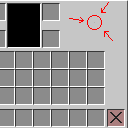
Inventory Pixel Change
Java resource pack listed for Minecraft 1.16–26.x. Downloads from the MC Java Mods app on Android.
⬇ Download on ModrinthThe Ultimate Precision: The C6C6C6 Inventory Fix
Are you a Minecraft perfectionist? Do minor visual inconsistencies disrupt your immersion?
If so, this ultra-minimalist texture pack is designed exactly for you. It targets one specific, highly overlooked detail in the default user interface: a single pixel.
In the standard Minecraft inventory overlay, there is a lone pixel colored in the shade #C5C5C5. While invisible to the casual player, this slight color deviation can be a constant distraction for players who value absolute visual harmony.
This pack changes that exact #C5C5C5 pixel to a perfectly matching #C6C6C6 hue.
By unifying the color palette of the inventory border, this micro-tweak creates a seamless, symmetrical, and visually flawless user interface. It introduces no lag, requires zero performance overhead, and maintains a 100% vanilla look. It is fully compatible with other faithful resource packs and works across all modern game versions.
Stop letting a single misplaced color tone ruin your menus. Download the C6C6C6 Inventory Fix today and experience the ultimate peace of mind that comes with true pixel perfection. Clean, subtle, and absolutely flawless.
- Edition: Minecraft Java
- File type: .zip (resource pack)
- Minecraft versions listed: 1.16, 1.16.1, 1.16.2
- How to install: Download the .zip resource pack — do not unzip it. → Put it in .minecraft/resourcepacks. → Enable it in Options → Resource Packs.
- Where to get it: Opens on Modrinth — not every file is mirrored on our own servers.
Install steps are the general flow for this file type — How to install Minecraft Java resource packs walks through it step by step.
- Downloads as inv.pixel.change.zip
- Download size: 3 KB
- Download link checked 6 Oct 2026 — working
These come from our own check of the pack file, not from the source page.