Jump OP Enchant
Jump to instantly max-enchant your held item — every jump enchants your weapon, tool, or armor to its highest valid level, including Spear's Lunge and…
⬇ Download on CurseForge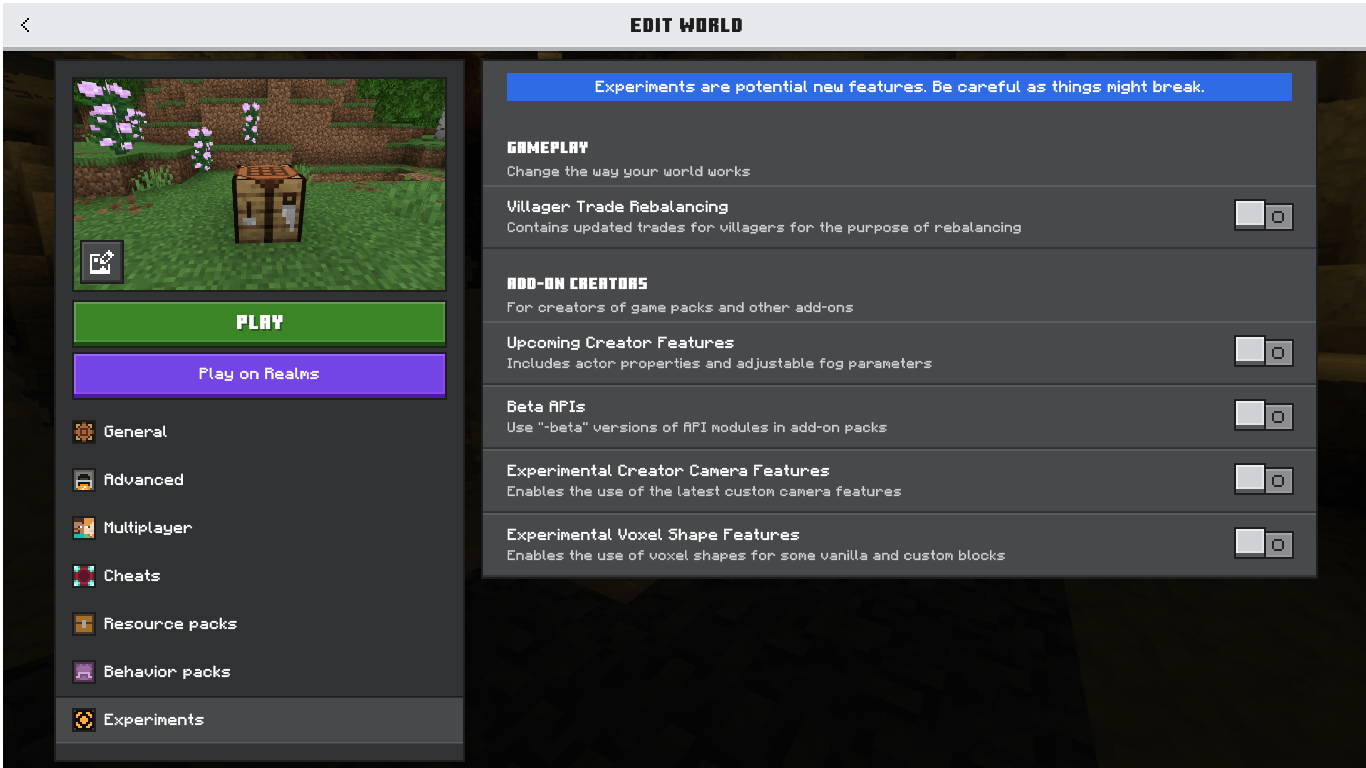
Jump OP Enchant
Jump. Land. Fully enchanted.
Jump OP Enchant is a lightweight gameplay-mechanic add-on for Minecraft Bedrock Edition that turns every jump into an instant enchanting session. No enchanting table, no XP levels, no anvils — just jump, and the item in your hand gets enchanted to its maximum valid level on the spot.
How It Works
Every time you jump while holding a compatible weapon, tool, or piece of armor, the add-on automatically applies every enchantment that item can legally hold, each set to the highest level the game actually allows (e.g. Sharpness V, Efficiency V, Protection IV, Mending). This isn't a fake "Sharpness 999" gimmick — every level shown is 100% valid and stable in vanilla Bedrock, so your gear behaves exactly as intended, just fully maxed out.
If two enchantments can't normally coexist (like Mending vs. Infinity, or Fortune vs. Silk Touch), the add-on resolves the conflict randomly on every jump — so which one "wins" keeps changing, adding a bit of unpredictability to your loadout instead of the same static result every time.
Supported Items
- Swords — Sharpness, Looting, Fire Aspect, Knockback, Unbreaking, Mending
- Axes — Sharpness, Efficiency, Unbreaking, Mending
- Pickaxes — Efficiency, Fortune / Silk Touch (random), Unbreaking, Mending
- Shovels & Hoes — Efficiency, Fortune, Unbreaking, Mending
- Bows — Power, Punch, Flame, Infinity / Mending (random), Unbreaking
- Crossbows — Multishot, Piercing, Quick Charge, Unbreaking, Mending
- Tridents — Loyalty, Channeling, Riptide, Impaling, Unbreaking, Mending
- Fishing Rods — Luck of the Sea, Lure, Unbreaking, Mending
- Full Armor Set (Helmet/Chestplate/Leggings/Boots) — Protection, Thorns, Unbreaking, Mending, plus slot-specific enchants (Respiration, Aqua Affinity, Feather Falling, Depth Strider / Frost Walker)
- Spear (all 7 tiers: Wood → Netherite) — Sharpness, Looting, Fire Aspect, Knockback, Unbreaking, and the spear-exclusive Lunge enchant
- Mace — Smite, Fire Aspect, Unbreaking, Mending, plus the mace-exclusive Breach, Density, and Wind Burst enchants
Features
- ✅ Instant max-level enchanting — every jump, no waiting, no grinding
- ✅ Covers the newest Bedrock weapons — full Spear and Mace support included
- ✅ Smart conflict handling — clashing enchants are resolved with an RNG system instead of always favoring the same one
- ✅ Achievement-safe — the pack ships with the proper
product_type: addonmanifest metadata, so achievements stay enabled - ✅ Silent by design — no spammy pop-ups or action bar messages, it just works in the background
Requirements (OPSIONAL)
This add-on uses the Bedrock Scripting API, so you must enable Beta APIs in your world's Experimental Settings before activating the pack. Without this toggle, the enchanting mechanic will not run.
Installation
- Download the
.mcpackfile. - Double-click it (or open with Minecraft on mobile) to import it automatically.
- Create or edit a world → enable the Jump OP Enchant behavior pack under Behavior Packs.
- In Experimental Settings, turn on Beta APIs. (OPSIONAL)
- Jump into the game, hold any supported item, and jump!
Notes
- All enchant levels applied are genuine vanilla-valid levels — there is currently no supported way to exceed a tool's true maximum enchant level on Bedrock (unlike some Java NBT tricks), so this add-on focuses on making sure you always have the best possible legal loadout instantly.
- Compatible with Survival worlds; no cheats or operator permissions required.
- Edition: Minecraft Bedrock
- File type: .mcpack or .mcaddon
- Minecraft versions listed: 26.0.02, 26.0, 26.3
- How to install: Download the .mcpack or .mcaddon file. → Open it — Minecraft imports it. → In your world: Behavior Packs → Available → Activate, then the same under Resource Packs.
- Where to get it: Opens on CurseForge — not every file is mirrored on our own servers.
Install steps are the general flow for this file type — How to install Minecraft Bedrock addons & mods walks through it step by step.
- Pack type: .mcpack — a single pack
- Manifest requires Minecraft 1.20.60 or newer
- Complete pack — everything it depends on is inside the file
- Download size: 31 KB
- Download link checked 18 Sept 2026 — working
These come from our own check of the pack file, not from the source page.