
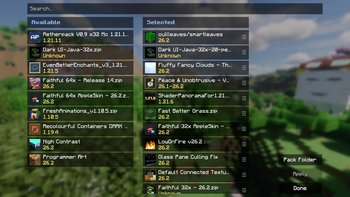
Better Resource Pack Menu
Better Resource Pack Menu replaces Minecraft’s default resource pack selection screen with a cleaner, more compact interface inspired by modern mod settings menus.
It makes managing large resource pack folders easier with a two-column layout that displays each resource pack in a much smaller entry than the default menu:
- Drag selected packs by their handle to change pack priority, instead of the default clunky up and down arrows
- View pack details in a hover panel
- See only detected Minecraft versions and version ranges when pack metadata or filenames provide them, not a bunch of extraneous text
Better Resource Pack Menu is a client-side Fabric mod for 26.2. It does not add, modify, or include any resource packs; it only changes how you browse and organize them.
Requirements
- Version 26.2
- Fabric Loader 0.19.3+
Sodium is not required. Better Resource Pack Menu only takes visual inspiration from its clean, compact settings style.
- Edition: Minecraft Java
- File type: .jar
- Minecraft version listed: 26.2
- How to install: Install the matching mod loader (Forge, Fabric or NeoForge) for your Minecraft version. → Download the .jar. → Put it in the .minecraft/mods folder and launch that loader profile.
- Where to get it: Opens on Modrinth — not every file is mirrored on our own servers.
Install steps are the general flow for this file type — How to install Minecraft Java mods & modpacks walks through it step by step.
- Ships as better-rp-menu-1.0.jar — drop this file into the mods folder
- Download size: 19 KB
- Download link checked 16 Sept 2026 — working
These come from our own check of the pack file, not from the source page.