
Simple Voice Chat Scroll — Quick Voice Volume Control
Simple Voice Chat Scroll is a lightweight client-side Minecraft mod for Fabric, Forge, and NeoForge. It integrates with Simple Voice Chat and lets you adjust individual player volume without opening the voice chat menu.
Look at a player, hold the right mouse button, and scroll the mouse wheel to change their volume. The selected value is saved automatically through Simple Voice Chat.
The volume indicator remains visible even when player name tags are disabled or hidden.
Features
- Quickly adjust individual player volume
- Volume range from 0% to 200%
- Simple right mouse button + mouse wheel controls
- Automatic volume saving
- Temporary volume indicator above the selected player
- Smooth indicator fade-out
- Works with hidden or disabled player name tags
- Client-side only — no server installation required
- Fabric, Forge, and NeoForge support
- Native Simple Voice Chat integration
Controls
- Point the crosshair at a player connected to Simple Voice Chat.
- Hold the right mouse button.
- Scroll up to increase their volume.
- Scroll down to decrease their volume.
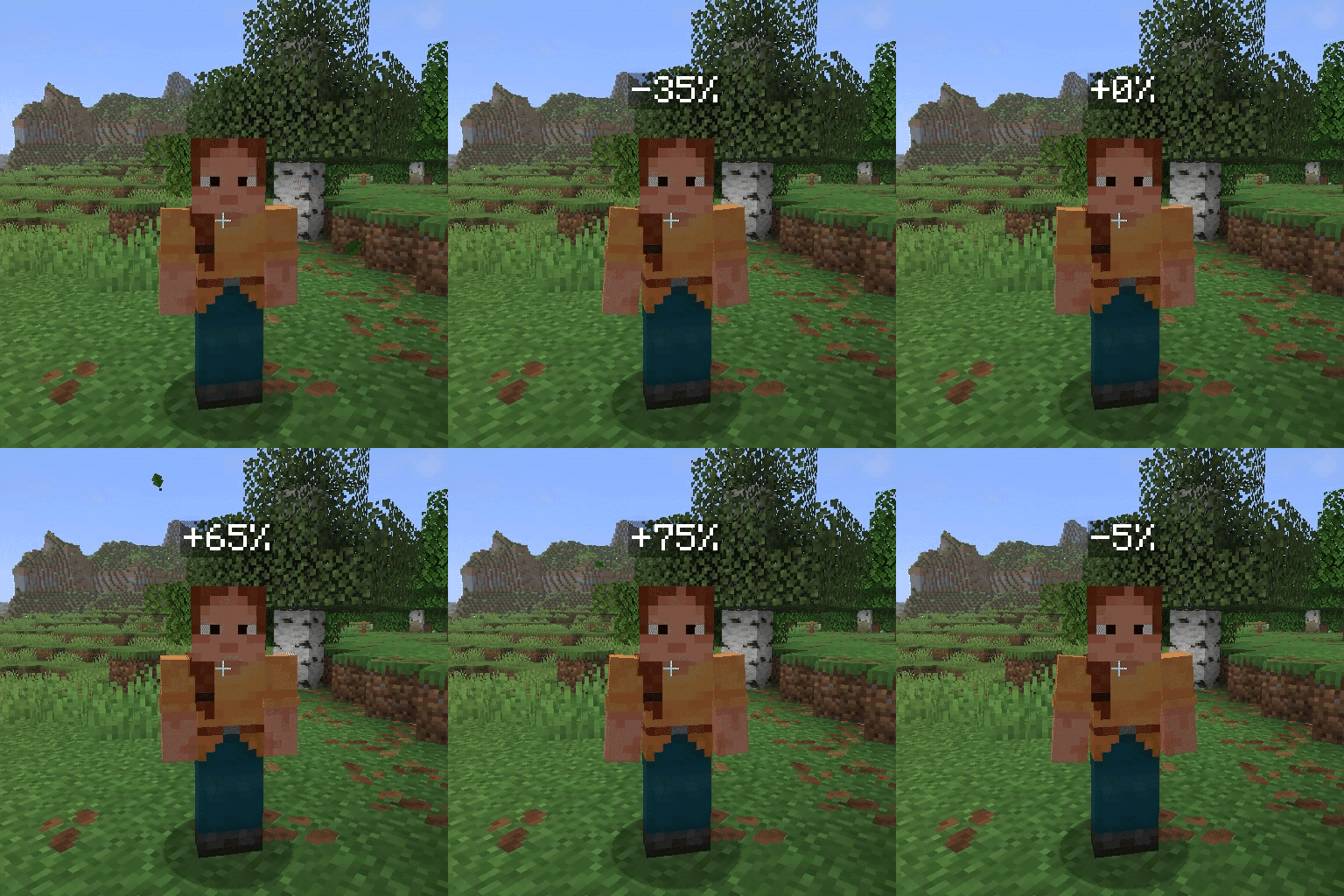
Below the default 100% volume, each scroll step changes the volume by 5 percentage points. At or above 100%, each step changes it by 10 percentage points.
The displayed value shows the difference from the default volume:
0%— default 100% volume+100%— 200% volume-100%— muted
Compatibility
| Minecraft | Fabric | Forge | NeoForge | Java |
|---|---|---|---|---|
| 26.2 | ✅ | ✅ | ✅ | 25+ |
| 26.1, 26.1.1, 26.1.2 | ✅ | ✅ | ✅ | 25+ |
| 1.21.11 | ✅ | ✅ | ✅ | 21+ |
| 1.21.10 | ✅ | ❌ | ❌ | 21+ |
| 1.21.1, 1.21.3–1.21.9 | ✅ | ✅ | ✅ | 21+ |
| 1.21.2 | ✅ | ❌ | ✅ | 21+ |
Every installation requires Simple Voice Chat and the matching mod loader. Fabric installations also require Fabric API.
Forge is not available for Minecraft 1.21.2. Forge and NeoForge builds are not available for Minecraft 1.21.10.
Installation
- Install Fabric, Forge, or NeoForge for your Minecraft version.
- Install Fabric API if you are using Fabric.
- Install Simple Voice Chat for the same Minecraft version and mod loader.
- Download the matching Simple Voice Chat Scroll JAR.
- Place the JAR inside the Minecraft
modsfolder. - Start the game.
Simple Voice Chat Scroll only needs to be installed on the client. Servers do not need to install it.
Requirements
- A supported Minecraft version
- Java 21 or newer for Minecraft 1.21.x
- Java 25 or newer for Minecraft 26.x
- Fabric, Forge, or NeoForge
- Fabric API when using Fabric
- Simple Voice Chat
Usage Notes
Simple Voice Chat Scroll can only adjust players detected by Simple Voice Chat. The selected volume is stored using the existing Simple Voice Chat player-volume configuration.
The temporary indicator appears above the targeted player for approximately three seconds and can be displayed within 64 blocks.
Hidden or disabled player name tags do not disable the volume indicator.
Make sure the Minecraft version and mod loader in the downloaded filename match your installation:
SimpleVoiceChatScroll-0.0.1+mc26.2-fabric.jarSimpleVoiceChatScroll-0.0.1+mc26.2-forge.jarSimpleVoiceChatScroll-0.0.1+mc26.2-neoforge.jar
Support and Issues
If you discover a bug or have a suggestion, create an issue in the Simple Voice Chat Scroll GitHub repository.
Please include:
- Simple Voice Chat Scroll version
- Minecraft version
- Mod loader and version
- Simple Voice Chat version
- Steps required to reproduce the problem
- Relevant logs or screenshots
- Edition: Minecraft Java
- File type: .jar
- Minecraft version listed: 26.2
- How to install: Install the matching mod loader (Forge, Fabric or NeoForge) for your Minecraft version. → Download the .jar. → Put it in the .minecraft/mods folder and launch that loader profile.
- Where to get it: Opens on Modrinth — not every file is mirrored on our own servers.
Install steps are the general flow for this file type — How to install Minecraft Java mods & modpacks walks through it step by step.
- Ships as SimpleVoiceChatScroll-0.0.2+mc26.2-universal.jar — drop this file into the mods folder
- Download size: 32 KB
- Download link checked 16 Sept 2026 — working
These come from our own check of the pack file, not from the source page.