
MapMaster
Java mod listed for Minecraft 26.x. Downloads from the MC Java Mods app on Android.
Create massive, seamless map walls with ease. MapMaster automatically generates, expands and repairs connected map atlases while preserving map IDs and…
⬇ Download on Modrinth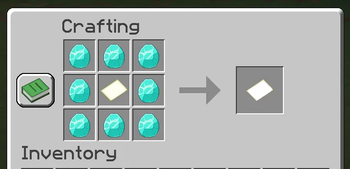
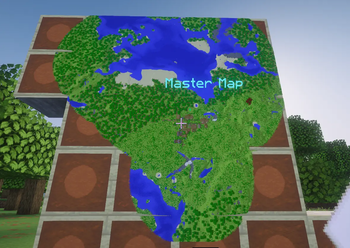
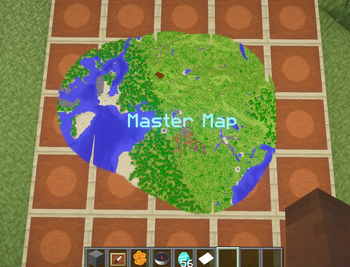
MapMaster offers a seemingly simple yet surprisingly complex addition to Minecraft, enriching a common feature found in many worlds: map walls.
MapMaster allows for completely automatic and seamless updating, expansion and rotation of your map walls.
List of Features
- Wall and floor atlas support
- Automatic atlas creation
- Automatic expansion
- Automatic repair
- Four rotation directions
- Compass-controlled rotation
- Honeycomb rotation locking
- Multiple independent atlases
- Only the Master Map drops when broken
- Overworld and End support
- No dependencies
- No known compatibility conflicts
Config Guide
- Configurable floor support — Default: Enabled
- Configurable End support — Default: Enabled
- Configurable maximum atlas size — Default: Unlimited
- Configurable Compass rotation — Default: Enabled
Personal Note
Created as a side project to fulfil a personal desire. Showing your love and support for this mod will help guarantee its continued development, expansion and public availability.
- Edition: Minecraft Java
- File type: .jar
- Minecraft version listed: 26.2
- How to install: Install the matching mod loader (Forge, Fabric or NeoForge) for your Minecraft version. → Download the .jar. → Put it in the .minecraft/mods folder and launch that loader profile.
- Where to get it: Opens on Modrinth — not every file is mirrored on our own servers.
Install steps are the general flow for this file type — How to install Minecraft Java mods & modpacks walks through it step by step.
- Ships as Mapmaster-3.5.jar — drop this file into the mods folder
- Download size: 49 KB
- Download link checked 6 Oct 2026 — working
These come from our own check of the pack file, not from the source page.