
login for 1.21.1
This project addresses the issue in version 1.21.1 of Neoforge where the mod cannot log in to the server offline.
⬇ Download on Modrinth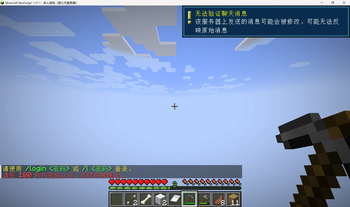
Login For Minecraft
Minecraft 1.21.1 · NeoForge · Server-side only · No client installation required
Login For Minecraft is a lightweight, server-side authentication mod that provides account registration, secure login, session protection, location restoration, and player teleport requests.
It is designed for server owners who want a self-hosted authentication system without relying on external login plugins. Players do not need to install anything on their clients.
Features at a Glance
- 🔐 Complete registration and login system
- 📍 Automatic restoration of each player's last location
- 🧭 Dimension, coordinates, and rotation are preserved
- 📨 Built-in
/tpaand/tpahererequest system - 🛡️ Movement and interaction restrictions before login
- ⚙️ Configurable timeouts, attempt limits, and waiting locations
- 🖥️ Fully server-side with no client-side dependencies
Account Authentication
Login For Minecraft provides all essential account-management commands.
| Command | Description |
|---|---|
/register <password> <confirmPassword> |
Register a new account |
/login <password> |
Log in to an existing account |
/l <password> |
Short alias for /login |
/logout |
Log out and preserve the current location |
/changePassword <oldPassword> <newPassword> |
Change the account password |
/unregister <password> |
Permanently unregister the account |
/account |
View personal account information |
Security Features
- Passwords are stored as salted SHA-256 hashes, never as plaintext
- Configurable login timeout with automatic disconnection
- Configurable maximum number of failed login attempts
- Unauthenticated players can only use
/loginand/register - Block, entity, inventory, and item interactions are disabled before login
- Temporary restrictions are cleared automatically after successful authentication
Smart Location Restoration
Login For Minecraft remembers where each player left the server and restores that position after their next successful login.
First Login
Players logging in for the first time are teleported to the default spawn point in the Overworld.
Returning Players
Returning players are teleported to their last saved location, including:
- Dimension
- X, Y, and Z coordinates
- Yaw
- Pitch
Player locations are saved when:
- The player disconnects
- The player uses
/logout - The server shuts down
If a previously saved dimension no longer exists, the player is safely returned to the default spawn point.
Player Teleport Requests
The built-in TPA system allows players to request teleportation without requiring a separate utility mod.
| Command | Description |
|---|---|
/tpa <player> |
Request to teleport to another player |
/tpahere <player> |
Request that another player teleport to you |
/tpaccept [player] |
Accept a request, optionally from a specific player |
/tpdeny [player] |
Deny a teleport request |
/tpacancel |
Cancel all teleport requests you have sent |
TPA Behavior
- Teleportation only occurs after the receiving player accepts
- Requests expire automatically after a configurable period
- The default request lifetime is 60 seconds
- Multiple incoming requests can be handled simultaneously
- Players can accept or deny a request from a specific sender
Protection and Anti-Exploit Measures
Before authentication, players are placed in a restricted state:
- Movement is locked at the configured waiting location
- Players are invulnerable while waiting
- Block breaking and placement are disabled
- Entity interaction is disabled
- Inventory and item interaction is disabled
- Commands other than registration and login are blocked
These restrictions help prevent unauthenticated players from affecting the world or being used for mob-farm and environmental exploits.
All temporary player states are correctly restored after login or logout.
Configuration
The configuration file is generated automatically at:
config/loginforminecraft-common.toml
# === Login Waiting Location ===

# true:
# Use a dedicated login dimension where unauthenticated players
# remain suspended in a void-like area and cannot interact.
#
# false:
# Use the configured dimension and coordinates below.
spawn.useLoginDimension = true

spawn.dimension = "minecraft:overworld"
spawn.x = 0.0
spawn.y = 500.0
spawn.z = 0.0
spawn.yaw = 0.0
spawn.pitch = 0.0


# === Authentication Settings ===

# Login timeout in seconds.
# Set to 0 to disable the timeout.
auth.loginTimeoutSeconds = 180

# Maximum number of failed password attempts.
auth.maxLoginAttempts = 5

# Players who must always use offline authentication.
auth.forcedOfflinePlayers = []


# === TPA Settings ===

# Enable or disable the TPA system.
tpa.enabled = true

# Teleport request lifetime in seconds.
tpa.requestTimeoutSeconds = 60
Compatibility
| Requirement | Details |
|---|---|
| Minecraft | 1.21.1 |
| Mod loader | NeoForge |
| Environment | Dedicated server |
| Client installation | Not required |
| Additional dependencies | None |
Installation
- Install a NeoForge server for Minecraft 1.21.1.
- Download the Login For Minecraft JAR file.
- Place the JAR file in the server's
modsdirectory. - Start the server.
- Edit
config/loginforminecraft-common.tomlif customization is needed. - Restart the server after changing the configuration.
When players join, they will automatically receive a registration or login prompt.
[!IMPORTANT] This mod only needs to be installed on the server. Players can connect using an unmodified Minecraft client.
Updating
Before installing a new version:
- Stop the server.
- Back up the server world, account data, and configuration.
- Replace the existing mod JAR.
- Start the server and review the console for migration or configuration messages.
Support
When reporting an issue, include:
- Minecraft version
- NeoForge version
- Mod version
- Relevant server logs
- Steps required to reproduce the problem
Never include passwords, account credentials, or other sensitive information in bug reports.
- Ships as login_for_minecraft-1.0.0.jar — drop this file into the mods folder
- Download size: 57 KB
- Download link checked 5 Aug 2026 — working
These come from our own check of the pack file, not from the source page.