MoxChestShop
MoxChestShop — Simple & Intuitive Sign-Based Shops. MoxChestShop is a lightweight, high-performance Minecraft plugin that allows players and…
⬇ Download on Modrinth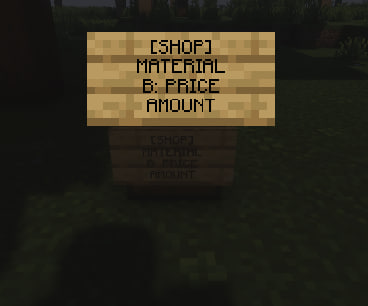
MoxChestShop — Simple & Intuitive Sign-Based Shops.
MoxChestShop is a lightweight, high-performance Minecraft plugin that allows players and administrators to create physical shops using just a chest and a sign. Inspired by classic shop systems, it offers a seamless trading experience with a straightforward setup.
Features
- Classic Sign Setup: Create a shop in seconds by placing a sign over or on a chest.
- Buy and Sell Support: Easily configure shops for players to buy items, sell items, or both.
- Lightweight & Lag-Free: Optimized codebase ensuring zero impact on your server's performance.
- Economy Compatibility: Integrates seamlessly with popular economy providers via Vault.
How to Create a Shop? To set up a shop, place a sign near a chest and fill in the lines as follows:
- Line 1: [SHOP] (or your server's designated shop tag)
- Line 2: MATERIAL (The ID or name of the item you want to trade)
- Line 3: B: PRICE (The price players pay to buy the item, e.g., B: 100)
- Line 4: AMOUNT (The quantity of items traded per transaction)
- Edition: Minecraft Java
- File type: .jar
- Minecraft version listed: 1.21.4
- How to install: Install the matching mod loader (Forge, Fabric or NeoForge) for your Minecraft version. → Download the .jar. → Put it in the .minecraft/mods folder and launch that loader profile.
- Where to get it: Opens on Modrinth — not every file is mirrored on our own servers.
Install steps are the general flow for this file type — How to install Minecraft Java mods & modpacks walks through it step by step.
- Ships as MoxChestShop-1.0.jar — drop this file into the mods folder
- Download size: 23 KB
- Download link checked 17 Sept 2026 — working
These come from our own check of the pack file, not from the source page.