
ModsJava
ConsoleNamer
Java mod listed for Minecraft 1.16–1.21. Downloads from the MC Java Mods app on Android.
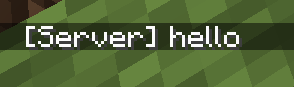
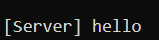
Customize the console's display name for the /say command — instead of always showing [Server], set any name you want.
⬇ Download on ModrinthBEFORE
AFTER

BEFORE
AFTER
 With ConsoleNamer, you can change this to any name you like, for example:
Features
- 🏷️ Custom console name — replace the default
[Server]with a name of your choosing. - 🎨 Custom format — customize the entire message layout with color codes (
&), not just the name. - ⚙️ Management command
/consolenamer(aliases:/cn,/consolename) with sub-commands:set— change the console namesetprefix— change the prefix formatreload— reload the config without restarting the serverinfo— view the current configuration
- 🔊 Overrides the /say command — enable or disable overriding vanilla's
/say. - 👤 Keep player names on /say — option to apply the custom name only to console messages, leaving player-issued
/saymessages unaffected. - 🔌 PlaceholderAPI support (soft-dependency, not required).
- 🔐 Clear permission system with
consolenamer.adminandconsolenamer.say.
Example Config
console:
  name: "AQUASURVIVAL"
  format: "&8[&6%name%&8] &f%message%"

override-say: true
keep-player-name-on-say: true
Permissions
| Permission | Description | Default |
|---|---|---|
consolenamer.admin |
Allows editing the console name | op |
consolenamer.say |
Allows using the /say command |
op |
Compatibility
- API version: 1.16+
- Soft-depend: PlaceholderAPI (optional, not required)
A lightweight, easy-to-configure plugin for servers that want to personalize console announcements without any complicated setup.
Quick facts
- Edition: Minecraft Java
- File type: .jar
- Minecraft versions listed: 1.16, 1.16.1, 1.16.2
- How to install: Install the matching mod loader (Forge, Fabric or NeoForge) for your Minecraft version. → Download the .jar. → Put it in the .minecraft/mods folder and launch that loader profile.
- Where to get it: Opens on Modrinth — not every file is mirrored on our own servers.
Install steps are the general flow for this file type — How to install Minecraft Java mods & modpacks walks through it step by step.
File checked by MCModsHub
- Ships as consolenamer-legacy-1.0.0.jar — drop this file into the mods folder
- Download size: 11 KB
- Download link checked 7 Oct 2026 — working
These come from our own check of the pack file, not from the source page.