
Zi's Music Player
Java mod listed for Minecraft 1.21. Downloads from the MC Java Mods app on Android.
⬇ Download on Modrinth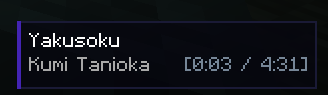

🎵 Zi's Music Player (ZMP)
Zi's Music Player is a modern, fully-featured in-game music player for Minecraft built using Fabric and ImGui. Take full control of Minecraft's soundtrack without ever minimizing the game!
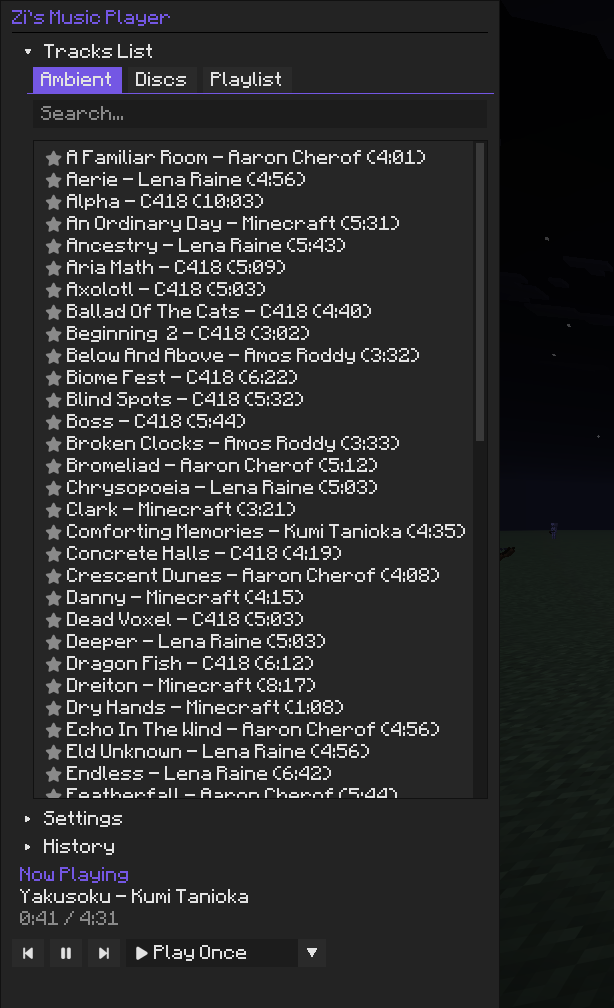
Whether you want to curate a playlist of your favorite Music Discs, skip an ambient track you don't like, or just want to see the name of the song currently playing, ZMP has you covered with an elegant, Spotify-like interface.
✨ Key Features
- 🎛️ Modern UI: An intuitive ImGui-powered overlay to manage all your music. Just press the keybind (default:
M) to open it instantly! - 📚 Library Management: Browse through Vanilla Ambient tracks and Music Discs.
- ⭐ Custom Playlists: Click the star icon next to any song to add it to your personal playlist.
- ⏯️ Playback Controls: Full control over your music! Play, pause, skip forward/backward, shuffle, and set tracks to repeat.
- 📺 HUD Overlay: A beautiful "Now Playing" HUD overlay in the bottom right corner showing the track name, artist, and live playback progress.
- 🍞 Toast Notifications: Modern slide-in toast alerts pop up dynamically whenever a new track starts.
- ⚙️ Seamless Integration: Adjust the music volume right from the player—it syncs directly with Minecraft's native volume settings!
🎮 Controls & Settings
- Open Player: Press
M(configurable in the standard Controls menu). - Settings Menu: Inside the player, you can toggle the HUD overlay and disable/enable vanilla music delays.
🛠️ Dependencies
This mod requires the following to be installed:
🐛 Issues & Source
Found a bug or have a suggestion? Feel free to check out the GitHub Repository and open an issue!
- Edition: Minecraft Java
- File type: .jar
- Minecraft version listed: 1.21.11
- How to install: Install the matching mod loader (Forge, Fabric or NeoForge) for your Minecraft version. → Download the .jar. → Put it in the .minecraft/mods folder and launch that loader profile.
- Where to get it: Opens on Modrinth — not every file is mirrored on our own servers.
Install steps are the general flow for this file type — How to install Minecraft Java mods & modpacks walks through it step by step.
- Ships as zmp-1.0.0-1.21.11.jar — drop this file into the mods folder
- Download size: 7.3 MB
- Download link checked 8 Oct 2026 — working
These come from our own check of the pack file, not from the source page.