
AposaBackup
A Fabric mod for automated Minecraft world backups with local storage and S3 API(e.g. Cloudflare R2) cloud backup support. Works on both dedicated servers…
⬇ Download on Modrinth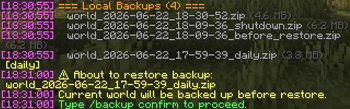
AposaBackup
A Fabric mod for automated Minecraft world backups with local storage and S3 API(e.g. Cloudflare R2) cloud backup support. Works on both dedicated servers and single-player worlds.
Features
- Scheduled Automatic Backups — Configurable interval (default: 60 min)
- Manual Backups —
/backup createwith optional comments - Shutdown Backups — Automatic backup when server stops
- Local Backup — Full ZIP archives with rotation policy (recent N + daily snapshots)
- Cloud Backup — Differential upload to Cloudflare R2 via S3 API with content-addressable deduplication
- Restore — Two-step restore with confirmation, auto-backup before restore
- Download — Export cloud backup as local ZIP
- In-game Notifications — Action bar messages for backup status
- Hot Configuration — All settings changeable via commands, no restart required
Installation
- Download the mod JAR from releases
- Place it in your server's or client's
mods/directory - Start the server — default config will be generated at
config/aposabackup.json
Quick Start
# Create a manual backup
/backup create

# Create a backup with comment
/backup create before big build

# List local backups
/backup list

# Check backup system status
/backup status
Commands
All commands require OP level 3 (admin) permission.
| Command | Description |
|---|---|
/backup create [comment] |
Create a local backup |
/backup cloud |
Create a cloud backup (differential upload) |
/backup list [local|cloud] |
List backups |
/backup restore <id> |
Prepare restore (requires confirmation) |
/backup confirm |
Confirm and execute restore |
/backup download <id> |
Download cloud backup as local ZIP |
/backup delete <id> [local|cloud] |
Delete a backup |
/backup info <id> |
Show backup details |
/backup status |
Show system status |
/backup interval <min> |
Set backup interval |
/backup config <key> <value> |
Change configuration |
/backup config show |
Show current configuration |
/backup config reload |
Reload from file |
See github/docs/COMMANDS.md for full command reference.
Configuration
The config file is at config/aposabackup.json. All options can also be changed via /backup config.
{
  "version": 1,
  "local": {
    "enabled": true,
    "backupDir": "./backups",
    "format": "ZIP",
    "compressionLevel": 6,
    "intervalMinutes": 60,
    "recentBackups": 10,
    "dailyKeepDays": 7,
    "shutdownBackup": true,
    "excludePatterns": ["session.lock", "*.tmp"]
  },
  "cloud": {
    "enabled": false,
    "maxBackups": 30,
    "dailyKeepDays": 7,
    "uploadTimeoutSeconds": 300,
    "retryCount": 3,
    "r2": {
      "accountId": "",
      "accessKeyId": "",
      "secretAccessKey": "",
      "bucketName": "mc-server-backups",
      "region": "auto",
      "pathPrefix": "my-server/",
      "customEndpoint": ""
    }
  },
  "notification": {
    "enabled": true,
    "style": "ACTION_BAR"
  }
}
See github/docs/CONFIGURATION.md for detailed configuration reference.
Cloud Backup (e.g. Cloudflare R2)
AposaBackup supports differential cloud backups using Cloudflare R2's S3-compatible API.
How it works:
- Only changed
.mcaregion files are uploaded (SHA-256 content addressing) - Files are gzip-compressed and stored as content-addressed chunks
- Each backup creates a manifest referencing the chunks
- Unreferenced chunks are garbage-collected when old manifests are deleted
Setup: See github/docs/CLOUD_SETUP.md for step-by-step instructions.
Backup Rotation Policy
Local Backups
- Recent backups: Keeps the last N backups (default: 10)
- Daily snapshots: Automatically preserves the last backup of each day for N days (default: 7)
Cloud Backups
- Manifest retention: Keeps the last N manifests (default: 30)
- Daily snapshots: Preserves daily manifests for N days (default: 7)
- Garbage collection: Deletes unreferenced chunks after manifest cleanup
Restore Flow
/backup restore world_2026-06-22_14-00-00.zip
→ "About to restore backup. Current world will be backed up first."

/backup confirm
→ Creates pre-restore backup → Saves pending restore → Stops server

[Server restarts]
→ Detects pending restore → Decompresses backup → World restored
- Edition: Minecraft Java
- File type: .jar
- Minecraft version listed: 26.2
- How to install: Install the matching mod loader (Forge, Fabric or NeoForge) for your Minecraft version. → Download the .jar. → Put it in the .minecraft/mods folder and launch that loader profile.
- Where to get it: Opens on Modrinth — not every file is mirrored on our own servers.
Install steps are the general flow for this file type — How to install Minecraft Java mods & modpacks walks through it step by step.
- Ships as AposaBackup-26.2-1.0.0.jar — drop this file into the mods folder
- Download size: 4.0 MB
- Download link checked 18 Sept 2026 — working
These come from our own check of the pack file, not from the source page.