
ModsJava
WebScreen
Renders a real Chromium web browser on a screen block inside Minecraft — click links, type, scroll, build multi-block screens, and browse together in…
⬇ Download on Modrinth
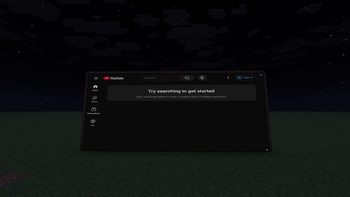
WebScreen
A real web browser on a block, right inside Minecraft. WebScreen renders a full Chromium browser onto a screen block — you can click links, type, scroll, and browse actual websites in-game.
Features
- Real browser — powered by Chromium (JCEF), not a fake mockup.
- Full interaction — click links, type on the keyboard, scroll, zoom (Ctrl+scroll), and an address bar with search.
- Remote control — right-click the screen with the Remote item to open the browser menu.
- Multi-block screens — place screens in a grid to build one big seamless wall.
- Per-screen audio — volume and falloff radius sliders; sound fades with distance from the block.
- Multiplayer — browse together. Navigation and input sync between players, and audio settings are shared.
How to use
- Craft or
/give @s webscreen:web_screenand/give @s webscreen:web_remote. - Place the screen block facing you.
- Right-click it with the Remote to open the browser, type a URL, press Enter.
Requirements
- Minecraft 26.2, Fabric loader, Fabric API, Java 25.
- On first launch the mod downloads the Chromium engine (~200 MB) automatically — give it a minute the first time.
Notes
- Each player runs their own browser instance; pages sync by URL and input, not by pixels, so live/dynamic content may differ slightly between players.
Quick facts
- Edition: Minecraft Java
- File type: .jar
- Minecraft version listed: 26.2
- How to install: Install the matching mod loader (Forge, Fabric or NeoForge) for your Minecraft version. → Download the .jar. → Put it in the .minecraft/mods folder and launch that loader profile.
- Where to get it: Opens on Modrinth — not every file is mirrored on our own servers.
Install steps are the general flow for this file type — How to install Minecraft Java mods & modpacks walks through it step by step.
Verified by MCModsHub
- Ships as webscreen-1.0.9.jar — drop this file into the mods folder
- Download size: 5.5 MB
- Download link checked 18 Sept 2026 — working
These come from our own check of the pack file, not from the source page.