
Quick Stack Nearby
Java mod listed for Minecraft 26.x. Downloads from the MC Java Mods app on Android.
I don't know my version or loader
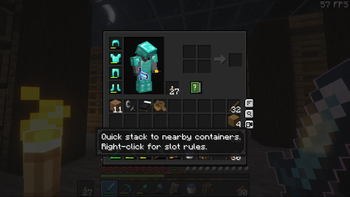

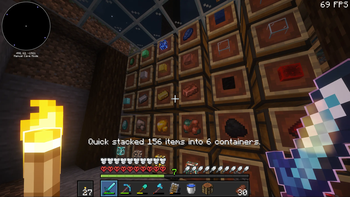
Quick Stack Nearby brings Terraria-style quick stacking to Minecraft. The goal is simple: press one inventory button and send matching items from your inventory into nearby containers that already hold those items.
What 0.4.0 Does
- Adds a quick-stack button to the player inventory.
- Adds a
B-by-default quick-stack keybind that can be held while moving around the world, and ignores the key while any UI screen is open. - Moves matching main-inventory stacks into nearby containers that already hold those item types.
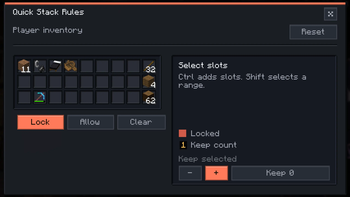
- Lets players right-click the button to lock main-inventory slots or keep a chosen count behind while quick stacking.
- Fixes right-clicking the quick-stack button so the slot rules screen opens correctly before inventory slot handling can consume the click.
- Adds server-operator commands for inspecting, changing, and reloading the nearby-container scan range.
- Keeps item movement server-authoritative for multiplayer.
- Uses the Inv+ button-slot API when an Inventory Mods companion is installed.
- Falls back to a local InventorySort-style button placement when Inv+ is not installed.
Install Note
Multiplayer quick stacking requires Quick Stack Nearby on both the server and client. If the client is installed without the server mod, the button shows a clear unavailable message instead of moving items.
Offline singleplayer works from a client install because the integrated server runs the common mod logic in the same process.
Version 0.4.0 supports Minecraft 1.20 through 26.3-snapshot-1, including Minecraft 26.2 final. Hotbar, armor, offhand, and carried shulker contents are intentionally left alone in this release. More UI improvements are planned as the quick-stack button and rules screen continue to mature.
Fabric API is required.
- Edition: Minecraft Java
- File type: .jar
- Minecraft versions listed: 26.1, 26.1.1, 26.1.2
- How to install: Install the matching mod loader (Forge, Fabric or NeoForge) for your Minecraft version. → Download the .jar. → Put it in the .minecraft/mods folder and launch that loader profile.
- Where to get it: Opens on Modrinth — not every file is mirrored on our own servers.
Install steps are the general flow for this file type — How to install Minecraft Java mods & modpacks walks through it step by step.
- Ships as quick-stack-nearby-0.4.0.jar — drop this file into the mods folder
- Download size: 156 KB
- Download link checked 18 Sept 2026 — working
These come from our own check of the pack file, not from the source page.