
Event Manager | Ultimate Event Host Tool
Host Minecraft Bedrock events with ease using Event Manager. Manage players, teams, arenas, teleports, recoveries, and more through one simple and…
⬇ Download on CurseForge
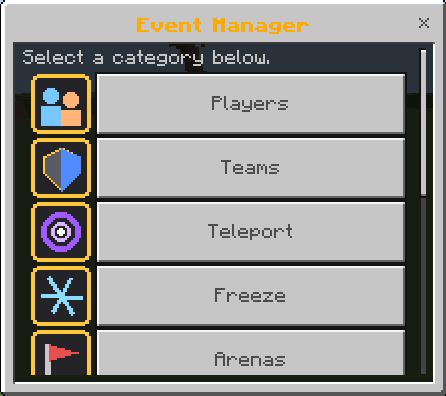
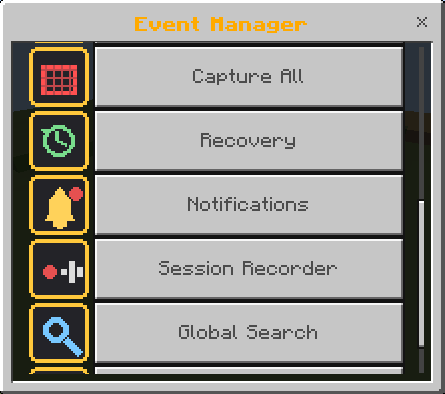
Event Manager is an all-in-one Minecraft Bedrock add-on built for event hosts, SMP admins, and server staff.
Manage players, create teams, organize arenas, teleport players, recover mistakes, and control your entire event from one easy-to-use interface.
⭐ Features
👥 Player Manager
✅ Freeze & Unfreeze Players
✅ Bring & Teleport Players
✅ Heal, Feed & Kill
✅ Change Game Modes
✅ Tag & Untag Players
🛡️ Team Manager
✅ Unlimited Teams
✅ Team Colors
✅ Friendly Fire Toggle
📍 Teleport Manager
✅ Safe Random Teleport
✅ Circle, Line, Grid & Spiral Formations
✅ Mass Teleport
🌍 Arena Manager
✅ Unlimited Arenas
✅ Lobby, Arena & Spectator Spawns
✅ One-Click Arena Loading
📦 More Features
✅ Capture All
✅ History & Undo
✅ Recovery System
✅ Session Recorder
✅ Global Search
✅ Smart Notifications
✅ Confirmation System
✅ Performance Settings
🎯 Perfect For
✅ PvP Events
✅ Tournaments
✅ Lifesteal SMP
✅ Survival SMP
✅ Mini Games
✅ Community Events
📥 How to Use
-
Install the add-on.
-
Enable it in your world.
-
Join as an Operator.
-
Run:
/function event/get_host_tool
-
Use the Event Manager tool to open the GUI.
Make sure to turn on Beta API & Cheats -

🧾 Additional Information
✔ Minecraft Bedrock 1.21+
✔ Multiplayer Compatible
✔ GUI Based
✔ Lightweight & Optimized
❤️ Credits
Created by Ash Blast
Version: v1.4.0
⚠️ Copyright Notice
This add-on was created by Ash Blast. Please do not redistribute or use it in your own projects without permission. Proper credit is required.
- Edition: Minecraft Bedrock
- File type: .mcpack or .mcaddon
- Minecraft versions listed: 26.10, 26.11, 26.12
- How to install: Download the .mcpack or .mcaddon file. → Open it — Minecraft imports it. → In your world: Behavior Packs → Available → Activate, then the same under Resource Packs.
- Where to get it: Opens on CurseForge — not every file is mirrored on our own servers.
Install steps are the general flow for this file type — How to install Minecraft Bedrock addons & mods walks through it step by step.
- Pack type: .mcaddon — behaviour and resource pack in one file
- Manifest requires Minecraft 1.21.0 or newer
- Complete pack — everything it depends on is inside the file
- Download size: 53 KB
- Download link checked 18 Sept 2026 — working
These come from our own check of the pack file, not from the source page.