
PulseAI
Java mod listed for Minecraft 26.x. Downloads from the MC Java Mods app on Android.
⬇ Download on Modrinth
Pulse AI ⚡
A powerful AI assistant living inside your Minecraft HUD.
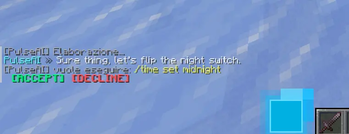
Pulse AI is a client-side Fabric mod that brings a real AI directly into Minecraft. Powered by Namotron 3 Super 120B A12B through OpenRouter, it appears as a futuristic glowing companion beside your hotbar, understands your current game context, executes supported in-game commands, and chats with you naturally.
✨ Features
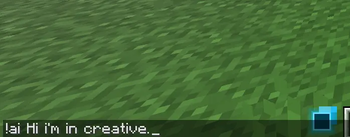
- 💬 Chat with your AI — use
!ai <message>to start a conversation. - 🧠 Context-aware — Pulse AI knows your inventory, biome, coordinates, dimension, game mode, and whether you're playing in singleplayer or multiplayer.
- ⚡ Execute commands — the AI can perform supported Minecraft commands for you when appropriate.
- 🗂️ Session memory — remembers your conversation until you leave the world.
- 🌍 Multilingual — automatically replies in the language you use.
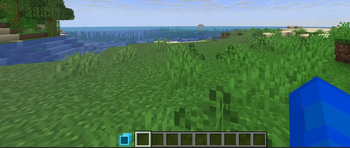
- 🟦 Futuristic HUD companion — a glowing blue AI cube sits beside your hotbar and animates while thinking and responding.
- 🚀 Powered by a large language model — responses are generated using Namotron 3 Super 120B A12B via OpenRouter.
🔑 Setting up your API Key
Pulse AI requires a free OpenRouter API Key.
Get your API Key
- Create an account on OpenRouter.
- Generate an API key from your dashboard.
- Copy your API key.
Add it to the mod
- Launch Minecraft with Pulse AI installed.
- Join any world once, then exit.
- Open:
.minecraft/config/pulseai.json
- Replace:
{
  "apiKey": "YOUR_API_KEY_HERE"
}
- Save the file and launch Minecraft again.
⚠️ API Usage
Pulse AI uses OpenRouter to access the Namotron 3 Super 120B A12B language model.
Every !ai request consumes tokens from your OpenRouter account.
The mod uses namotron-3-super-120b:free, which is currently available through OpenRouter's free tier. At the time of writing, it costs $0 for both input and output tokens. Availability and pricing may change in the future.
🛠️ Requirements
- Minecraft 26.1.2
- Fabric Loader 0.18.4+
- Fabric API 0.149.1+26.1.2
- An OpenRouter API Key
🔒 Privacy
Your API key is stored locally in:
.minecraft/config/pulseai.json
It is never shared except when authenticating requests to OpenRouter.
To generate responses, Pulse AI sends the following information to the AI model:
- Your message
- Inventory contents
- Player position
- Biome
- Dimension
- Game mode
- Player name
- Other gameplay context required for AI features
No additional data is collected by the mod.
License
This project is licensed under All Rights Reserved (ARR).
You may:
- Download and use the mod for personal use.
- Include it in gameplay videos and livestreams.
You may NOT:
- Redistribute the mod.
- Reupload it to other websites.
- Modify and distribute modified versions.
- Use the source code or assets in other projects without my written permission.
© Fabio. All Rights Reserved.
Disclaimer
NOT AN OFFICIAL MINECRAFT PRODUCT. NOT APPROVED BY OR ASSOCIATED WITH MOJANG OR MICROSOFT.
- Edition: Minecraft Java
- File type: .jar
- Minecraft version listed: 26.1.2
- How to install: Install the matching mod loader (Forge, Fabric or NeoForge) for your Minecraft version. → Download the .jar. → Put it in the .minecraft/mods folder and launch that loader profile.
- Where to get it: Opens on Modrinth — not every file is mirrored on our own servers.
Install steps are the general flow for this file type — How to install Minecraft Java mods & modpacks walks through it step by step.
- Ships as PulseAI-1.0.jar — drop this file into the mods folder
- Download size: 1.1 MB
- Download link checked 9 Oct 2026 — working
These come from our own check of the pack file, not from the source page.