HomeJavaModsUpdate Beacon
Update Beacon
ModsJava

Update Beacon

Automatically checks for and updates your servers mods - highly configurable

Which build do you need?

This mod ships a separate file for every mod loader and every version of the game. Pick both, then download — the wrong build installs fine and then does nothing in the game.

Mod loader

Minecraft version

⬇ Download for 26.1.1–26.1.2 · Fabric⬇ Download for 1.21.5–1.21.11 · Fabric⬇ Download for 1.21.1 · Fabric⬇ Download for 1.20.1 · Fabric⬇ Download for 26.1.1–26.1.2 · NeoForge⬇ Download for 1.21.5–1.21.11 · NeoForge⬇ Download for 1.21.1 · NeoForge
I don't know my version or loader
Open the Minecraft launcher and look at the profile you play on — it names both, like fabric-loader-1.21.4. The version also shows in the bottom-right corner of the game's main menu.
No loader in the profile name? Then it's plain Minecraft, and these mods won't run — you need Fabric or NeoForge installed first.
Update Beacon — screenshot 1Update Beacon — screenshot 2Update Beacon — screenshot 3Update Beacon — screenshot 4

UpdateBeacon

Discord CurseForge Modrinth

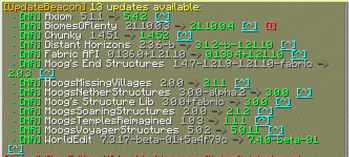
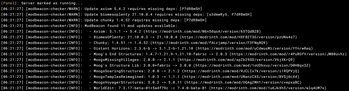
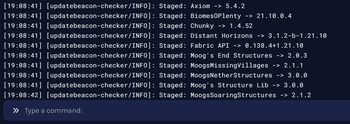
A server-side Minecraft mod that automatically checks for updates to your installed mods on Modrinth and CurseForge, then notifies your operators — and can download and apply the updates for you. No client installation required.


Features

Update detection

Notifications

Downloads & applying

Maintenance


Commands

All commands are under /updatebeacon and require permission level 2 (op).

Command Description
/updatebeacon check Run a fresh update check and display results
/updatebeacon list Show cached results from the last check
/updatebeacon info <modid> Detailed info, channel, and a direct download link for one mod
/updatebeacon scan Integrity scan — verify installed jars against published hashes
/updatebeacon download Download all pending updates to the staging area
/updatebeacon staged Show what is downloaded and waiting to be applied
/updatebeacon apply [seconds] Apply staged updates now, or start a restart countdown
/updatebeacon apply cancel Cancel a running apply countdown
/updatebeacon rollback <modid> Restore a mod's previous jar from backup
/updatebeacon pin <modid> Pin a mod at its current version (suppress updates)
/updatebeacon unpin <modid> Remove a pin
/updatebeacon ignore <modid> Stop checking a mod entirely
/updatebeacon unignore <modid> Resume checking a mod
/updatebeacon channel <modid> <release|beta|alpha|any> Set a mod's update channel
/updatebeacon reload Hot-reload updatebeacon.toml without restarting

Webhooks

Add one [[webhooks]] block per target, each with its own URL and format:

[[webhooks]]
url = "https://discord.com/api/webhooks/..."
format = "discord_embed"

[[webhooks]]
url = "https://your-endpoint.com/hook"
format = "generic_json"

Supported formats:


Installation

Drop the mod jar that matches your Minecraft version and loader into your server's mods/ folder, then start the server once to generate the config.

Requirements:


Configuration

Generated at config/updatebeacon.toml on first run:

[general]
enabled = true
check_on_startup = true
check_interval_minutes = 0   # 0 = disabled; any positive value = minutes between checks

[ignore]
mod_ids = []                 # mod IDs to skip, e.g. ["mymod", "anothermod"]
quiet_when_no_updates = true # suppress all notifications when everything is up to date

[console]
enabled = true

[chat]
enabled = true
ops_only = true              # only notify server operators
permission_level = 2         # minimum permission level to receive notifications

# Add one [[webhooks]] block per target. Supported formats: discord_embed, generic_json
# [[webhooks]]
# url = ""
# format = "discord_embed"

[downloads]
auto_download = false        # automatically download updates after each check
auto_apply = false           # swap staged jars into mods/ on server stop
backup = true                # keep replaced jars in .updatebeacon/backup/
allowed_mod_ids = []         # empty = all mods eligible; non-empty = whitelist
apply_countdown_seconds = 300 # default countdown length for /updatebeacon apply

[curseforge]
# Get a free API key at https://console.curseforge.com/
api_key = ""                 # leave blank to check Modrinth only

# Per-mod update channel: "release", "beta", or "alpha"
[mod_policy]
# lithium = "beta"

# Pin a mod to prevent update notifications. Use /updatebeacon pin <modid>
[mod_pins]

Staged downloads and backups live under .updatebeacon/staged/ and .updatebeacon/backup/.


Notes

Mods are matched on Modrinth by default; CurseForge checks turn on once you set a curseforge.api_key. Mods that aren't published on either platform are silently skipped.


BH Promo

Verified by MCModsHub

These come from our own check of the pack file, not from the source page.

Explore more