![Better Mob Catcher/Capture [Achievement + Tame Friendly]](https://files.mcmodshub.com/img/curseforge/394832.png)
Better Mob Catcher/Capture [Achievement + Tame Friendly]
This addon allows you to safely capture, transport, and release ANY mob in the game using a single, easy-to-use tool. Whether you're moving your favorite…
⬇ Download on CurseForgeThe author built this one for Minecraft 26.20–26.50. On other versions it may install and then do nothing.
![Better Mob Catcher/Capture [Achievement + Tame Friendly] — screenshot 1](https://files.mcmodshub.com/img/curseforge/394832_s2915680.png)
Check my youtube video for the showcase:
↓↓↓↓↓↓↓↓
https://www.youtube.com/watch?v=NycES0YeIOk
Main Features:
Works on Everything: Catch vanilla mobs AND custom mobs from other addons!
Achievement & Tame Friendly: Capturing a tamed wolf, cat, or horse won't break their tame status. Your pets are safe!
Custom UI System: No random dropping. We have a clean UI menu so you can choose exactly which mob you want to release.
Multiplayer Compatible: Works flawlessly on Realms and servers with your friends.
🛠️ How to Use:
Crafting:
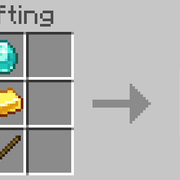
To Catch a Mob: Hold the Mob Catcher in your hand, look directly at the mob, and Right-Click (or Long-Press on mobile). Make sure you are NOT crouching! You can even give them a name to mark them.
To Release a Mob: Crouch (Sneak) and use the Mob Catcher. A UI will pop up showing the mobs you've caught. Just click the one you want to release, and they will spawn right in front of you!
Compatibility: This addon does not use player.json, so it is completely compatible with almost any other addon you have installed.
comment if u got any bug
If you showcase this add-on in a video or share it, please credit @haevafer and link back to this CurseForge page!
- Edition: Minecraft Bedrock
- File type: .mcpack or .mcaddon
- Minecraft versions listed: 26.20, 26.30, 26.40
- How to install: Download the .mcpack or .mcaddon file. → Open it — Minecraft imports it. → In your world: Behavior Packs → Available → Activate, then the same under Resource Packs.
- Where to get it: Opens on CurseForge — not every file is mirrored on our own servers.
Install steps are the general flow for this file type — How to install Minecraft Bedrock addons & mods walks through it step by step.
- Pack type: .mcaddon — behaviour and resource pack in one file
- Download size: 2.2 MB
- Download link checked 19 Sept 2026 — working
These come from our own check of the pack file, not from the source page.