
Pixture
Java mod listed for Minecraft 1.21. Downloads from the MC Java Mods app on Android.
⬇ Download on Modrinth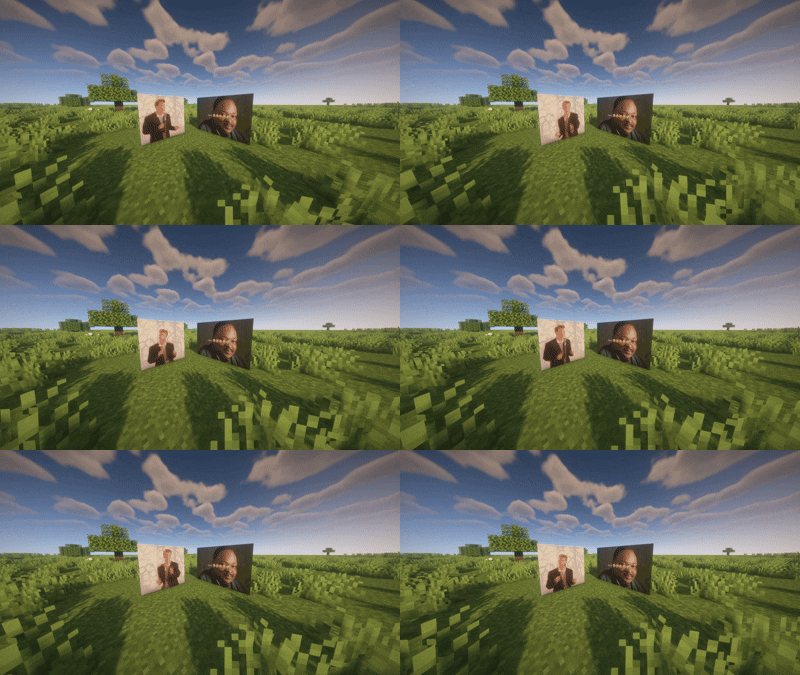
🖼️ Pixture
Turn any image or GIF into life-sized wall art, straight from a URL. Pixture lets you download an image (static or animated GIF) from any link, then automatically converts it into a grid of Minecraft maps ready to display — no need to place a single frame by hand.
✨ Features
Direct URL download — give it a name and a link, Pixture handles the rest. Resize on demand — generate the same downloaded image at 1×1, 3×2, 5×5, or any size you want, every time, without re-downloading. Animated GIF support — animations play in real time on the maps, with accurate per-frame timing. One item, whole structure — no more bundles or placing dozens of frames one by one: a single click against a wall (or floor/ceiling) instantly spawns the entire grid, already filled in and aligned. Indestructible, invisible frames — only the image is visible; frames are invulnerable to environmental damage (explosions, fire, projectiles...) and float without needing support blocks. Group destruction — a player attack on one frame cleanly destroys the whole structure at once, no leftover empty frames. Persistent — your downloaded images and animations survive server restarts.
🎮 Commands
/pixture download <name> <url>          Download and store an image or GIF
/pixture give <name> <width> <height>   Generate and give the image at the desired size
/pixture list                           List saved images
/pixture delete <name>                  Delete an image and stop its animations
📌 Notes
Fully server-side — no client-side installation needed in multiplayer. Great for display boards, decorative screens, server logos, or simple ambient animations.
- Edition: Minecraft Java
- File type: .jar
- Minecraft version listed: 1.21.11
- How to install: Install the matching mod loader (Forge, Fabric or NeoForge) for your Minecraft version. → Download the .jar. → Put it in the .minecraft/mods folder and launch that loader profile.
- Where to get it: Opens on Modrinth — not every file is mirrored on our own servers.
Install steps are the general flow for this file type — How to install Minecraft Java mods & modpacks walks through it step by step.
- Ships as pixture-1.0.0.jar — drop this file into the mods folder
- Download size: 231 KB
- Download link checked 10 Oct 2026 — working
These come from our own check of the pack file, not from the source page.