
Backpack plugin
Java mod listed for Minecraft 26.x. Downloads from the MC Java Mods app on Android.
A lightweight and powerful backpack plugin for Minecraft servers. Give your players a personal virtual backpack with customizable sizes, permissions, and…
⬇ Download on Modrinth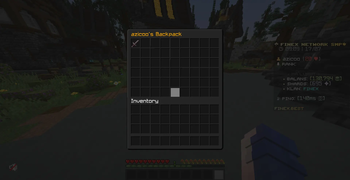
🎒 Backpack
Supported Loaders: Bukkit, Spigot, Paper, Purpur, Folia Supported Versions: 1.21.x, 26.1.x, 26.2.x (Java 21+)
🔌 Compatibility & Core Support
| Loader | Compatibility Status | Notes |
|---|---|---|
| Paper / Purpur | 🟢 100% Native | Recommended. Best performance and MiniMessage support. |
| Spigot / Bukkit | 🟢 100% Native | Fully compatible. Legacy colors and API work perfectly. |
| Folia | 🟢 100% Native | Fully supported! Uses region-based scheduling, preventing thread errors. |
✨ Features
- 6 backpack sizes — from 1 row (9 slots) up to 6 rows (54 slots)
- Permission-based sizing — the plugin automatically gives players the largest backpack they have permission for
- Death clearing — backpack items are lost on death by default (configurable with
backpack.keeppermission) - Admin tools — view and edit any player's backpack in real-time, even when they're offline
- Per-player storage — each player's backpack is stored separately for maximum performance
- Async saving — all file I/O runs off the main thread to prevent lag
- Auto-save — periodic saves to prevent item loss (configurable interval)
- MiniMessage support — full hex color, gradient, and rich text formatting in all messages
- PlaceholderAPI support — use any PAPI placeholder in the backpack title (optional)
- Sound effects — configurable open/close sounds
- Fully configurable — every message, title, sound, and interval can be changed in
config.yml - Lightweight — no dependencies required, optimized for large servers
📋 Commands
| Command | Description |
|---|---|
/backpack |
Open your backpack |
/bp |
Alias for /backpack |
/bpack |
Alias for /backpack |
/backpack reload |
Reload the plugin configuration |
/backpack <player> |
Open another player's backpack (live editing) |
/backpack give <player> <rows> |
Show info on how to grant backpack permissions |
🔐 Permissions
Player Permissions
| Permission | Description | Default |
|---|---|---|
backpack.row.1 |
1 row — 9 slots | false |
backpack.row.2 |
2 rows — 18 slots | false |
backpack.row.3 |
3 rows — 27 slots | false |
backpack.row.4 |
4 rows — 36 slots | false |
backpack.row.5 |
5 rows — 45 slots | false |
backpack.row.6 |
6 rows — 54 slots | false |
backpack.keep |
Keep backpack items on death | false |
How it works: The plugin automatically detects the highest row permission a player has.
For example, if a player has
backpack.row.1,backpack.row.2, andbackpack.row.3, their backpack will be 27 slots (3 rows).If a player has no
backpack.row.*permission, the/backpackcommand will not open and they will see a "no permission" message.
Death Behavior
By default, when a player dies, their backpack contents are cleared. To let certain players (e.g. donors, VIPs) keep their backpack items on death, grant them the backpack.keep permission.
Admin Permissions
| Permission | Description | Default |
|---|---|---|
backpack.admin |
All admin features | op |
backpack.reload |
Reload configuration files | op |
backpack.bypass |
Bypass restrictions (always gets max size) | op |
backpack.view |
View and edit other players' backpacks | op |
backpack.give |
Use the give info command | op |
backpack.* |
Grants all permissions above + all rows + keep | op |
⚙️ Configuration
The plugin generates a fully commented config.yml on first run. Here are the key options:
| Setting | Description | Default |
|---|---|---|
prefix |
Message prefix (MiniMessage supported) | Gradient "Backpack" |
messages.no-permission |
Shown when player has no backpack permission | Configurable |
messages.death-clear |
Shown when backpack is cleared on death | Configurable |
gui.title |
Backpack window title (%player% supported) |
<gold>%player%'s Backpack |
sounds.open |
Sound when opening backpack | BLOCK_CHEST_OPEN |
sounds.close |
Sound when closing backpack | BLOCK_CHEST_CLOSE |
autosave.interval |
Auto-save interval in seconds | 300 (5 min) |
cache.timeout |
Unload offline backpacks after X minutes | 10 |
debug |
Enable debug logging | false |
All messages support MiniMessage formatting including hex colors like <color:#FF5555> and gradients like <gradient:#FF6B6B:#4ECDC4>.
📦 Installation
- Choose the matching JAR file for your server loader and version from the
versionsfolder:- For Paper / Purpur / Folia / Spigot / Bukkit
- For 1.21.x / 26.1.x / 26.2
- Place it in your server's
plugins/folder (or equivalent mods/plugins directory) - Restart your server
- Edit
plugins/Backpack/config.ymlto customize messages and settings - Use your permissions plugin (e.g., LuckPerms) to grant
backpack.row.*permissions to players
Example LuckPerms setup:
/lp group default permission set backpack.row.3 true    # All players get 3 rows
/lp group vip permission set backpack.row.6 true        # VIPs get 6 rows
/lp group vip permission set backpack.keep true          # VIPs keep items on death
💾 Storage
Each player's backpack is stored as an individual YAML file:
plugins/Backpack/data/<uuid>.yml
This means:
- ✅ No database setup needed
- ✅ Easy to backup and migrate
- ✅ No performance issues with large player counts
- ✅ All saves happen asynchronously (no lag)
❓ FAQ
Q: What happens if the server crashes? A: The plugin auto-saves all backpacks periodically (default: every 5 minutes). On clean shutdown, everything is saved immediately.
Q: Can admins edit offline player backpacks?
A: Yes! Use /backpack <playername> with the backpack.view permission to open and edit any player's backpack, even if they're offline.
Q: Does the plugin cause lag? A: No. All file operations run asynchronously. The plugin is designed for servers with hundreds of players.
Q: Is PlaceholderAPI required? A: No. PlaceholderAPI is optional. If installed, you can use any PAPI placeholder in the backpack title. The plugin works perfectly without it.
Q: Do players lose backpack items on death?
A: Yes, by default. Grant the backpack.keep permission to let players keep their backpack items on death.
🔧 Support
If you encounter any issues, please report them with:
- Server version (
/version) - Plugin version
- Error logs from
logs/latest.log - Steps to reproduce the issue
- Edition: Minecraft Java
- File type: .jar
- Minecraft version listed: 26.2
- How to install: Install the matching mod loader (Forge, Fabric or NeoForge) for your Minecraft version. → Download the .jar. → Put it in the .minecraft/mods folder and launch that loader profile.
- Where to get it: Opens on Modrinth — not every file is mirrored on our own servers.
Install steps are the general flow for this file type — How to install Minecraft Java mods & modpacks walks through it step by step.
- Ships as backpack_v.26.2_folia.jar — drop this file into the mods folder
- Download size: 35 KB
- Download link checked 10 Oct 2026 — working
These come from our own check of the pack file, not from the source page.