
Create Column Displays
Java mod listed for Minecraft 1.21. Downloads from the MC Java Mods app on Android.
This mod adds a second mode for the Create Display Board, which allows it to display text in columns, instead of lines.
⬇ Download on Modrinth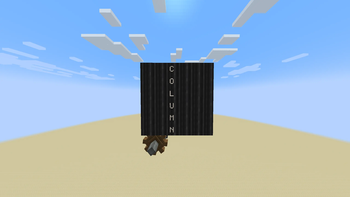
Create Column Display
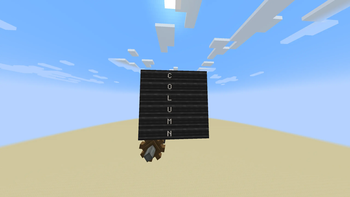
Create Column Display is a Create addon that adds a board-wide LINE/COLUMN writing mode to Display Boards.
COLUMN mode allows Display Links, named name tags and Create clipboards to write text vertically while preserving Create’s original horizontal behavior in LINE mode.
Features
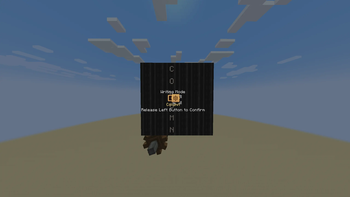
- Create-native wrench selector for switching between LINE and COLUMN
- One shared writing mode for the complete connected Display Board
- Vertical Display Link writing in COLUMN mode
- Adaptive
Line NandColumn NDisplay Link controls - Vertical writing with named name tags
- Vertical writing with Create clipboards
- Column-wise text deletion
- Mode persistence across saves and Display Board restructuring
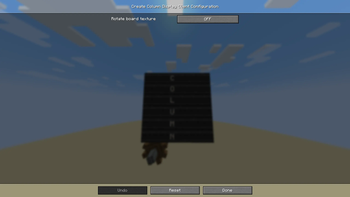
- Optional vertical Display Board texture in COLUMN mode
- Client configuration available through the Mods menu
- COLUMN controls and visuals automatically hide on servers without the addon
How to use
- Construct a Create Display Board.
- Hold a Create wrench while looking at the front or back of the board.
- Hold right-click and select LINE or COLUMN.
- Configure a Display Link normally.
- Select the desired line or column in the Display Link interface.
In COLUMN mode, text is written vertically from top to bottom.
Installation
Install the mod on both the client and server for full functionality.
Requirements
- Minecraft 1.21.1
- NeoForge 21.1.219 or newer
- Create 6.0.10
Create versions other than 6.0.10 are not currently supported.
Configuration
The client configuration contains the following visual option:
- Rotate board texture — rotates the Display Board’s front pattern while it is in COLUMN mode
This option changes only the board’s appearance and does not affect text writing.
Known limitations
- Text does not automatically continue into the next column when a column becomes full.
- COLUMN mode uses the first supplied source row for vertical output.
- Styled text components are converted to ordinary flap-display text during modified column writing.
- Display Board restructuring may rearrange or remove existing text, matching Create’s normal behavior.
Multiplayer compatibility
When installed only on the client, the addon detects servers without Create Column Display and hides its COLUMN controls and visual changes.
Full COLUMN functionality requires the mod on both the client and server.
Created by ___Woe___.
This is an unofficial Create addon and is not affiliated with or endorsed by the Create developers.
- Edition: Minecraft Java
- File type: .jar
- Minecraft version listed: 1.21.1
- How to install: Install the matching mod loader (Forge, Fabric or NeoForge) for your Minecraft version. → Download the .jar. → Put it in the .minecraft/mods folder and launch that loader profile.
- Where to get it: Opens on Modrinth — not every file is mirrored on our own servers.
Install steps are the general flow for this file type — How to install Minecraft Java mods & modpacks walks through it step by step.
- Ships as CreateColumnDisplay-1.21.1-1.0.jar — drop this file into the mods folder
- Download size: 37 KB
- Download link checked 10 Oct 2026 — working
These come from our own check of the pack file, not from the source page.