
Pangu Spacing
Java mod listed for Minecraft 26.x. Downloads from the MC Java Mods app on Android.
Automatically inserts spaces between CJK (Chinese, Japanese, Korean) characters and Latin alphabets/numbers in Minecraft for a cleaner, more readable chat…
⬇ Download on Modrinth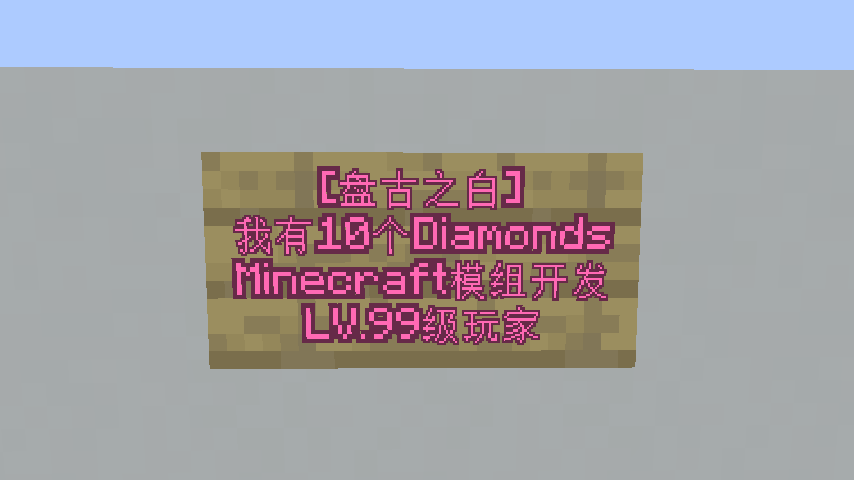
Pangu Spacing / 盘古之白
Automatically inserts spaces between CJK (Chinese, Japanese, Korean) characters and Latin alphabets/numbers in Minecraft for a cleaner, more readable chat and UI.
自动在 Minecraft 的中日韩字符(CJK)与拉丁字母、数字之间插入空格(盘古之白),告别挤作一团的排版,给你的游戏 UI 和聊天框带来呼吸感。
Supports / 支持版本
- Minecraft 26.x Fabric
- Minecraft 26.x NeoForge
We plan to port this mod to older Minecraft versions.
我们有将此 Mod 移植到先前的 Minecraft 版本的计划。
Introduction / 简介
In Chinese, Japanese, and Korean (CJK) typesetting, it is a common aesthetic practice to leave a blank space between CJK characters and Latin characters (letters, numbers, and symbols) — a concept affectionately known in the Chinese community as "Pangu's Whitespace" (盘古之白).
This mod automatically applies this spacing rule to Minecraft's text rendering, making your in-game text, chat, tooltips, and menus look beautifully formatted and much easier to read.
中文排版审美中,在中文字符与英文字母、数字之间留出一个空格的间距(俗称“盘古之白”),能够极大地提升文本的可读性和视觉美感。
本模组通过拦截并自动处理游戏内的文本渲染,将这一排版规则带入 Minecraft。无论是聊天栏、物品提示(Tooltip)、公告、书籍还是各类 GUI 界面,都能自动呈现出最优雅的排版效果。
Effects / 效果
Before / 安装 Mod 前:
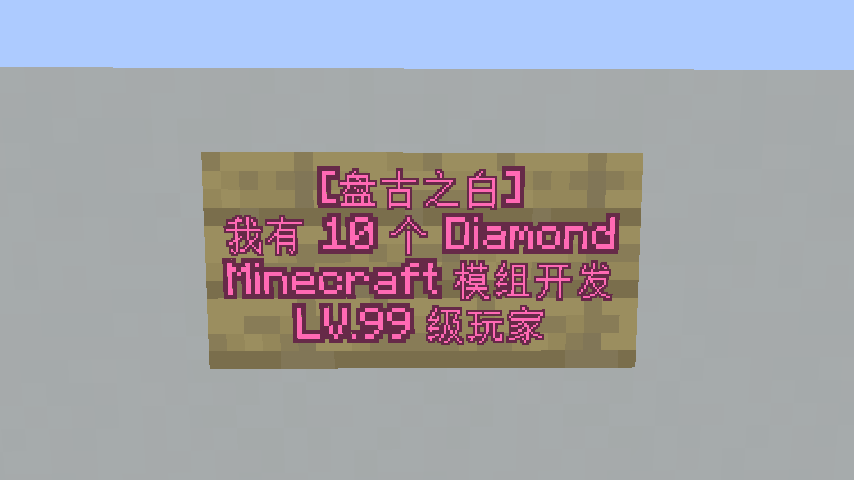
After / 安装 Mod 后:
Features / 特性:
Real-time Formatting: Automatically formats chat messages, item tooltips, books, and GUI text.
Client-side Only: Runs entirely on the client. You can join any vanilla or modded server with this mod installed.
Lightweight & High Performance: Minimal impact on game performance, utilizing efficient regex/character checking.
In-game Commands: Quickly check the status with
/panguor toggle the spacing on/off on the fly using/pangu togglewithout restarting the game.
Chinese translation for features:
实时格式化:无缝支持聊天信息、物品提示、服务器公告、书籍、甚至其他模组的 GUI 文本。
纯客户端模组:无需服务器支持。安装后,你可以带着它加入任何原版或跨版本服务器,不影响正常联机。
轻量且无感:采用高效的字符匹配算法,对游戏帧率和文本渲染性能几乎零影响。
便捷命令: 支持在游戏内使用命令
/pangu查看当前启用状态,支持输入/pangu toggle一键开关模组。
Installation / 安装方法:
- Make sure you have [Fabric / Forge / NeoForge] installed.
- Download the latest
.jarfile. - Drop the file into your
.minecraft/modsfolder. - Launch the game and enjoy the beautiful typography!
Chinese translation for installation methods:
- 请确保你已安装 [Fabric / Forge / NeoForge] 对应版本的加载器。
- 下载最新的
.jar文件。 - 将下载的文件放入你游戏目录的
.minecraft/mods文件夹中。 - 启动游戏,享受盘古之白吧!
License / 协议
Contributions, issues, and feature requests are welcome! Feel free to check the issues page.
This project is licensed under the GNU General Public License v3.0 only (GPL-3.0-only). See LICENSE for the complete terms.
欢迎提交 Bug 反馈、功能建议或 Pull Request!如果你有任何想法,请随时提交 Issue。
本项目采用 GPL v3.0 协议,完整条款请见 LICENSE.
- Edition: Minecraft Java
- File type: .jar
- Minecraft versions listed: 26.1, 26.1.1, 26.1.2
- How to install: Install the matching mod loader (Forge, Fabric or NeoForge) for your Minecraft version. → Download the .jar. → Put it in the .minecraft/mods folder and launch that loader profile.
- Where to get it: Opens on Modrinth — not every file is mirrored on our own servers.
Install steps are the general flow for this file type — How to install Minecraft Java mods & modpacks walks through it step by step.
- Ships as pangu_spacing-1.0.0-26.1.jar — drop this file into the mods folder
- Download size: 141 KB
- Download link checked 10 Oct 2026 — working
These come from our own check of the pack file, not from the source page.