
OdarIs
Java resource pack listed for Minecraft 1.20–26.x. Downloads from the MC Java Mods app on Android.
See Minecraft in a fresh light with handcrafted textures, natural materials, and crisp detail at resolutions up to 2048x.
⬇ Download on Modrinth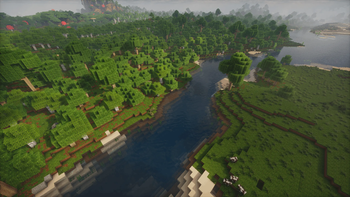
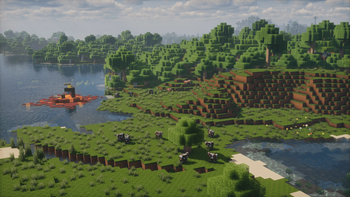
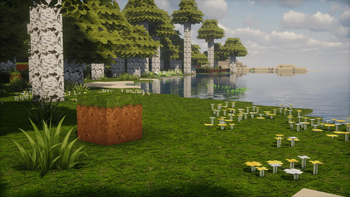
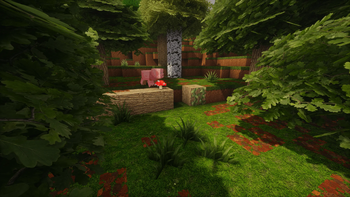
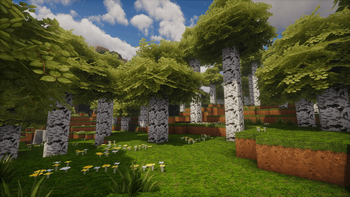
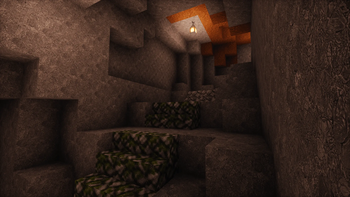
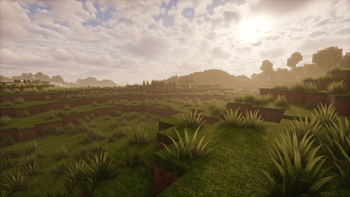
A fresh take on Enhanced Vanilla Minecraft
OdarIs makes Minecraft more detailed and natural without changing it into a completely different game.
The blocks are still easy to recognize and the world still feels like Minecraft, but with more depth and detail.
The pack is available in 7 resolutions, from 32x to 2048x, so you can choose the version that works best for your PC.
Alpha 0.1
This first public release mainly focuses on blocks that players encounter near the beginning of a survival world.
- 89 custom textures covering 57 complete blocks
- Seven resolutions: 32x, 64x, 128x, 256x, 512x, 1024x, and 2048x
- High-resolution interface elements
- Textures based on photos and real-world references
- Terrain textures designed to tile smoothly
- Works with vanilla Minecraft and shader packs
- No required mods
OdarIs uses photos and real materials as references, but it is not meant to turn Minecraft into a photorealistic game. The goal is to make familiar blocks look richer and more natural while keeping them easy to recognize.
Optional Add-ons
The Base Pack works on its own. Optional add-ons can be used to add more variation and detail.
The number in each pack name shows the correct load order. Lower numbers should be placed at the bottom of the resource-pack list, with higher numbers stacked above them.
- 10 — OdarIs Base — the main pack required for all add-ons.
- 20 — OdarIs Random Blocks — adds texture variations to selected blocks and reduces visible repetition.
- 30 — OdarIs Overlay — adds small plants and extra details to grass surfaces.
- 31 — OdarIs Random Overlay — adds matching overlays for the Random Blocks variations.
- 40 — OdarIs Foliage — makes tree foliage fuller and gives forests a denser look.
About the Project
I started working on OdarIs because I wanted Minecraft to look more detailed while keeping the original style that made me enjoy the game in the first place.
After Mojang canceled the Super Duper Graphics Pack, I decided to create my own resource pack with more detailed textures.
Over the past several months, I have been learning how resource packs work, creating textures, testing them in different environments, and optimizing the finished files.
Alpha 0.1 is the first public version of that work. It only covers a small part of the game for now, but it gives me a solid base to continue building the pack.
Performance, Shaders, and CompatibilityOdarIs is currently available for Minecraft Java Edition and works without OptiFine or any other required mods.
Shaders are optional. The pack can be used with standard vanilla lighting and is also designed to work with popular shader packs. The result may look different depending on the shader and its settings.
Lower resolutions such as 32x, 64x, and 128x should work on a wider range of computers. Higher resolutions use more graphics memory and system memory, especially when combined with shaders or a high render distance.
In my own testing, even the 2048x version runs without noticeable FPS drops or memory issues on an older laptop. I spent a lot of time optimizing the files, but performance will still depend on your hardware, shaders, render distance, and other settings.
Allocating more memory to Minecraft may also help when using the largest versions.
A Bedrock Edition version may be considered later, depending on community interest and the time needed to properly adapt the pack.
Installation- Open the Versions section and download OdarIs in your preferred resolution.
- Open Minecraft.
- Go to Options → Resource Packs.
- Click Open Pack Folder.
- Move the downloaded OdarIs
.zipfile into the folder. Do not extract it. - Return to Minecraft and enable the pack.
To use an add-on, move its .zip file into the same folder and place it above the Base Pack in the resource-pack list.
Alpha 0.1 covers only a small part of Minecraft.
Future updates will add more blocks, improve existing textures, and expand the pack into other parts of the game. New content will be released after it has been tested and is ready to use.
The main idea will stay the same: make Minecraft more detailed without losing the original feel of the game.
Support OdarIs
OdarIs will remain free to download.
Patreon supporters receive early access to new textures, development previews, and upcoming versions. Supporting the project helps me spend more time creating new content and improving the pack.
Public releases will continue to be available to everyone.
Feedback
Bug reports, performance information, screenshots, and suggestions are always welcome.
When reporting a problem, please include your Minecraft version, OdarIs resolution, shader pack, and any other visual mods you are using.
You can contact me through the OdarIs Discord server or Patreon.
Thank you for trying OdarIs.
Gallery screenshots were captured with Photon Shaders. Some images also showcase optional OdarIs add-ons.
- Edition: Minecraft Java
- File type: .zip (resource pack)
- Minecraft versions listed: 1.20, 1.20.1, 23w31a
- How to install: Download the .zip resource pack — do not unzip it. → Put it in .minecraft/resourcepacks. → Enable it in Options → Resource Packs.
- Where to get it: Opens on Modrinth — not every file is mirrored on our own servers.
Install steps are the general flow for this file type — How to install Minecraft Java resource packs walks through it step by step.
- Downloads as 10 ◆ OdarIs Base 2048x v0.1.zip
- Download size: 285.2 MB
- Download link checked 11 Oct 2026 — working
These come from our own check of the pack file, not from the source page.