ぐりぐりPIDS
MTR/JCM向け日本風発車標リソースパック。GURIGURI Station Companionで運休表示にも対応します。 A Japanese-style departure board resource pack for MTR/JCM, with cancellation display…
⬇ Download on Modrinth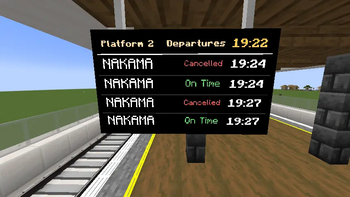
ぐりぐりPIDS
ぐりぐりPIDS は、Minecraft Transit Railway と Joban Client Mod 向けの日本風発車標リソースパックです。
JCMのPIDSプリセットとして、黒背景・白文字をベースにした日本風の発車案内表示を追加します。
日本語表示と英語表示を切り替えながら、発車時刻、行先、定刻、遅延、早着、接近案内などを表示できます。
このリソースパックでできること
- JCMのPIDSプリセットに日本風発車標を追加
- 黒背景、白文字、クリーム色の見出し、黄色の時計を使った表示
- 日本語と英語の表示切り替え
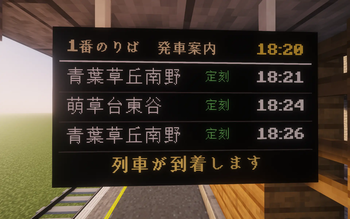
- 単一番線では「1番のりば 発車案内」などの見出しを表示
- 複数番線を対象にした場合は、番線名ではなく駅名を見出しに表示
- 行先名の日本語/英語切り替え
- 発車時刻を HH:mm 形式で表示
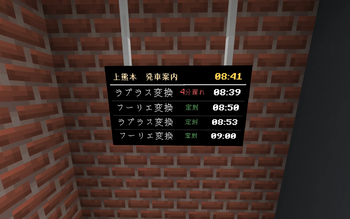
- 定刻、遅延、早着を色分けして表示
- 停車中の列車行の文字点滅
- 到着40秒前の接近案内表示
- カスタムメッセージ表示
- 非表示行設定への対応
表示の特徴
通常の発車案内は、現実の駅にある発車標を意識して、黒背景に白文字を中心とした見た目にしています。
見出し部分は少し色を付け、現在時刻は黄色で表示します。
定刻は緑、遅延は赤、早着は青系の色で表示されるため、列車の状態がひと目で分かります。
到着が近い列車がある場合は、最下段に接近案内を表示します。
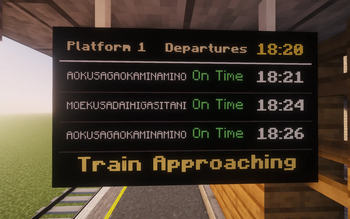
接近案内は「列車が到着します」と「Train Approaching」を切り替えて表示します。
ぐりぐり駅放送・発車標コンパニオンとの関係
このリソースパック単体でも、通常の発車案内、接近案内、停車中列車の文字点滅、定刻・遅延・早着表示は動作します。
別途配布している補助MOD「ぐりぐり駅放送・発車標コンパニオン」を導入すると、ぐりぐりPIDS側でリアルタイム運行向けの運休表示連携が使えるようになります。
補助MODがある場合、MTRが発車案内から除外した便を、通常の発車案内行へ「運休」または「Cancelled」として表示できます。
補助MODを入れていない場合は、運休表示だけが無効になります。
通常の発車標としてはそのまま使用できます。
行先名の書き方
日本語表示と英語表示を切り替えたい場合は、MTR側の行先名を次のように登録します。
緑草|MIDORIKUSA
左側が日本語表示、右側が英語表示として使われます。 区切り記号がない場合は、同じ名前を日本語表示と英語表示の両方で使用します。
必要なもの
Minecraft 1.20.4 Fabric Minecraft Transit Railway 4.0.5 Joban Client Mod 2.2.1 for Minecraft 1.20.4 運休表示も使う場合は、別途 ぐりぐり駅放送・発車標コンパニオン を導入してください。
導入方法
このリソースパックZIPを Minecraft の resourcepacks フォルダへ入れます。 Minecraftを起動します。 リソースパック画面で GURIGRUI PIDS を有効化します。 JCMのPIDSプリセット選択画面から GURIGRUI Japanese Departure Board を選びます。 運休表示も使う場合は、ぐりぐり駅放送・発車標コンパニオン を mods フォルダへ導入します。
注意
このリソースパックは、JCMのPIDSプリセットを追加するためのリソースパックです。 駅放送機能は、このリソースパックではなく ぐりぐり駅放送・発車標コンパニオン 側の機能です。 MTRやJCMの仕様、ダイヤ設定、駅や番線の登録状態によって、表示内容が変わる場合があります。
ライセンス
このリソースパックは、Japan_Style_PIDS日式PIDSv1.0.6 by Nakasu を改造ベースとして使用しています。
GURIGURI PIDS
GURIGURI PIDS is a Japanese-style departure board resource pack for Minecraft Transit Railway and Joban Client Mod.
As a JCM PIDS preset, it adds Japanese-style departure information displays based on a black background with white text. It can switch between Japanese and English display modes, showing departure times, destinations, on-time status, delays, early arrivals, approaching train information, and more.
What This Resource Pack Can Do
- Adds Japanese-style departure boards to JCM PIDS presets
- Displays information using a black background, white text, cream-colored headers, and a yellow clock
- Switches between Japanese and English display modes
- Shows headers such as “Platform 1 Departure Information” for single-platform displays
- Shows the station name instead of the platform name when multiple platforms are selected
- Switches destination names between Japanese and English
- Displays departure times in
HH:mmformat - Shows on-time, delayed, and early arrival statuses with different colors
- Makes the text blink for trains currently stopped at the platform
- Displays approaching train information 40 seconds before arrival
- Supports custom message display
- Supports hidden row settings
Display Features
The standard departure information display is designed to look like a real station departure board, mainly using a black background with white text.
The header area uses a slightly tinted color, while the current time is displayed in yellow. On-time trains are shown in green, delayed trains in red, and early arrivals in a blue-toned color, making the train status easy to understand at a glance.
When a train is approaching, approaching train information is shown on the bottom row. The approaching message alternates between “列車が到着します” and “Train Approaching”.
Relationship with GURIGURI Station Announcement / Departure Board Companion
This resource pack works on its own for standard departure information, approaching train information, blinking text for trains stopped at platforms, and on-time, delayed, or early arrival displays.
By installing the separately distributed companion mod, GURIGURI Station Companion, GURIGURI PIDS can also support service cancellation display integration for real-time operations.
When the companion mod is installed, services that MTR excludes from the departure information can be displayed on the normal departure board rows as “運休” or “Cancelled”.
If the companion mod is not installed, only the cancellation display feature is disabled. The resource pack can still be used normally as a departure board.
How to Write Destination Names
To switch destination names between Japanese and English display modes, register the destination name in MTR using the following format:
緑草|MIDORIKUSA
The left side is used for the Japanese display, and the right side is used for the English display. If there is no separator, the same name will be used for both Japanese and English display modes.
Requirements
- Minecraft 1.20.4
- Fabric
- Minecraft Transit Railway 4.0.5
- Joban Client Mod 2.2.1 for Minecraft 1.20.4
To use the cancellation display feature, please also install GURIGURI Station Companion separately.
Installation
- Place this resource pack ZIP file into the Minecraft
resourcepacksfolder. - Launch Minecraft.
- Enable GURIGURI PIDS from the Resource Packs screen.
- Select GURIGURI Japanese Departure Board from the JCM PIDS preset selection screen.
- To use the cancellation display feature, place GURIGURI Station Companion into the
modsfolder.
Notes
This resource pack adds PIDS presets for JCM.
The station announcement feature is not included in this resource pack. Station announcements are provided by GURIGURI Station Companion.
The displayed content may vary depending on MTR and JCM specifications, timetable settings, and how stations or platforms are registered.
License
This resource pack is based on a modified version of Japan_Style_PIDS 日式PIDS v1.0.6 by Nakasu.
- Downloads as GURIGRUI_PIDS_JCM2.2.1_MTR4.0.5.zip
- Download size: 10 KB
- Download link checked 10 Aug 2026 — working
These come from our own check of the pack file, not from the source page.