
Project Kyber: Build 0.01
Bedrock add-on listed for Minecraft 1.21–26.x (behavior + resource pack). File opened and checked on 14 Oct 2026; installs from the MC Bedrock Mods app on Android.
Project Kyber is an introduction of my lightsaber add-on, this add-on maybe discontinued for a customizable addon.
⬇ Download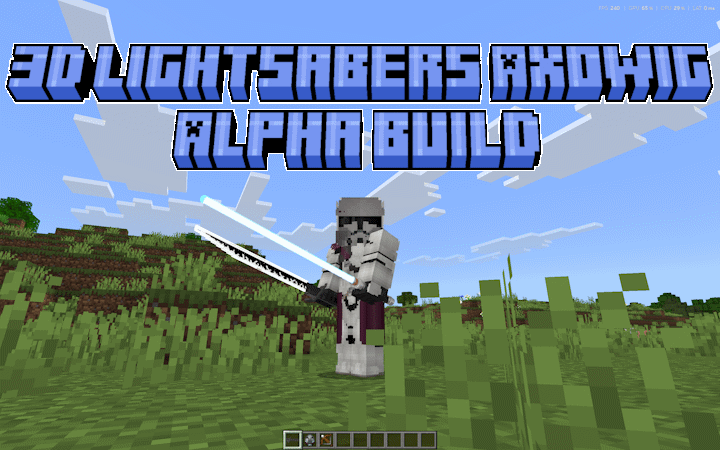
Please Read Before Moving On
The SWMC Lightsaber Resource Pack contains custom player files, animation controllers, render controllers, first-person animations, third-person animations, and other visual systems.
Because of this, the pack may conflict with addons that modify:
player.jsonplayer.entity.json- Player animation controllers
- Player render controllers
- First-person hand animations
- Third-person combat animations
- Block Animation
Whichever pack replaces the same player files may prevent parts of another pack from working correctly. Always test Resource Pack combinations in a copied world.
This addon is still under active development. Bugs, visual conflicts, animation problems, and balancing issues may occur.
Please report problems through the Discord server and include:
- Your Minecraft version
- Your Behavior Pack and Resource Pack versions
- Other active player-animation packs
- Screenshots, recordings, or Content Log errors
- Which lightsaber was being used
- Whether the lightsaber was active or inactive
- Whether you were blocking, attacking, or switching blade states
Thank you for supporting the continued development of SWMC!
About the Addon
SWMC: Lightsabers introduces a large collection of fully modeled Star Wars-inspired lightsabers to Minecraft Bedrock Edition.
The addon includes custom 3D hilts and blades, activation states, unique colors, first-person and third-person animations, lightsaber blocking, projectile deflection, combat sounds, multi-blade configurations, and a wide selection of recognizable designs.
Each lightsaber has separate inactive and activated states. Activating a lightsaber changes its model, damage, animations, sounds, and combat abilities.
Main Features
- Large collection of 3D lightsabers
- Separate powered-off and powered-on states
- Custom ignition sounds
- Custom deactivation sounds
- Special Darksaber ignition and deactivation sounds
- Animated lightsaber blades
- First-person animations
- Third-person animations
- Custom blocking poses
- Projectile blocking
- Projectile deflection
- Directional blocking
- Lightsaber impact sounds
- Swing sounds when attacking the air
- Continuous active-lightsaber ambience
- Unique blade colors
- Single-bladed lightsabers
- Double-bladed lightsabers
- Multi-stage blade activation
- Offhand support for inactive lightsabers
- Multiplayer combat support
Included Lightsabers
The collection includes designs based on:
- Adi Gallia
- Anakin Skywalker
- Ahsoka Tano
- Ahsoka’s blue lightsaber
- Cal Kestis
- The Darksaber
- Darth Maul
- Count Dooku
- Ezra Bridger
- The Grand Inquisitor
- Kanan Jarrus
- Kit Fisto
- Kylo Ren
- Luke Skywalker
- Mace Windu
- Darth Malgus
- Obi-Wan Kenobi
- Plo Koon
- Qui-Gon Jinn
- Savage Opress
- Darth Sidious
- Starkiller
- Temple Guards
- Darth Vader
- Yoda
Some designs include additional activation stages or alternate blade configurations.
Lightsaber Activation
Use a powered-off lightsaber to activate it.
Activating a lightsaber:
- Replaces the inactive hilt with its active version
- Extends the blade
- Plays an ignition sound
- Enables full lightsaber damage
- Enables blocking
- Enables projectile defense
- Enables active holding, swinging, and impact sounds
Use the active lightsaber again to deactivate it.
Deactivating a lightsaber:
- Retracts the blade
- Restores the inactive hilt
- Plays a deactivation sound
- Disables active combat sounds
- Disables lightsaber blocking and deflection
The Darksaber uses its own ignition and deactivation sounds.
Multi-Blade Lightsabers
Several lightsabers use multiple active stages.
These include designs such as:
- Darth Maul’s double-bladed lightsaber
- Inquisitor lightsabers
- Temple Guard lightsabers
- Savage Opress’s lightsaber
Using these lightsabers may cycle through:
- Powered-off state
- Partial or single-blade state
- Full or double-blade state
- Powered-off state again
This allows supported weapons to change their visual blade configuration without requiring separate unrelated items.
Lightsaber Blocking
Crouch while holding an activated lightsaber in your main hand to enter the blocking state.
While blocking:
- The player uses a custom lightsaber-blocking pose
- Incoming projectiles inside the blocking area can be intercepted
- Projectiles approaching from outside the blocking direction may still hit
- Blocking sounds play when a projectile contacts the lightsaber
- Some projectiles are reflected
- Other blocked projectiles are destroyed before dealing normal damage
The system checks the direction the player is facing, preventing the lightsaber from providing complete protection against attacks from every direction.
Projectile Deflection
Blocked projectiles have a chance to be reflected in the direction the player is looking.
A reflected projectile:
- Is recreated in front of the player
- Travels away from the blocking player
- Uses the blocking player as its new owner
- Has a small amount of directional spread
- Can potentially hit enemies in front of the player
Not every blocked projectile is reflected. Some are simply stopped by the blade.
This makes blocking useful without making every projectile automatically return perfectly to its original shooter.
Blocking and Melee Attacks
When crouching and blocking with an activated lightsaber, attacks against non-player mobs are limited to 1 damage.
This prevents the player from dealing full lightsaber damage to a mob while remaining in the blocking pose.
Normal active-lightsaber attacks deal their intended damage when the player is not using the blocking stance.
Lightsaber Sounds
Activated lightsabers use several types of custom sound feedback.
Holding Sounds
While an activated lightsaber is held:
- One of several active-lightsaber ambience sounds plays
- The sounds are selected randomly
- The next sound begins after the previous ambience finishes
- Active ambience can work while the saber is held in either hand
- Inactive lightsabers do not play active holding sounds
Swing Sounds
Swinging an activated lightsaber without hitting an entity plays one of the custom movement sounds.
Impact Sounds
Hitting an entity with an activated lightsaber plays one of the custom lightsaber-impact sounds.
Blocking Sounds
Intercepting or reflecting a projectile plays a dedicated lightsaber-block sound.
First-Person and Third-Person Visuals
The Resource Pack contains custom animation and rendering systems for lightsaber combat.
These include:
- First-person idle poses
- First-person attack animations
- Third-person holding animations
- Third-person attack animations
- Blocking animations
- Blade-specific rendering
- Different hilt models
- Different blade lengths
- Different blade colors
- Multi-blade models
- Darksaber visuals
- Crossguard lightsaber visuals
Because these systems affect player rendering, they may conflict with other animation-heavy Resource Packs.
Inactive Offhand Support
Inactive lightsabers can be moved between the main hand and offhand while crouching when the other hand is empty.
This allows players to reposition inactive hilts for roleplay, screenshots, or dual-wield setups.
Full combat, blocking, swing, and impact behavior is primarily based on an activated lightsaber in the main hand.
Patreon Access
Support the continued development of SWMC: Lightsabers through Patreon and receive faster updates, testing builds, development previews, and access to the wider SWMC addon collection.
Patreon supporters receive:
- Early access to upcoming updates
- Faster bug fixes and emergency patches
- Development and testing builds
- Progress previews
- Access to my other supported SWMC addons
- Access to the supporter-only administration tools included with those addons
The current Lightsaber release uses one shared Behavior Pack and one shared Resource Pack.
All current lightsabers, animations, sounds, blocking, and projectile-deflection features are included in the standard Lightsaber download. There is currently no separate Lightsaber Admin Control Tool in this pack.
Installation
The download contains:
- Lightsaber BP
- Lightsaber RP
Importing the Packs
- Open the Behavior Pack
.mcpackwith Minecraft - Open the Resource Pack
.mcpackwith Minecraft - Wait for both packs to finish importing
- Create a new world or edit an existing world
- Activate the SWMC Lightsaber Behavior Pack
- Activate the SWMC Lightsaber Resource Pack
- Confirm that both packs are enabled
- Enter the world
For the intended visual experience, keep the Lightsaber Resource Pack active.
Always back up an important world before updating.
Important Notes
- Designed for Minecraft Bedrock Edition
- Java Edition is not supported
- Uses Minecraft’s Script API
- Requires both the Behavior and Resource Packs
- Includes custom player animation files
- May conflict with other player-animation Resource Packs
- Blocking requires an activated lightsaber
- Blocking requires crouching
- Projectile defense is directional
- Not every blocked projectile is reflected
- Inactive lightsabers do not use active combat sounds
- Test multiplayer and addon combinations before server deployment
- Back up worlds before updating
License
This add-on is licensed under Deed - Attribution-NonCommercial 3.0 Unported - Creative Commons
Unless additional permission is provided:
Distribution and Usage
- You CAN download and use this addon for personal, non-commercial gameplay.
- You CAN feature the addon in videos, livestreams, screenshots, and reviews with proper credit and a link to the official download page.
- You CAN use the addon on private or public Minecraft servers, provided access to the addon files is not sold or redistributed.
- You CANNOT reupload, redistribute, mirror, or directly share the addon files.
- You CANNOT sell the addon or place access to it behind payment, advertisements, subscriptions, or paid download links.
- You CANNOT modify and publicly distribute the addon or any edited version.
- You CANNOT extract, reuse, or redistribute the addon’s code, models, textures, animations, sounds, or other assets.
- You CANNOT claim the addon or any part of it as your own.
Videos and streams are allowed, but the description should include a link to the official MCPEDL page or another approved download location.
Plagiarism, unauthorized redistribution, asset theft, and false ownership claims are not allowed. Please respect the work that I went into creating the add-on.
Credits
Created by Ax0wig
Using animation and attachable design for lightsabers by TheVeis
_Thank you for downloading SWMC: Blasters & Equipment. Build your loadout, prepare your equipment, and bring glory to the Age of the Empire into Minecraft Bedrock Edition.
JOIN THE DISCORD FOR MORE INFO, LATEST NEWS, BUG REPORTS AND A HOSTED SERVER TO ENJOY THE MOD WITH OTHER PEOPLE
https://discord.gg/4jh9KWqM8H
- Edition: Minecraft Bedrock
- File type: .mcpack or .mcaddon
- Minecraft versions listed: 1.21.120, 1.21.122, 1.21.121
- How to install: Download the .mcpack or .mcaddon file. → Open it — Minecraft imports it. → In your world: Behavior Packs → Available → Activate, then the same under Resource Packs.
- Where to get it: In MCModsHub, or directly above on this page.
Install steps are the general flow for this file type — How to install Minecraft Bedrock addons & mods walks through it step by step.
- Pack type: .mcaddon — behaviour and resource pack in one file
- Manifest requires Minecraft 1.26.40 or newer
- Complete pack — everything it depends on is inside the file
- Download size: 26.0 MB
- Download link checked 11 Oct 2026 — working
These come from our own check of the pack file, not from the source page.