HomeJavaModsModerationGUI
ModerationGUI
ModsJava

ModerationGUI

A powerful GUI-based moderation plugin with ban, mute, kick, warn and full LuckPerms support.

⬇ Download on Modrinth
ModerationGUI — screenshot 1ModerationGUI — screenshot 2ModerationGUI — screenshot 3ModerationGUI — screenshot 4ModerationGUI — screenshot 5

🛡️ ModerationGUI — The All-in-One Staff Management Plugin

A powerful, GUI-based moderation plugin built for Paper/Purpur servers. Manage your players effortlessly with a clean interactive menu, full LuckPerms support, and a complete punishment system.


✨ Features


📸 Screenshots

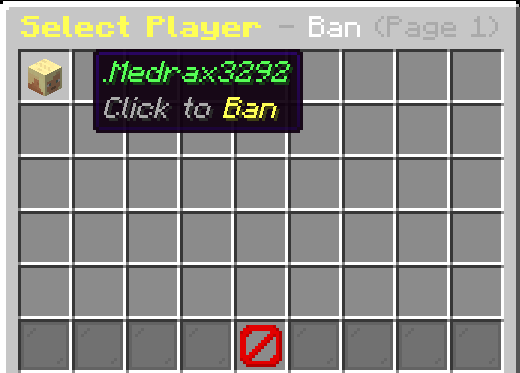
Main Menu — Open with /mod or /moderation

Moderation Menu

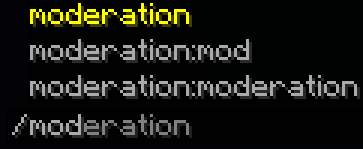
Command Suggestion — Start typing /mod and the command appears automatically

Command Suggestion

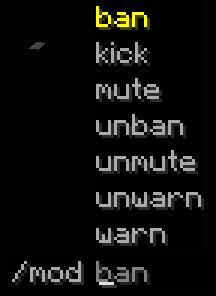
Tab Completion — Press Tab after /mod to see all available actions

Tab Completion

Chat Input Flow — Type the duration and reason directly in chat, then done!

Chat Input


🎮 Commands

Command Description
/mod or /moderation Open the moderation GUI menu
/mod ban <player> <duration> <reason> Ban a player
/mod unban <player> Unban a player
/mod mute <player> <duration> <reason> Mute a player
/mod unmute <player> Unmute a player
/mod kick <player> <reason> Kick a player
/mod warn <player> <reason> Warn a player
/mod unwarn <player> Remove a player's warning

Duration Format Examples: 30m 2h 12h 1d 7d 30d permanent


🔑 Permissions

Permission Node Description Default
moderation.use Open the moderation menu OP
moderation.kick Permission to kick players OP
moderation.ban Permission to ban players OP
moderation.mute Permission to mute players OP
moderation.warn Permission to warn players OP
moderation.unban Permission to unban players OP
moderation.unmute Permission to unmute players OP
moderation.unwarn Permission to remove warnings OP
moderation.* Grants all moderation permissions OP

LuckPerms Example

# Give a staff member only kick and mute permissions
/lp group mod permission set moderation.kick true
/lp group mod permission set moderation.mute true

# Give full moderation access
/lp group admin permission set moderation.* true

💡 Players with any permission (e.g. moderation.kick) automatically gain access to open the /mod menu. Buttons they don't have permission for will appear locked with a barrier icon.


⚙️ Installation

  1. Download the latest Moderation.jar
  2. Drop it into your server's plugins folder
  3. Restart your server (do not use /reload)
  4. Configure permissions using LuckPerms or your preferred permission plugin
  5. Type /mod in-game to open the menu!

📋 Requirements

Requirement Version
Server Software Paper or Purpur
Minecraft Version 1.21.11
Java 21+
Permission Plugin LuckPerms (recommended)

💬 Support & Community

Have a bug to report or a feature to suggest? Join our Discord server!

Discord


📝 Config Preview

# Moderation Plugin - Settings
prefix: "&c&lModeration &8» &7"

menu:
  main-title: "&c&lModeration Menu"
  kick-name: "&5&lKick"
  ban-name: "&c&lBan"
  mute-name: "&6&lMute"
  warn-name: "&1&lWarn"
  # ... and much more!

messages:
  ban-success: "&a{player} &7has been banned! &eDuration: &f{duration}"
  kick-success: "&a{player} &7has been kicked successfully!"
  # All messages are fully customizable!

Made ❤️ by MDR Studios

Verified by MCModsHub

These come from our own check of the pack file, not from the source page.

Explore more