
ModsJava
ckzbHideMe
Java mod listed for Minecraft 1.21–26.x. Downloads from the MC Java Mods app on Android.
A modern, lightweight, and highly customizable plugin designed to completely hide player nametags above their heads.
⬇ Download on Modrinth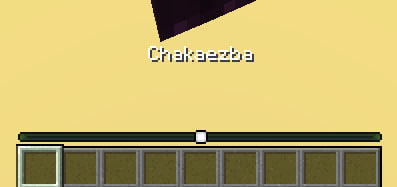
About
ckzbHideMe is a lightweight plugin designed to completely hide player nametags above their heads and provide immersive ways to identify players.
Features
- Invisible Nametags: Completely removes floating names above players' heads.
- Action Bar Display: Look at or click on a player to safely see their name in the Action Bar.
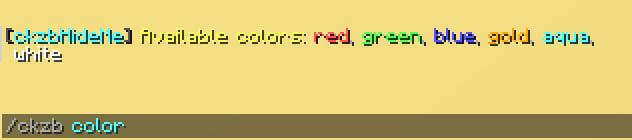
- Custom Colors: Allows players to choose their own nickname colors via a simple command.
- TAB Sync: Automatically syncs custom colors with the server TAB list.
- Highly Configurable: Full control over display triggers, cooldowns, sounds, and messages.
- PlaceholderAPI: Full integration with
%ckzb_color_code%and%ckzb_color_name%.
Commands
- /ckzb reload - Reloads the plugin configuration.
- /ckzb color - Opens the menu with available colors.
- /ckzb color - Applies the chosen color to the nickname.
Telegram Channel: Follow t.me/ckzbp for updates and news!
Configuration
features:
  # Enable or disable showing player names in the Action Bar.
  show-actionbar-names: true

  # How to trigger the Action Bar name display?
  # "HOVER" = Look at the player (uses crosshair).
  # "CLICK" = Right-click on the player.
  actionbar-trigger: "CLICK"

  # The format of the text shown in the Action Bar.
  # You can use {color}, %player_name%, and any PlaceholderAPI placeholders.
  actionbar-format: "{color}%player_name%"

  # The cooldown between Action Bar displays in milliseconds.
  # Set to 0 to disable the cooldown.
  actionbar-cooldown: 1000

  # Completely hide the standard name tags above players' heads.
  hide-head-names: true

  # Enable the /ckzb color command, allowing players to choose their own nick color.
  personal-nick-color: false

  # Apply the chosen personal color to the player's name in the server TAB list.
  change-tab-color: false

  # Play a sound when right-clicking a player to see their name.
  # Note: This only works if 'actionbar-trigger' is set to "CLICK".
  sound-on-right-click: true

colors:
  red: "&c"
  green: "&a"
  blue: "&9"
  gold: "&6"
  white: "&f"
Quick facts
- Edition: Minecraft Java
- File type: .jar
- Minecraft versions listed: 1.21, 1.21.1, 1.21.2
- How to install: Install the matching mod loader (Forge, Fabric or NeoForge) for your Minecraft version. → Download the .jar. → Put it in the .minecraft/mods folder and launch that loader profile.
- Where to get it: Opens on Modrinth — not every file is mirrored on our own servers.
Install steps are the general flow for this file type — How to install Minecraft Java mods & modpacks walks through it step by step.
File checked by MCModsHub
- Ships as ckzbHideMe_1.jar — drop this file into the mods folder
- Download size: 18 KB
- Download link checked 21 Sept 2026 — working
These come from our own check of the pack file, not from the source page.