
ModsJava
PlugTrace
Catch broken plugin updates, missing commands, dependency failures, and silent regressions before players do.
⬇ Download on Hangar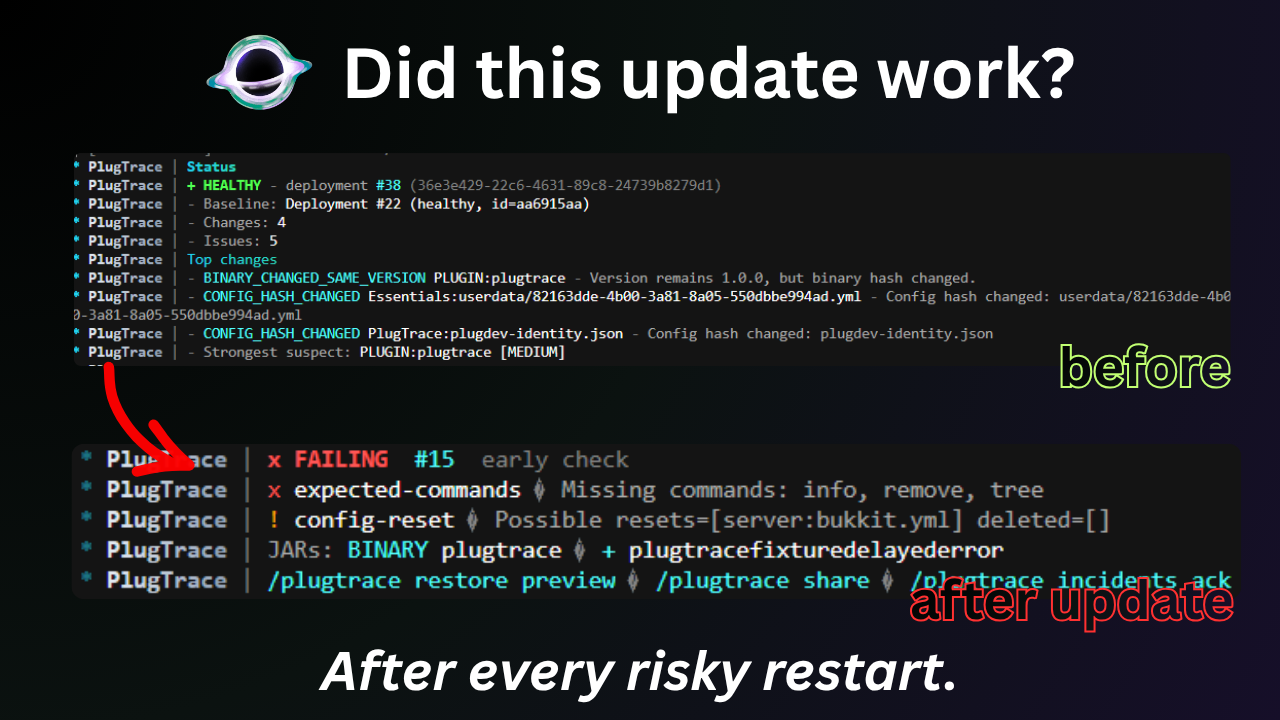
# 🔍 PlugTrace
Most server updates don't fail in a dramatic way. The server starts, the console reaches `Done`, and everything looks normal until someone notices a command is missing, a plugin never enabled, a dependency broke, or a config got reset.
PlugTrace is built for that exact situation. It keeps a history of deployments, watches the server after startup, compares the new state against a healthy one, and tells you whether the update actually held together.
Instead of treating **"the process is still running"** as success, it checks the parts of the server you actually care about.
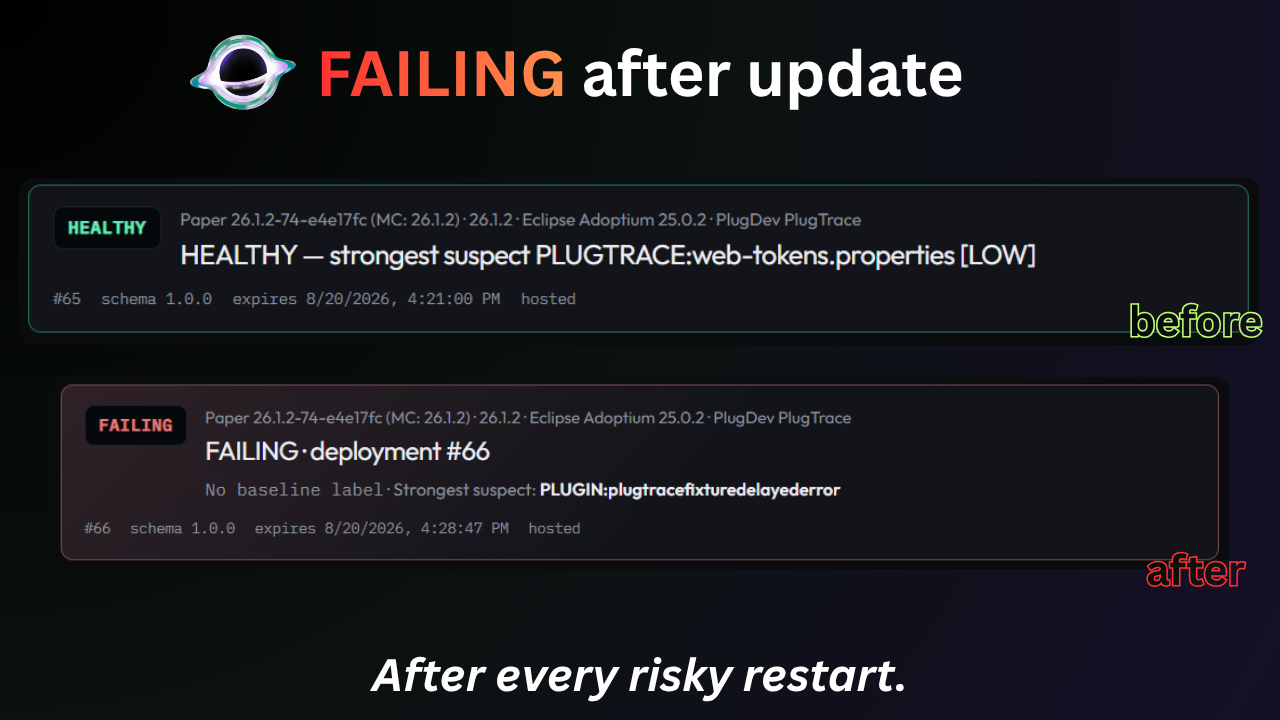
A deployment can end up as `HEALTHY`, `DEGRADED`, `FAILING`, or `UNKNOWN`, with the evidence that led to that result.
> ⚡ **spark is great for finding what is slow. PlugTrace is for finding what changed after an update.**
---
## 🎬 Demo
`HEALTHY` → bad restart → `FAILING` → diff → share report.
---
## 🛡️ Baselines
PlugTrace is most useful when you install it while the server is still healthy.
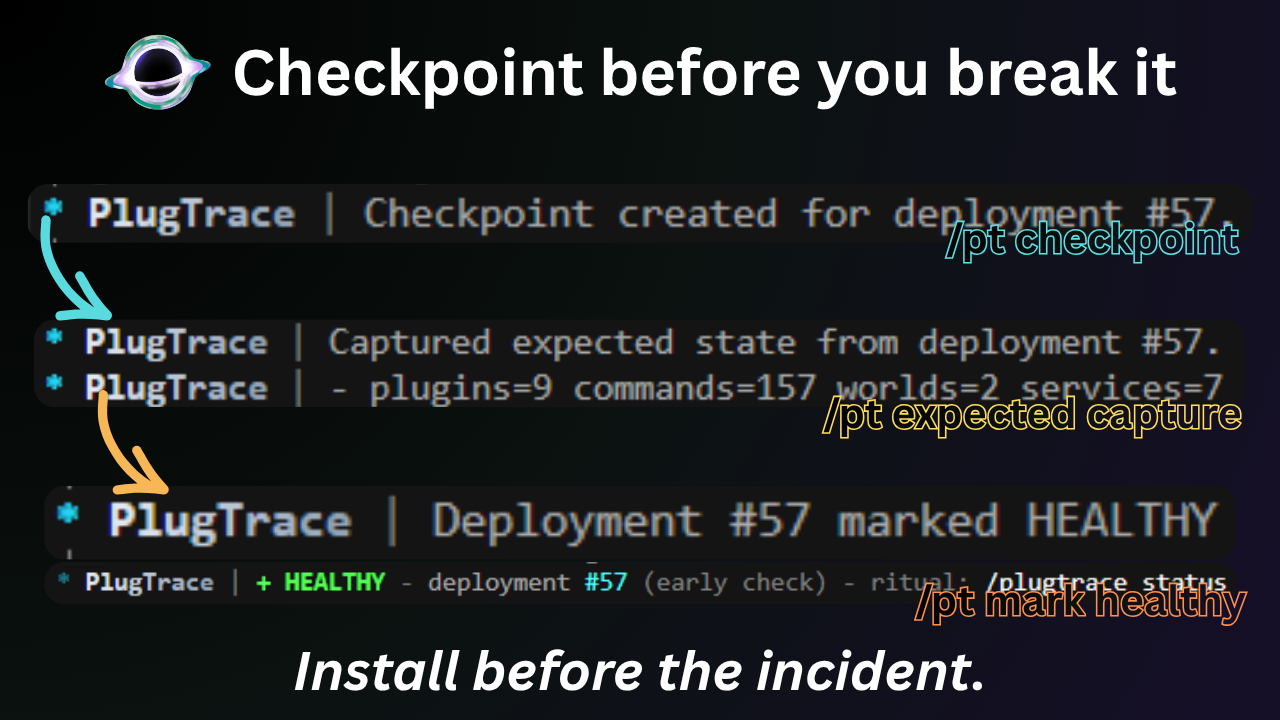
Before a risky update, capture the state you want future deployments to be compared against:
```text
/plugtrace selfcheck
/plugtrace checkpoint
/plugtrace expected capture
/plugtrace mark healthy
/plugtrace status
```
`expected capture` records things such as plugins, commands, worlds, and registered services that should still be there after the next restart.
Once that's done, update your plugins, replace JARs, change configs, upgrade Paper, or do whatever maintenance you were going to do anyway.
After the restart:
```text
/plugtrace status
```
That's the normal workflow:
**capture a healthy state → make the change → restart → check what actually happened.**
A PlugTrace checkpoint is a reference to a known-good deployment, **not a backup**.
Keep normal backups for worlds, databases, configs, and anything else you cannot afford to lose.
---
## 🕵️ Detection
PlugTrace is mainly interested in the failures that are easy to miss.
Depending on what changed, it can surface things such as:
- plugins disappearing, disabling, or failing to enable
- commands that existed before the update going missing
- missing worlds or registered services
- broken or missing dependencies
- plugin JARs being added, removed, or replaced
- a JAR changing while keeping the same version number
- config reset or deletion evidence
- new severe startup issues
- failures that appear during the post-start observation window
It also keeps the useful context around the deployment:
- failed checks
- important JAR differences
- changes from the healthy baseline
- detected issues
- incident history
- the strongest suspect supported by the evidence
That last part is intentionally conservative.
PlugTrace isn't supposed to invent a root cause just because something looks suspicious. If the available evidence isn't strong enough, it can return `UNKNOWN` instead.
---
## ⚡ Status
For day-to-day use, `/plugtrace status` is the main command.
```text
/plugtrace status
```
If you need to dig further:
```text
/plugtrace diff
/plugtrace issues
/plugtrace incidents
/plugtrace suspect
/plugtrace deployments
```
PlugTrace also keeps observing the deployment for a configurable period after the server becomes ready.
This matters because some problems don't happen during startup itself — they appear shortly afterward.
While that observation is still running, the deployment is `OBSERVING`.
Once it finishes, PlugTrace settles on one of these states:
| State | Meaning |
| --- | --- |
| ✅ `HEALTHY` | Critical checks passed |
| ⚠️ `DEGRADED` | Something regressed, but no critical check failed |
| ❌ `FAILING` | One or more critical checks failed |
| ❓ `UNKNOWN` | There isn't enough reliable evidence to make a confident call |
---
## 🔗 Sharing
When you need help from another admin, a plugin developer, or a host, dumping the entire console usually isn't ideal.
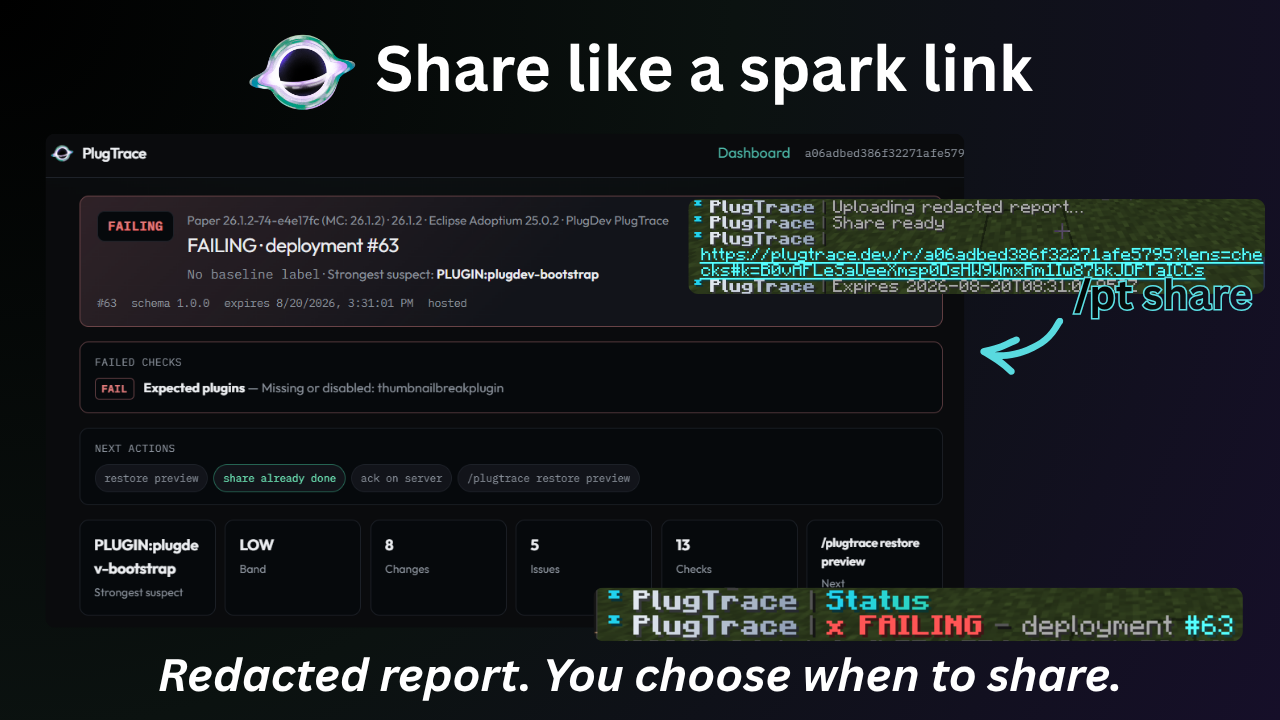
PlugTrace can build a report around the deployment instead, so the person looking at it gets the failed checks, relevant changes, incident evidence, and surrounding context in one place.
Preview it first:
```text
/plugtrace report preview
```
If you decide to share it:
```text
/plugtrace share
```
That creates a hosted PlugTrace report link you can send through Discord, GitHub, or a support ticket.
### 🔐 Privacy
Hosted reports are optional and **nothing is uploaded automatically**.
Checkpoints, verification, deployment history, local reports, and the local dashboard stay on your server.
A hosted report is uploaded only when an administrator explicitly runs:
```text
/plugtrace share
```
Before upload, the report is redacted and encrypted.
The hosted service stores the encrypted report data, while the decryption key remains in the `#k=...` fragment of the full share URL.
Anyone with the complete URL can open the report, so treat it as private.
Hosted reports expire automatically; the default lifetime is **14 days**.
PlugTrace can also send a redacted deployment digest to a Discord webhook if you configure one. No webhook is configured by default, and Discord notifications do not automatically create or upload a hosted report.
More details:
🔐 [PlugTrace Privacy](https://plugtrace.dev/privacy)
---
## 🏠 Local-first
You don't need a PlugTrace account, and the hosted report service is not required for normal use.
Commands, verification, deployment history, local reports, and the optional web UI all work locally.
The dashboard binds to:
```text
http://127.0.0.1:9465
```
by default and gives you a cleaner way to browse deployments, changes, checks, incidents, suspects, checkpoints, and recovery state.
If you choose to expose the dashboard outside localhost, secure it properly behind TLS and a reverse proxy.
---
## ↩️ Restore
When the required local evidence exists, PlugTrace can prepare a conservative restore plan:
```text
/plugtrace restore preview
/plugtrace restore stage
/plugtrace restore finalize
/plugtrace restore verify
/plugtrace restore complete
```
The restore flow is deliberately review-first.
The goal is to recover the smallest relevant change supported by the evidence rather than blindly rolling the whole server backward.
You can abort an in-progress restore with:
```text
/plugtrace restore abort
```
PlugTrace does not automatically restore worlds or databases, and it does not make hot reloads safe.
Use proper backups alongside it.
---
## 📦 Install
Drop PlugTrace into `plugins/`, perform a clean restart, then check that everything loaded correctly:
```text
/plugtrace selfcheck
```
Once the server is in a healthy state, capture that baseline before the next risky update.
PlugTrace runs entirely server-side, so players do not need to install anything.
### Compatibility
- Paper
- Purpur
- Folia
- Spigot
- No client mod required
- Server-side only
- Uses the Java version required by your server software
Check the compatibility information on the version you're downloading before installing.
---
## 💜 Free & open source
PlugTrace is free and open source under the **Apache License 2.0**.
There is no required account, paid edition, or required cloud service.
Hosted reports are there when you want to share an incident; the core deployment tracking and verification workflow does not depend on them.
🎬 **[Watch the demo](https://youtu.be/8XnSFtoRdp4)**
🌐 **[Website](https://plugtrace.dev)**
📖 **[Documentation](https://plugtrace.dev/docs)**
💻 **[Source Code](https://github.com/mattbaconz/plugtrace)**
🐛 **[Issue Tracker](https://github.com/mattbaconz/plugtrace/issues)**
💬 **[Discord](https://discord.gg/C4X3rThtAM)**
☕ **[Ko-fi](https://ko-fi.com/mattbaconz)**
---
## 📊 Usage Stats
PlugTrace uses bStats for anonymous usage metrics.
[](https://bstats.org/plugin/bukkit/PlugTrace/32755)
---

## 🧪 PLUG Labs
PlugTrace is built under **PLUG Labs**, which is also where its support, ideas, testing, bug reports, development discussion, and release news live.
💬 **[Join the PLUG Labs Discord](https://discord.gg/C4X3rThtAM)**
🐛 **[Open an issue](https://github.com/mattbaconz/plugtrace/issues)**
📖 **[Read the docs](https://plugtrace.dev/docs)**
🎬 **[Watch PlugTrace in action](https://youtu.be/8XnSFtoRdp4)**
PlugTrace is a free Minecraft Java mod. Compatible with Minecraft 1.20, 1.20.1, 1.20.2, 1.20.3 and newer. Available via Hangar. Download it and open it directly in the game.