
Progress Renderer
Java mod listed for Minecraft 26.x. Downloads from the MC Java Mods app on Android.
⬇ Download on Modrinth
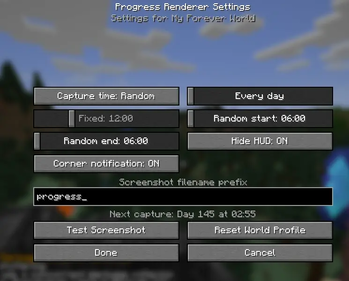
Progress Renderer is a lightweight, client-side Fabric mod that automatically creates a visual history of your Minecraft world through periodic screenshots.
Choose between a random or fixed capture time, set screenshots to occur every few in-game days, and configure everything through the in-game settings menu. Progress Renderer maintains separate settings and schedules for each world or server, avoids duplicate captures after reconnecting, and accounts for time skipped by sleeping.
Features
- Random or fixed screenshot times
- Configurable random-time window
- Capture every 1–30 in-game days
- Separate settings for each world and server
- Sleep-aware scheduling
- Optional HUD hiding during screenshots
- Optional corner notifications
- Custom filename prefix
- Test Screenshot button
- Displays the next scheduled capture
- Remappable settings key, bound to
Jby default - No server installation required
Screenshots are saved in Minecraft’s normal screenshots folder. Mod Menu is recommended for convenient access to settings, but it is not required.
- Edition: Minecraft Java
- File type: .jar
- Minecraft version listed: 26.1.2
- How to install: Install the matching mod loader (Forge, Fabric or NeoForge) for your Minecraft version. → Download the .jar. → Put it in the .minecraft/mods folder and launch that loader profile.
- Where to get it: Opens on Modrinth — not every file is mirrored on our own servers.
Install steps are the general flow for this file type — How to install Minecraft Java mods & modpacks walks through it step by step.
- Ships as progress-renderer-1.1.1+26.1.2.jar — drop this file into the mods folder
- Download size: 281 KB
- Download link checked 22 Sept 2026 — working
These come from our own check of the pack file, not from the source page.