
BalancedBright
Java resource pack listed for Minecraft 1.21–26.x. Downloads from the MC Java Mods app on Android.
Smooth natural permanent brightness (Night-Vision style). Zero FPS impact. Works in caves, night, Nether, End & more. Vanilla / Sodium / Iris compatible.
⬇ Download on Modrinth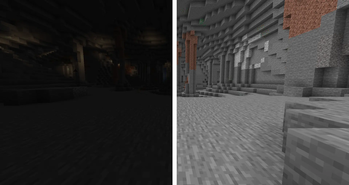
BalancedBright
Original Minecraft Java Resource Pack
Smooth • Lightweight • Natural permanent brightness (Night-Vision style)
Version: 1.0.0
Target: Minecraft Java 1.21+ (including 26.x year-based versions)
What it does
Replaces the vanilla core lightmap shader so every light level becomes brighter in a controlled way.
Feels like a permanent, polished Night Vision effect that works in:
- Caves & abandoned mineshafts
- Nighttime surface
- Underwater
- Dense forests
- Mountains & interiors
- Deep Dark
- The Nether
- The End
Colors stay natural. No neon, no heavy wash-out.
Performance
- Zero FPS impact
- Zero extra memory
- Zero lag
- Only one shader file is overridden
- Fully compatible with Vanilla, Sodium, Iris (when no external shaderpack is loaded), and OptiFine
Installation
- Download the zip
- Put it in
.minecraft/resourcepacks - Options → Resource Packs → move BalancedBright to Selected
- Keep it above any other packs that touch shaders
- Set in-game Brightness to Bright / 100% for maximum effect
- Press F3+T to reload
Compatibility Notes
| Environment | Status |
|---|---|
| Vanilla | Fully supported |
| Sodium | Fully supported |
| Iris (no shaderpack) | Fully supported |
| OptiFine (no shaderpack) | Fully supported |
| External shaderpacks | Effect is overridden (expected) |
| Other resource packs | Works – put BalancedBright higher |
Technical
Overrides only assets/minecraft/shaders/core/lightmap.fsh.
Block textures, models, fog and UI remain 100% vanilla.
Credits
Completely original.
Shader logic derived from public vanilla lightmap.fsh and re-balanced for natural appearance.
- Edition: Minecraft Java
- File type: .zip (resource pack)
- Minecraft versions listed: 1.21, 1.21.1, 1.21.2
- How to install: Download the .zip resource pack — do not unzip it. → Put it in .minecraft/resourcepacks. → Enable it in Options → Resource Packs.
- Where to get it: Opens on Modrinth — not every file is mirrored on our own servers.
Install steps are the general flow for this file type — How to install Minecraft Java resource packs walks through it step by step.
- Downloads as BalancedBright.zip
- Download size: 14 KB
- Download link checked 12 Oct 2026 — working
These come from our own check of the pack file, not from the source page.