HomeJavaModsClipChat
ClipChat
ModsJava

ClipChat

A clipboard manager that lives inside the Minecraft chat screen. Open chat, click an entry, and it is inserted at your cursor : no alt-tabbing to find…

⬇ Download on Modrinth
ClipChat — screenshot 1ClipChat — screenshot 2ClipChat — screenshot 3ClipChat — screenshot 4ClipChat — screenshot 5

ClipChat

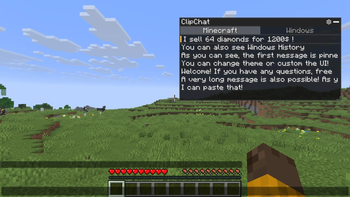
A clipboard manager that lives inside the Minecraft chat screen. Open chat, click an entry, and it is inserted at your cursor : no alt-tabbing to find that seed, coordinate or command again.

ClipChat is client-side only. It does nothing on a server and does not need to be installed on one.

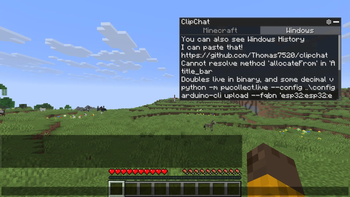
The ClipChat panel open in the chat screen

Features

Supported platforms

Windows Fully supported, including the Windows clipboard history tab
macOS Fully supported, except the Windows history tab
Linux Fully supported, except the Windows history tab

The Windows clipboard history tab additionally requires Windows 10 version 1809 or newer, with clipboard history switched on in Settings → System → Clipboard.

Installation

  1. Install Fabric Loader 0.19.3 or newer for Minecraft 26.2.
  2. Download Fabric API 0.155.2+26.2 or newer and drop the jar into .minecraft/mods/.
  3. Download the ClipChat jar and drop it into .minecraft/mods/ as well.
  4. Optionally install Mod Menu if you want a settings button in the mod list.
  5. Launch the game with the Fabric profile.

You need Java 25 or newer. Recent Minecraft launchers install a suitable runtime automatically.

Configuration

Settings can be reached in three ways:

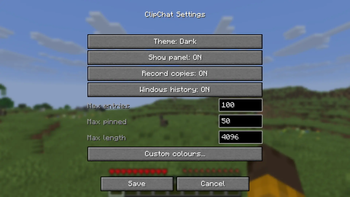
The ClipChat settings screen

Setting Default What it does
Show panel On Hides the panel entirely when off. Settings stay reachable via /clipchat.
Record copies Off Persists your Minecraft clipboard history to disk between sessions.
Windows history Off Adds the Windows tab, reading the system clipboard history live.
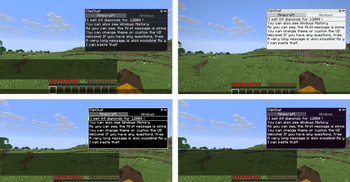
Theme Dark Dark, Light, High contrast or Classic.
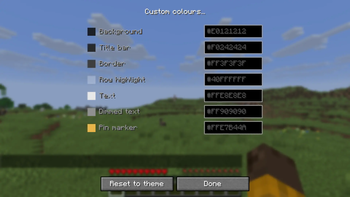
Custom colours Per-element colour overrides that take precedence over the theme.
Max entries 100 How many unpinned entries to keep before the oldest is dropped. 1–1000.
Max pinned 50 How many entries may be pinned at once. 1–500.
Max length 4096 Copied text longer than this is shortened before being stored. 16–65536.

The four built-in themes : Dark and Light on the top row, High contrast and Classic below.

The four built-in ClipChat themes side by side

Any individual colour can be overridden on top of the chosen theme, and overrides are kept when you switch theme.

The custom colour editor

Configuration files live under .minecraft/config/clipchat/. See Privacy for exactly what each one holds.

Keybindings and controls

The panel appears in the top right of the chat screen. Drag the title bar to move it, drag the bottom-right grip to resize it, and click the bar in the title to collapse it.

Action Mouse Keyboard
Move through entries Ctrl + Up / Down
Insert into chat Left click Ctrl + Enter
Pin / unpin Right click, or the pin icon Ctrl + P
Delete The cross icon Ctrl + Delete
Switch source tab Click the tab Ctrl + Left / Right
Open settings The gear icon

Every shortcut is held behind Ctrl because the chat box keeps keyboard focus while the panel is open: an unmodified arrow key belongs to Minecraft's sent-message history, and an unmodified letter belongs in the message you are typing.

Long text is shortened to fit the chat box's 256-character limit when inserted.

Privacy: what is stored, and where

Clipboard contents are sensitive by nature : passwords, tokens, personal messages. ClipChat is built so that you can see exactly what it keeps.

Three files are written, all under .minecraft/config/clipchat/:

File Contents Written when
history.json Your Minecraft clipboard entries, as plain text Only while Record copies is on
config.json Settings: theme, colours, limits, toggles On save
ui.json Panel position, size, collapsed state On move or resize

The Windows history tab

Off by default. When you switch it on, ClipChat reads the Windows clipboard history live from Windows each time you open the tab, and holds the result in memory only for as long as the tab is open. It is never written to history.json or to any other file, and turning the setting back off discards the in-memory copy immediately.

Because it is read on demand, nothing native runs at all until you both enable the setting and open the tab.

The Windows clipboard history tab

License

Licensed under the Creative Commons Attribution-NonCommercial-ShareAlike 4.0 International license (CC-BY-NC-SA-4.0). The full text is in LICENSE.

You are free to share and adapt ClipChat, provided you give appropriate credit, do not use it for commercial purposes, and distribute any derivative under the same license.

ClipChat is a free Minecraft Java mod. Compatible with Minecraft 1.21.1. Downloaded 26 times (via Modrinth). Download it and open it directly in the game.

Explore more