pvpToggle
Minecraft Java mod. Downloads from the MC Java Mods app on Android.
⬇ Download on CurseForge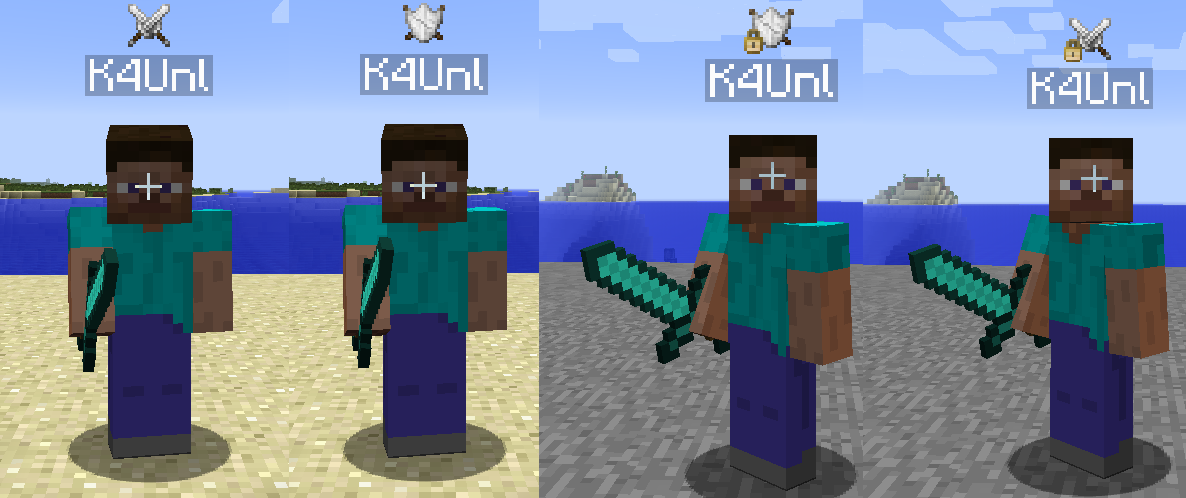
Ever had players who wanted to kill eachother for the fun of it, but also have players who'd rather not have pvp enabled?
With this mod you can have players decide for themselves! Let players opt-out of PVP by typing /pvp off. Or, if they rather have their heads smashed in, have them type /pvp on
Config:
- keepInventoryOnPVPDeath (default=false) Whether or not the players keep their inventory when they die because of a player
- keepExperienceOnPVPDeath (default=false) Whether or not the players keep their experience when they die because of a player
- showMessageOnLogin (default=true) Whether or not to show the player a message that pvpToggle is enabled on your server, and what his/her state of pvp is (disabled or enabled)
- coolDownInSeconds (default=30) How long a player has to wait before toggling his state of PvP. Thus counteracting the hit-and-run phenomenon. (set to 0 to disable)
- announceDimensionSetting (default=true) Whether or not to display a message when a player enters a dimension with forced PvP settings.
The mod is mostly server only, however, since version 1.0.x the mod can also be installed client side. This'll display two swords on your gui when PvP is enabled and a shield when PvP is disabled.
Commands:
pvp on/off
Toggles PVP
pvpui [location x y]/[own enable/disable]/[other enable/disable]
location - Sets the location of the icon.
own - Whether or not to display the icon.
other - Whether or not to display the icon over a players head.
open - Opens a new GUI component to manage areas and dimensions
pvptoggle [version]/[save]/[load]/[area]/[dimension]
version - Displays the version of pvptoggle
save - Saves the users, dimension settings and areas to the world dir
load - Loads the users, dimension settings and areas from the world dir
area new/delete/option
new <name> <x1> <y1> <z1> <x2> <y2> <z2> - Creates a new area with "name" in the given coordinates.
delete <name> - Deletes area "name"
option get/set announce/forced - Gets or sets the options. Announce is if the mod will notify a user if they enter or leave the area. forced on/off, whether or not PvP is on or off.
dimension [get] <dimensionID> -1/0/1 - Gets or sets the settings in the dimension. -1 means not forced. 0 means forced off, 1 means forced on.
Issues:
You can report issues to the github issue tracker. Or you can join me in #K4Unl on irc.esper.net
Required mods:
For PvPToggle (and all my other mods) K4Lib is required!
Modpacks:
You're allowed to use this mod in any pack you want, as long as it's not behind a paywall.
Permissions/Bukkit:
If you want to use this mod with, for example cauldron servers and want to run a permission plugin, these are the permissions needed:
For the /pvp command:
k4unl.minecraft.pvptoggle.commands.commandpvp
For the /pvptoggle command:
k4unl.minecraft.pvptoggle.commands.commandpvptoggle

- Edition: Minecraft Java
- File type: .jar
- How to install: Install the matching mod loader (Forge, Fabric or NeoForge) for your Minecraft version. → Download the .jar. → Put it in the .minecraft/mods folder and launch that loader profile.
- Where to get it: Opens on CurseForge — not every file is mirrored on our own servers.
Install steps are the general flow for this file type — How to install Minecraft Java mods & modpacks walks through it step by step.
- Ships as pvpToggle-1.7.10-0.1.20-universal.jar — drop this file into the mods folder
- Download size: 26 KB
- Download link checked 13 Oct 2026 — working
These come from our own check of the pack file, not from the source page.