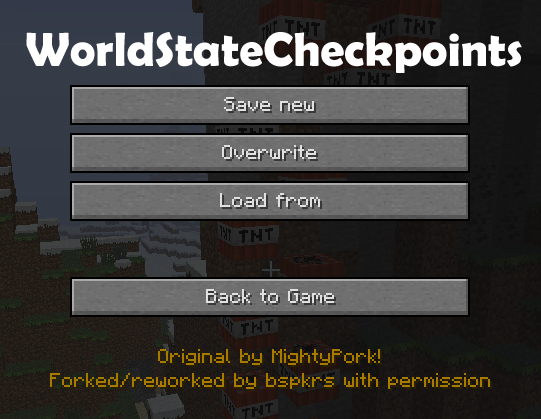
WorldStateCheckpoints
Minecraft Java mod. Downloads from the MC Java Mods app on Android.
⬇ Download on CurseForge(forked with permission from Checkpoints Backup Mod by MightyPork)
This mod REQUIRES bspkrsCore to be installed as well: http://minecraft.curseforge.com/mc-mods/bspkrscore
WorldStateCheckpoints gives you a way to take snapshots of your SP worlds! MightyPork indicated that he most likely won't be continuing to support his awesome mod, so I got his permission to update it.
Features:
- Access the checkpoints menu by pressing F6 (this can be changed on the regular controls screen)
- Save checkpoints (snapshots) of your world.
- Auto-save mode with GUI and configurable auto-save time increments.
- Press F7 (now ALT + F6 in 1.6.4.r02) (configurable) to quick-save a checkpoint.
- Go back in time - if you die, load checkpoint.
- Commands for saving and loading checkpoints for use in adventure maps. Type /wsc for details.
- Number of checkpoints only limited by harddisk space.
- You can overwrite existing checkpoints.
- You can easily delete checkpoints.
- When you delete world, all it's checkpoints are deleted automatically.
- Complete world is stored, including all dimensions and inventory.
- Automatic version checking - never miss an update.
Screenshots:


Videos:
Thanks DonkeyPanic!
[media]http://www.youtube.com/embed/Xwdo3K4exeY[/media]
[media]http://www.youtube.com/embed/vLwf6i3Rh08[/media]
Thanks ChronoFury!
[media]http://www.youtube.com/embed/CvZ51JmwqFo[/media]
Thanks Aschoff! (German language)
[media]http://www.youtube.com/embed/AQptDeQvZAk[/media]
Notable differences from MightyPork's original mod:
- no base class edits (that means the in-game menu is unchanged, and no extra buttons on the game-over screen, but should make it compatible with just about every mod)
- requires ModLoader or equivalent
- open the WorldStateCheckpoints menu using F6 by default (configurable from the controls screen... hard to see due to ModLoader bug where it shows up under the Done button)
- fixed issue when loading a checkpoint where newer chunks wouldn't be removed
Known Issues:
- every once in a while in my testing I noticed if a lot of changes are made and then you load a checkpoint real quick right afterwards, sometimes the changes are not reverted. I think this is because the chunks are still saving, but if you load the checkpoint again it will almost always fix it.
- if your actual world name (not the checkpoint name) has special characters in it (specifically "!", but maybe others), it can cause issues when saving/loading/deleting checkpoints.
- try not to end your checkpoint names with a period. I will add code to disallow this in the next release, but for now just avoid using periods at the end of a checkpoint name.
- when you load a world and auto-save is turned on for that world, sometimes you'll see a few errors in your console. This is the auto-save failing, most likely because it tries to force save the chunks and runs into a concurrent modification issue. You can always just manually do a quick-save if that happens.
Where are snapshots saved?
.minecraft/saves/Your World/checkpoints/YYYY-MM-DD_HH-MM-SS!Checkpoint name
They don't use any special format, so if your world folder gets corrupted (or world folder deleted), you can place your backed up snapshots into "saves" folder in minecraft and use them as normal world.
Thanks:
- MightyPork (for making an awesome mod and letting me continue it) Give him some love!
- Edition: Minecraft Java
- File type: .jar
- How to install: Install the matching mod loader (Forge, Fabric or NeoForge) for your Minecraft version. → Download the .jar. → Put it in the .minecraft/mods folder and launch that loader profile.
- Where to get it: Opens on CurseForge — not every file is mirrored on our own servers.
Install steps are the general flow for this file type — How to install Minecraft Java mods & modpacks walks through it step by step.
- Ships as [1.7.10]WorldStateCheckpoints-client-1.7.10.r03.jar — drop this file into the mods folder
- Download size: 55 KB
- Download link checked 23 Sept 2026 — working
These come from our own check of the pack file, not from the source page.