Java Version Checker
Minecraft Java mod. File opened and checked on 30 Sep 2026; downloads from the MC Java Mods app on Android.
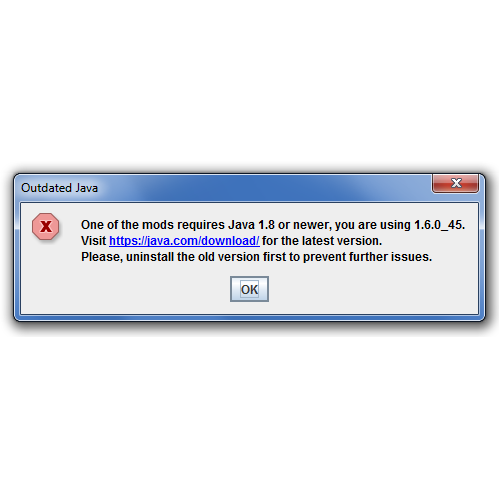
⬇ Download on CurseForgeJava Checker is a tweaker mod that shows a user-friendly message if the user has outdated Java. There are currently two versions, one that checks for Java 7, and one for Java 8 - read the Installation Guide for more details. The mod is free to use, modify, redistribute or whatever else you might want to do. Usage in modpacks is welcome.
Installation Guide
- Make sure you have the appropriate Forge version installed
- Visit the Files page and find the appropriate version of Java Checker (use the Universal builds)
- Download the file and place it into the mods folder
This will work for all versions of Minecraft since 1.6.2. If you need to know how to install the mod without Forge or for older versions, read the Special Requests section below.
Example dialog and log

The source code is available on GitHub: https://github.com/chylex/Java-Checker
External links: My website | Twitter | Patreon
Special Requests
Including Java Checker in another mod (shading)
Read a guide on shading Java Checker on its GitHub repository.
Using Java Checker in Minecraft 1.6.1 and older (with Forge)
Download Java Checker v1.1, and install it into the coremods folder.
Using Java Checker without Forge/FML
Java Checker is a tweaker mod, which allows you to modify the json file in your Minecraft launcher profile, and add --tweakClass chylex.javacheck.Java<version>Checker to minecraftArguments, and add Java Checker as a library. This is very much a theoretical scenario that has not been tested, so be careful.
- Edition: Minecraft Java
- File type: .jar
- How to install: Install the matching mod loader (Forge, Fabric or NeoForge) for your Minecraft version. → Download the .jar. → Put it in the .minecraft/mods folder and launch that loader profile.
- Where to get it: Opens on CurseForge — not every file is mirrored on our own servers.
Install steps are the general flow for this file type — How to install Minecraft Java mods & modpacks walks through it step by step.
- Ships as Java8Checker MC-UNIVERSAL v2.0.jar — drop this file into the mods folder
- Download size: 10 KB
- Download link checked 13 Oct 2026 — working
These come from our own check of the pack file, not from the source page.