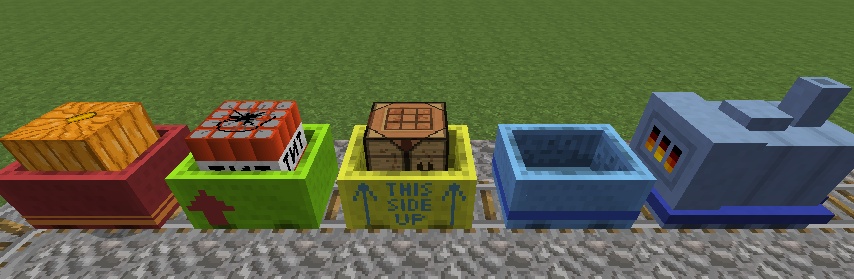
Cart Livery
Minecraft Java mod. Downloads from the MC Java Mods app on Android.
⬇ Download on CurseForgeAre you fed up with standard-issue gray minecarts? Have you ever wished you could color your carts so they match your shiny new steam locomotive? Or just stand out from the crowd?
Well, now you can! Cart Livery is a mod that allows you to paint your carts in all 16 glorious sheep colors, and apply colored stickers to them.
Usage
- Craft a Livery Cutting Tool in a normal 3x3 crafting table like this:

- Right-click with the Livery Cutting Tool to bring up its GUI

- There is a preview in the top left, where you can test how your livery will appear
- You can left- or right-click on the preview with a piece of dye to change the primary color and secondary color of the sticker, respectively
- Change which sticker to craft with the arrow buttons. The colors in the preview are for show only, you will always get white stickers
- Put some paper in the left slot, and you can pull out the Livery Sticker from the right
- The Tool has 100 uses
- Place your sticker in the center slot of a 3x3 crafting table, then place the primary color dye on top, and the secondary color dye on bottom.
- This crafts a sticker with the two colors (similar to coloring Railcraft locomotives).

- Sneak + right-click with a Livery Sticker on a cart to apply it. If the cart already has a sticker on it, the old sticker will pop off of it so you can recollect it.
- Sneak + right-click with the Livery Cutting Tool on a cart to remove the sticker from it. The sticker will pop off of it so you can recollect it.

- If you have Railcraft installed and the config option enabled, you can apply Railcraft emblems to carts. Just sneak + right-click with an emblem on a cart to apply it. If the cart already has an emblem on it, the old emblem will pop off of it so you can recollect it.
- Sneak + right-click with the Livery Cutting Tool on a cart to remove the emblem from it. The emblem will pop off of it so you can recollect it.

- If you are someone that is automation-oriented, you can craft the Livery Cutting Press in a 3x3 crafting table like this:

- To use the Livery Cutting Press, place paper in the left slot and a pre-made sticker in the middle slot as a template.
- The Livery Cutting Press will craft a white sticker with the same pattern as the template and put it in the right slot.
- Unless you disable the config option, the Livery Cutting Press will require RF (redstone flux) in order to craft stickers.

Stickers
Cart Livery is designed with extensibility in mind. The mod itself contains only a few livery stickers, but new ones can be easily added with resource packs. Other mods may also define their own built-in set of stickers if they wish.
The stickers you are able to craft are determined solely by your client - i.e. the sum of all resource packs you have active at the moment. In SMP, other players who don't have the particular pack a sticker comes from will not be able to see it; everything else however will still work (they can color and apply the stickers normally).
Creating a Resource Pack
My own textures may be bad, but it's my hope that some more artistically minded people will take off with this idea. Creating a pack is quite easy, take a look at the provided pack - which is a subset of those available built-in - to get an idea how it's done.
Basically you need 3 things:
- A pack.mcmeta file (as always), with some extra metadata to list the stickers it adds
- One or more language files in /assets/cartlivery/lang to define the names of the stickers (yes, you can localize them)
- The textures themselves in /assets/cartlivery/textures/livery (PNG format)
The mod simply draws a textured box around the minecart, with a texture that's mostly transparent. The easiest way to make a texture is to start off from the test.png texture in my pack. There are no technical reasons to use only white, however colored textures may look weird when dyed.
Compatibility & Support
The mod works fine both with and without Railcraft installed (tested version is RC 9.5.0.1 for MC 1.7.10, RC 8.3.2.0 for MC 1.6.4). It also works fine with Extra Carts and Steve's Carts installed.
Support for Waila versions 1.5.0 and higher is included out-of-the-box, it can show you the name of the sticker on a cart, the resource pack it is from (if you have it), the colors, and the emblem on the cart. These may be switched on and off separately.
Sticker coloring recipes do not show up in NEI at the moment.
License
You may use Cart Livery in any public or private modpacks without any limitation.
You may distribute Cart Livery as part of a public or private modpack, but any form of monetization on the download is forbidden (this refers only to distribution: you may run your servers however you like).
You may not publicly distribute Cart Livery standalone, or hotlink to the underlying files. Use the provided goo.gl redirector link, or simply link to this topic.
If you use it in your pack, a link to this topic or my GitHub page would be much appreciated.
Changelog
0.11.1 - More Awesomeness!
- Added config options
- Livery cutting press now uses RF to function (can be disabled in config)
- Added Redstone Flux API (duh)
- Added custom sounds to replace vanilla sounds used in previous update
- Updated Sphax patches
- CartLivery works with and without Railcraft
- Livery cutting press moved to transportation creative tab
- Fix small bugs
- Attempted to add missing pieces to German language file (need someone who actually speaks German... maybe Vexatos?)
0.10.8 - Textures and Sounds!
- Changed Livery Cutting Press texture
- Added animation and sound when Livery Cutting Press crafts
- Added sounds when stickers and emblems are applied and removed
- Added Sphax PureBDcraft patches
0.10.7a
- Hopefully fixed multiplayer
0.10.6
- Added shift-click to Livery Cutting Tool GUI
- Livery Cutting Tool takes damage when used to remove customizations to carts
- Removed "MysteryDump" Livery Sticker because Railcraft Emblems have been added
(To get the MysteryDump emblem, use the unlock code "MysteryDump")
0.10.4 - Emblems!
- Added the ability to place Railcraft emblems on carts - All you have to
do is shift right click on the cart with an emblem in your hand,
When you shift right click on a cart with the Livery Cutting Tool, the
emblem is removed first and you get it back as an item,
To retrieve the sticker, just do it again and you will receive it back
as an item
0.10.2 - Features!
- Added Automatic Livery Cutting Tool:
Insert Paper in the top left slot and a premade sticker in the middle
slot as a template. Stickers are output into the top right slot. Works
with hoppers, buildcraft pipes, and anything else that transports items. - Updated and fixed the mcmod.info file
- Added mod logo
0.10.0 - Lots of Changes
- Updated to 1.7.10, Forge 10.13.2.1277, and Waila 1.5.8a
- Added new texture and recipe for Livery Cutting Tool
- Changed dying recipe of stickers to include both primary and secondary colors
- Sticker item renders with both colors like Railcraft locomotives
- Improved sticker tooltip
0.9.3-beta
- fixed rendering without Railcraft installed
0.9.2-beta
- fixed network handling bug
0.9.1-beta
- mods may define built-in liveries (without resource packs)
- default livery set is now included in mod
- added german localization (thanks Vexatos)
- more liveries
0.9-beta
- initial release
Installation
Put the JAR in yout /mods folder, you know the drill.
Bug Reports
Head to my GitHub project page
Comments & feedback are always welcome!
You can also find me on Github, Minecraft Forum, Curseforge, FTB Forum, BDcraft Forums, and DeviantArt all with the username "kuenzign".
- Edition: Minecraft Java
- File type: .jar
- How to install: Install the matching mod loader (Forge, Fabric or NeoForge) for your Minecraft version. → Download the .jar. → Put it in the .minecraft/mods folder and launch that loader profile.
- Where to get it: Opens on CurseForge — not every file is mirrored on our own servers.
Install steps are the general flow for this file type — How to install Minecraft Java mods & modpacks walks through it step by step.
- Ships as CartLivery-1.7.2-0.9.3b.jar — drop this file into the mods folder
- Download size: 50 KB
- Download link checked 22 Sept 2026 — working
These come from our own check of the pack file, not from the source page.
Related Java mods

GHolo

Uncraftable Trims & Sherds

Q6A++

WarTech Reforged

Wavey Capes
