ModsJava
Aetheric Expansion
Minecraft Java mod. Downloads from the MC Java Mods app on Android.
⬇ Download on CurseForgeThe Aetheric Expansion
The Aetheric Expansion mod is a mod designed to make Aether-Only survival possible, as well as adding various miscellaneous features! Many people, me included, wish that it where truly possible to accomplish anything from within the Aether. continuum orbs almost make this so, but you would need so many of them to get what you wanted, especially if you have other mods installed. This mod allows you to harness the raw power of the continuum orbs to make it do exactly what you want. Additional, it adds various crafting recipes to make life in the Aether easier! Furthermore, if you have other mods like Thaumcraft installed, it adds even more features!
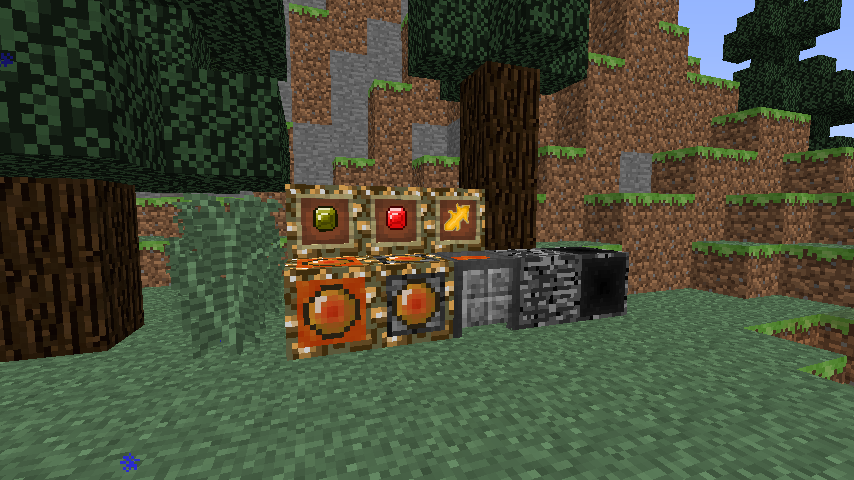
Blocks & Items
Aetheric Converter: This device allows you to convert Aether items into Overworld items!
Nether Converter: This device goes one step farther, and converts Overworld items into Nether items!
Aetheric Crucible: The block converts cobblestone into lava!
Fake Bedrock: Almost unbreakable block that looks exactly like bedrock! If you have Thaumic Tinkerer Kami installed, it adds one other feature involving the Awakened Ichorium Pickaxe...
Ambrosium Gem: Has no purpose on it's own, put in the Aetheric Converter to create redstone.
Energized Ambrosium Gem: Has no purpose on it's own, put in the Aetheric Converter to create lapis lazuli.
Aether Shard: (Thaumcraft Only) Has no purpose on it's own, put in the Aetheric Converter to create balanced shards.
Basic Conversions
Skyroot Logs/Planks/Sticks ---> Oak Logs/Planks/Sticks
Holystone ---> Cobblestone
Ambrosium Shard ---> Coal
Zanite Gemstone ---> Iron ingot
Enchanted Gravitite ---> Diamond
Golden Amber ---> 5x Gold Nugget
Skydirt ---> Dirt
Quicksoil ---> Sand
For other conversions, try experimenting! Moa eggs has special uses...
Bugs
Currently there are no known bugs. If you find one, please post about it!
Planned Features
+A block that allows respawning inside the Aether.
Quick facts
- Edition: Minecraft Java
- File type: .jar
- How to install: Install the matching mod loader (Forge, Fabric or NeoForge) for your Minecraft version. → Download the .jar. → Put it in the .minecraft/mods folder and launch that loader profile.
- Where to get it: Opens on CurseForge — not every file is mirrored on our own servers.
Install steps are the general flow for this file type — How to install Minecraft Java mods & modpacks walks through it step by step.
File checked by MCModsHub
- Ships as AethericExpansion-1.7.10-1.1.1-Stable.jar — drop this file into the mods folder
- Download size: 63 KB
- Download link checked 23 Sept 2026 — working
These come from our own check of the pack file, not from the source page.