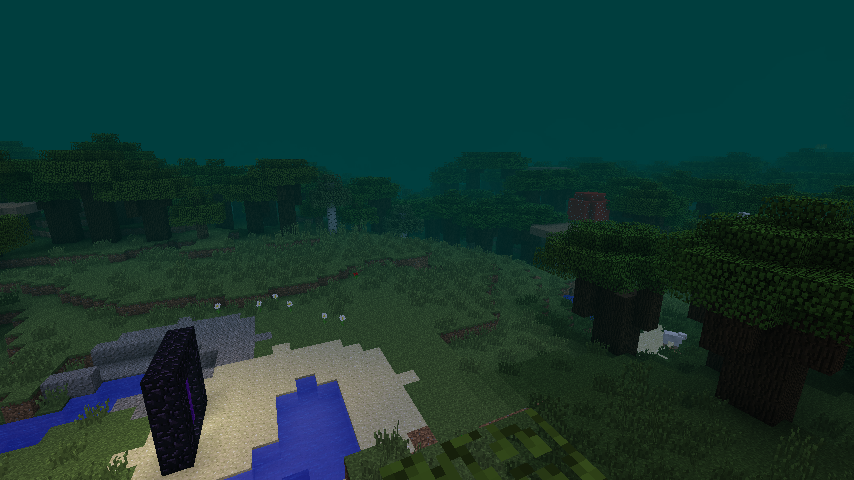
Infernal Sky Color
Minecraft Java mod. Downloads from the MC Java Mods app on Android.
⬇ Download on CurseForgeThis mod performs one basic function: to change the sky and fog color of the overworld or nether. For the overworld, it also removes the sun, moon, stars, and clouds. The command to do so is:
/skycolor [dimensionID] [r] [g] [b] <delay>
This color is saved to the loaded world, and transmitted to all connected players.
The dimension ID of the nether is -1, the overworld is 0. The R, G, B values can accept floating-point values, so anywhere between 0.0 and 1.0 is probably what you'll want to use, though you can go higher for a more fog-encroaching effect. The delay is optional, and is the number of milliseconds for the transition to complete. The default is 5000 (5 seconds).
To disable for a dimension, set any of the R, G, B values to be negative.
This mod was designed for use in the Infernal Skies modpack but you're welcome to use it wherever else you see fit.
- Edition: Minecraft Java
- File type: .jar
- How to install: Install the matching mod loader (Forge, Fabric or NeoForge) for your Minecraft version. → Download the .jar. → Put it in the .minecraft/mods folder and launch that loader profile.
- Where to get it: Opens on CurseForge — not every file is mirrored on our own servers.
Install steps are the general flow for this file type — How to install Minecraft Java mods & modpacks walks through it step by step.
- Ships as InfernalSkyColor-0.8.jar — drop this file into the mods folder
- Download size: 26 KB
- Download link checked 13 Oct 2026 — working
These come from our own check of the pack file, not from the source page.