
Block Control - Push, Pull, and Rotate blocks.
Minecraft Java mod. Downloads from the MC Java Mods app on Android.
⬇ Download on CurseForge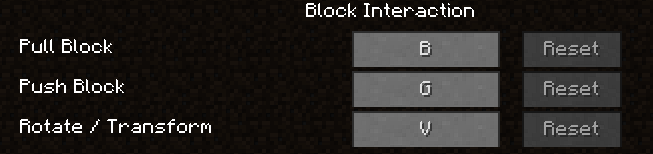
Push Block (default B) : Move the block away from you horizontally.
Pull Block (default G) : Move the block towards you horizontally.
** For above ** Only will work if there is air space, will not move multiple like a piston.
Rotate / Transform (default V) : change the metadata of the block, which affects the texture/orientation (only for vanilla blocks). For example: rotate a log sideways, care sandstone into different variants, rotate pumpkins around their axis, change stair position to each side and upside-down, move slabs from top to bottom of the block space. Does not change wooden planks to different wood types, or cobble to smoothstone, or things that would be overpowered like that. Does not work on multi-block things such as doors.
Also has an ignore list passed in from the config file, so if you want any vanilla/modded blocks to be not affected by these three keys, add them here. Config file looks like as shown:
# Configuration file
samscontrolblocks {
# Ignore list for push and pull keys. [default: minecraft:cactus,minecraft:chest]
S:push_pull_ignore=minecraft:cactus,minecraft:chest
}
If you link to this page and let me know somehow (comment or twitter @lothrazar), you can use this in a modpack.
Requires Minecraft Forge version 1.8-11.14.3.1446 or higher.
- Edition: Minecraft Java
- File type: .jar
- How to install: Install the matching mod loader (Forge, Fabric or NeoForge) for your Minecraft version. → Download the .jar. → Put it in the .minecraft/mods folder and launch that loader profile.
- Where to get it: Opens on CurseForge — not every file is mirrored on our own servers.
Install steps are the general flow for this file type — How to install Minecraft Java mods & modpacks walks through it step by step.
- Ships as BlockControlKeys-1.8.8-1.0.1.jar — drop this file into the mods folder
- Download size: 21 KB
- Download link checked 13 Oct 2026 — working
These come from our own check of the pack file, not from the source page.