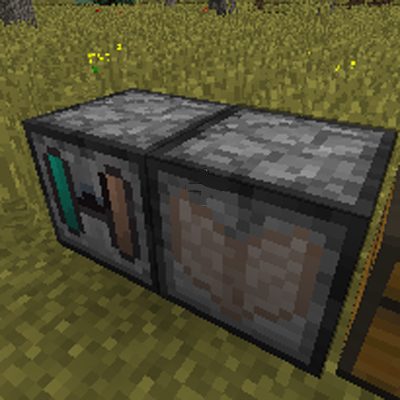
Animal Research Machine
Minecraft Java mod. Downloads from the MC Java Mods app on Android.
⬇ Download on CurseForgeThis mod adds two new machines and some items:
Two machines:
- Animal Ingredient Extracting Machine - Can extract animal ingredients.
- Animal Research Machine - Use the animal ingredients spawns animals.
New item:
- Mushroom's mushroom - It is Mushroom drops.It is used for extracting ingredients.
- Horsehide - It is Horse drops.It is used for extracting ingredients.
- Villager's hair - It is Villager drops.It is used for extracting ingredients.
- Pig ingredient - It is used for spawning pig.
- Sheep ingredient - It is used for spawning sheep.
- Cow ingredient - It is used for spawning cow.
- Mushroom ingredient - It is used for spawning mushroom.
- Horse ingredient - It is used for spawning horse.
- Villager ingredient - It is used for spawning villager.
- Rabbit ingredient - It is used for spawning rabbit.
- Chicken ingredient - It is used for spawning chicken.
Machine recipes:
Animal Ingredient Extracting Machine:
Stone Stone Stone
Block of Redstone Block of Diamond Block of Redstone
Stone Stone Stone
Animal Research Machine:
Stone Stone Stone
Block of Redstone Block of Emerald Block of Redstone
Stone Stone Stone
Machine instructions:
Animal Ingredient Extracting Machine:
First, place the Animal Ingredient Extracting Machine on the floor, and then open the Machine GUI. You can see three slots in it. Put animal ingredients in to the top slot.Please looks the following table of comparisons:
- Pig ingredient - Porkchop
- Sheep ingredient - Mutton
- Cow ingredient - Steak
- Mushroom ingredient - Mushroom's mushroom
- Horse ingredient - Horsehide
- Villager ingredient - Villager's hair
- Rabbit ingredient - Rabbit meat
- Chicken ingredient - Raw chicken
Then put diamond in the under stack.
Animal Research Machine:
First, place the Animal Research Machine on the floor, and then open the Machine GUI. You can see three slots in it. Put 32 animal ingredients in to the top slot. Put emerald in to the under stack. Then the machine begin working.When the bar go to end, the animal on this machine is spawned
Use screenshots


- Edition: Minecraft Java
- File type: .jar
- How to install: Install the matching mod loader (Forge, Fabric or NeoForge) for your Minecraft version. → Download the .jar. → Put it in the .minecraft/mods folder and launch that loader profile.
- Where to get it: Opens on CurseForge — not every file is mirrored on our own servers.
Install steps are the general flow for this file type — How to install Minecraft Java mods & modpacks walks through it step by step.
- Ships as AnimalResearchMachine-15.6.26-1.0.0-1.8.jar — drop this file into the mods folder
- Download size: 56 KB
- Download link checked 13 Oct 2026 — working
These come from our own check of the pack file, not from the source page.