Search Commands
Minecraft Java mod. Downloads from the MC Java Mods app on Android.
⬇ Download on CurseForgeUPDATE 1.10.2 : This still exists but no longer as a standalone single item mod. See downloads at https://mods.curse.com/mc-mods/minecraft/239286-cyclic , a mod where you can turn off any items you dont want in config.
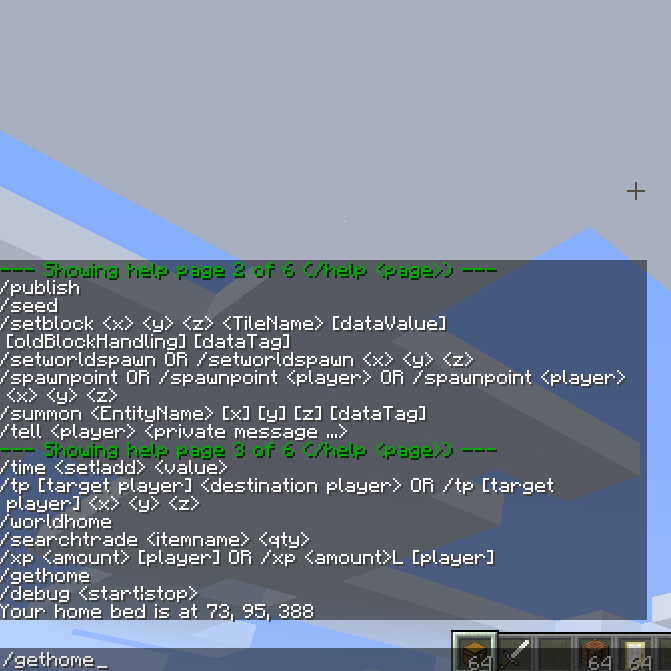
New commands: /searchitem, /searchtrade, /enderchest, /home, /gethome, /worldhome. (Not every command searches for something, but thats just the name of the mod).
Search nearby containers and villagers to help you find out if certain items or villagers are nearby.
So "/searchitem piston" will direct you to nearby containers with pistons by saying something like (4 west 2 north), or displaying coordinates if the config file allows it.
Home will send you to your bed (if set and if you are in the overworld only). Gethome will just display your bed location, and worldhome sends you to the map spawn point.
I suggest turning 'enderchest' to OP only, since the command is overpowered a little in survival.
Each command can be turned off in the config file (in case it conflicts with a command added by another mod with the same name)
Also, you can set for each command whether it requires OP or not, and sometimes the search radius.
- Edition: Minecraft Java
- File type: .jar
- How to install: Install the matching mod loader (Forge, Fabric or NeoForge) for your Minecraft version. → Download the .jar. → Put it in the .minecraft/mods folder and launch that loader profile.
- Where to get it: Opens on CurseForge — not every file is mirrored on our own servers.
Install steps are the general flow for this file type — How to install Minecraft Java mods & modpacks walks through it step by step.
- Ships as SearchCommands-1.8.8-1.0.0.jar — drop this file into the mods folder
- Download size: 18 KB
- Download link checked 3 Nov 2026 — working
These come from our own check of the pack file, not from the source page.