Potion Storage - pause your effects and save them for later
Minecraft Java mod. Downloads from the MC Java Mods app on Android.
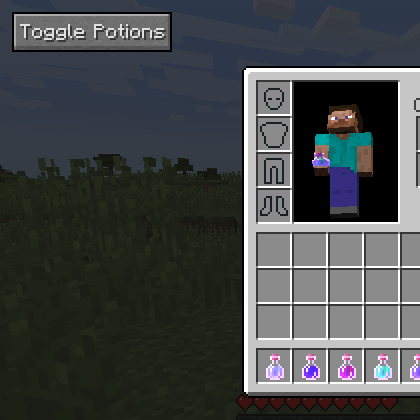
⬇ Download on CurseForgeAdds a button that simply puts your active potion effects on hold.
It is in the upper left of the screen. Clicking this takes any active potions you have and pauses them (saved to your player NBT data) for later. Click again to reapply.
This is great for survival for when you eat a gold apple, or say you drink an 8 minute speed potion. But then, you are done using the speed effect with 3 minutes left, and it goes to waste while you stand around crafting or fighting. Well, now you can pause that timer and turn it back on later.
In other words
- If you click the button while ANY potion effects are in storage, it always gives them back to you. So, if you put some in storage and drink more, then pushing the button will put more in storage.
Update v 1.0.1:
- Now a config (with ingame support) to enable or disable potion effect merging (add the times together). So now you can drink and store Speed II potions over and over to get a super long effect timer!
Update v 1.0.2:
- By default, saved potions now persist through death. Can be disabled in config
- Bugfix different levels - so you can no longer merge Speed I and Speed II and have their timers add together
Version 1.0.3 was removed, it had an error in that sometimes crashed the game.
Update v 1.0.4:
- Add a hotkey to toggle the potions, so you don't have to use that inventory button. Default key is 'Y'
- Also a config option to hide the button.
- Added a config file black list of effect ids (csv) so you can make this mod ignore effects. By default it ignores negative ones like hunger and slowness and mining fatigue, so it will not store these.
- Edition: Minecraft Java
- File type: .jar
- How to install: Install the matching mod loader (Forge, Fabric or NeoForge) for your Minecraft version. → Download the .jar. → Put it in the .minecraft/mods folder and launch that loader profile.
- Where to get it: Opens on CurseForge — not every file is mirrored on our own servers.
Install steps are the general flow for this file type — How to install Minecraft Java mods & modpacks walks through it step by step.
- Ships as PotionStorage-1.8-1.0.4.jar — drop this file into the mods folder
- Download size: 15 KB
- Download link checked 13 Oct 2026 — working
These come from our own check of the pack file, not from the source page.